Arial font AutoCAD 2018 DWG to PDF printing problem

Arial font AutoCAD 2018 DWG to PDF printing problem

Anonymous
Not applicable
8,617 Views
6 Replies
Message 1 of 7

Arial font AutoCAD 2018 DWG to PDF printing problem

Anonymous
Not applicable

Hello.

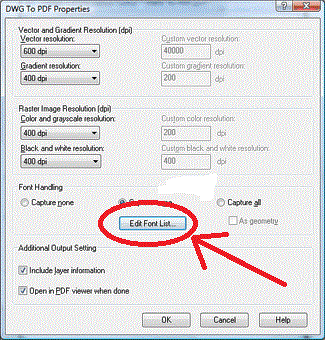
I have a problem with ARIAL font printing. DWG to PDF print instead of font Arial, only the dots. I known to set DWG to PDF in older version of AutoCAD- Properties - user properties ... Edit Font List. There I chose ARIAL font.

Now in version 2018, this option is not there.


Thanks.Properities.PNG

0 Likes
Accepted solutions (1)
8,618 Views
6 Replies
Replies (6)
Message 2 of 7

pendean
Community Legend
Community Legend

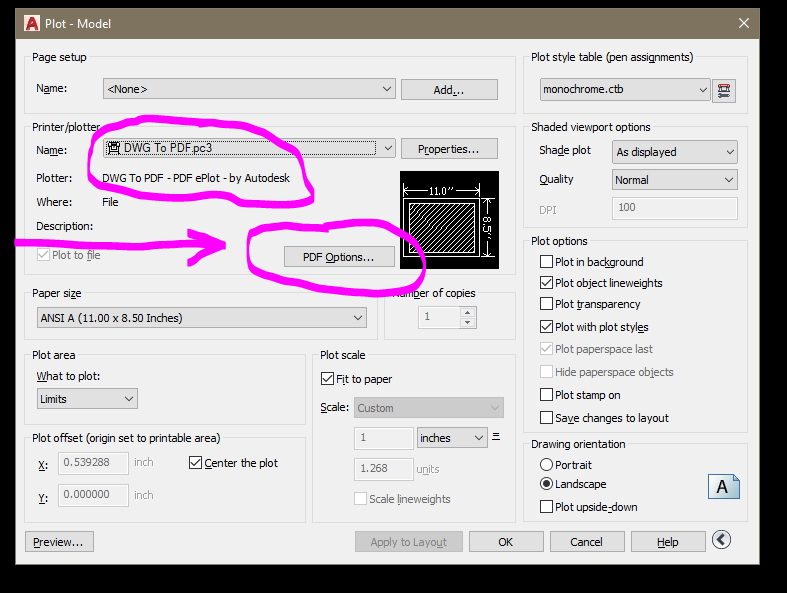
PDF options are on the PLOT command pop-up in 2017 and newer versions for all AutoCAD included PDF output drivers

Capture.PNG


If you are using a 3rd party or you migrated from an older version deliberately, that option disappears.


0 Likes
Message 3 of 7

john.vellek
Alumni
Alumni

Hi @Anonymous,


I see that you are visiting as a new member to the AutoCAD forum. Welcome to the Autodesk Community!


 Did Dean's answer help you with the plotting issue you are having with Arial?  If not, please let me know some more details so I can help.


John Vellek


Join the Autodesk Customer Council - Interact with developers, provide feedback on current and future software releases, and beta test the latest software!

Autodesk Knowledge Network | Autodesk Account | Product Feedback
0 Likes
Message 4 of 7

Anonymous
Not applicable

Hi @john.vellek

The Dean's answer does not help me.

As I wrote, Arial font is printed incorrectly (text printed as a dots).

In older version Auto CAD is setting (Edit font List), where I can select Arial font and printing is OK.

PDFprops.gif


There is not setting "Edit Font List" in AutoCAD 2018  there. (See picture in the first post).

0 Likes
Message 5 of 7

john.vellek
Alumni
Alumni
Accepted solution

Hi @Anonymous,


The newer PDF Options allows you to Capture fonts used in the drawing which does essentially the same thing.


Capture.PNG

If this is not working for you, can you please attach a sample file for me to try in AutoCAD 2018?


Please select the Accept as Solution button if my post solves your issue or answers your question.


John Vellek


Join the Autodesk Customer Council - Interact with developers, provide feedback on current and future software releases, and beta test the latest software!

Autodesk Knowledge Network | Autodesk Account | Product Feedback
Message 6 of 7

pendean
Community Legend
Community Legend

You need to either select/turn this on


Capture.PNG 


Or if that is no help to also select the AS GEOMETRY option below it if needed.


We all print using ARIAL in AutoCAD to PDFs all day long with no issues. You're need is not unique, but your settings may not be complete.

0 Likes
Message 7 of 7

Anonymous
Not applicable

@john.vellekThank you. Helped select options Include layer information and Include hyperlinks.


0 Likes