Area

Area

graziolicorradoKLTL3
Observer Observer
862 Views
6 Replies
Message 1 of 7

Area

graziolicorradoKLTL3
Observer
Observer

Sera,

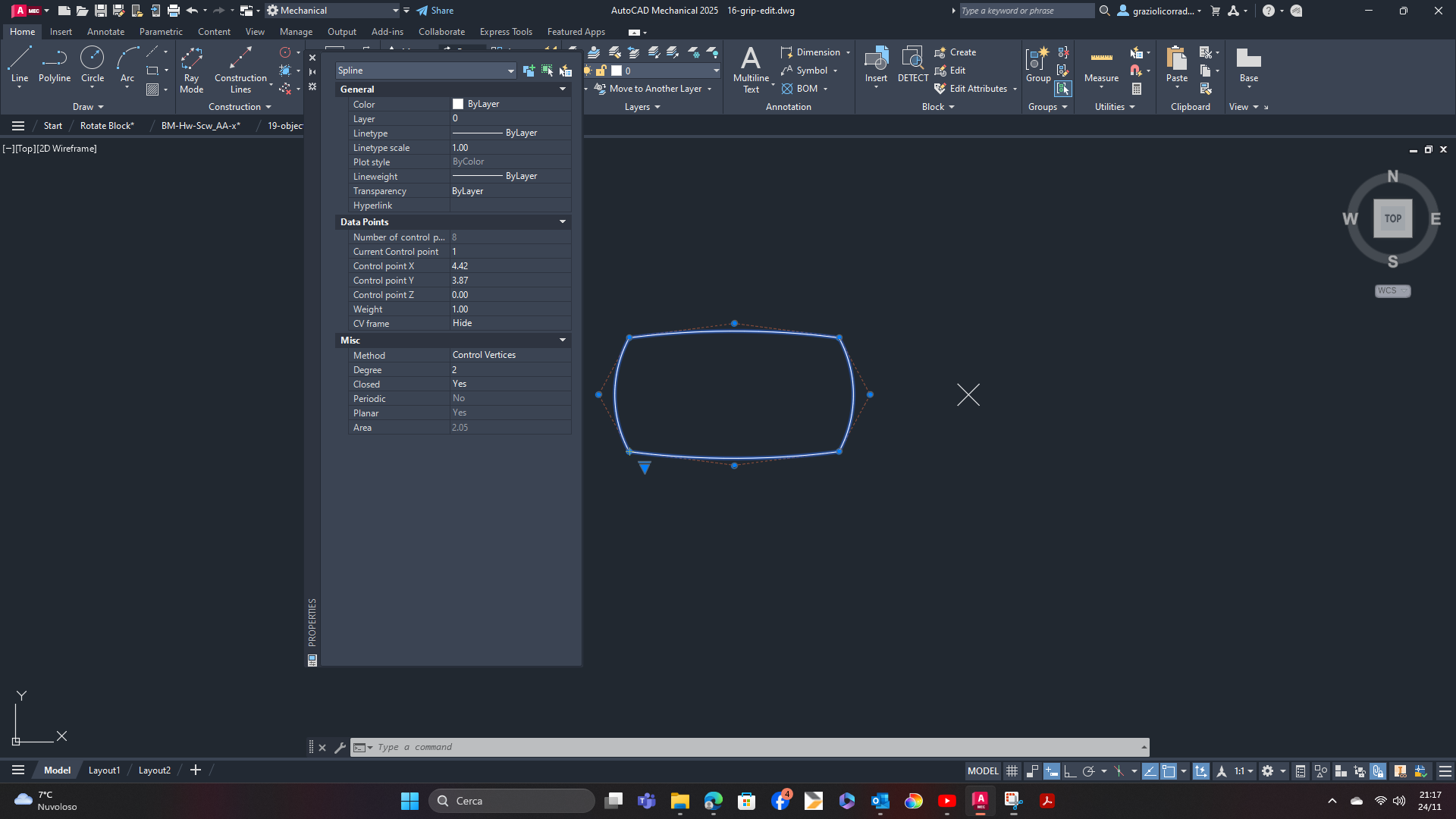
come si vede dalle immagini allegate,

l' area della prima polilinea ricavata dalle proprietà è 2.05,

utilizzando il comando area si ottiene il medesimo risultato.

L' area del retino inserito nella stessa polilinea è 2.76, in teoria dovrebbero essere uguali.

Perchè tale differenza?

0 Likes
Accepted solutions (2)
863 Views
6 Replies
Replies (6)
Message 2 of 7

leeminardi
Mentor
Mentor

I created an 8 CV spline of degree 2 simila to the shape you posted.  I  modified the weights of some of the CVs as it appears is the case in your drawing. The area of the spline and the area of hatchinging referencing the spline were the same,


Can you post your drawing file?

lee.minardi
Message 3 of 7

graziolicorradoKLTL3
Observer
Observer

Sera, allego field area.dwg.

I valori di area sono ottenuti direttamente col comando field, anche il comando area e la paletta proprietà danno gli stessi valori

0 Likes
Message 4 of 7

leeminardi
Mentor
Mentor
Accepted solution

It appears that the hatch command may assume that the weights of a CV in a degree 2 spline are all equal to 1.0.  Changing CVs 2, 4, 6, and 8 to 1.0 (from 0.89) in your drawing yields an area consistent with the hatching area.  Changing the weight does alter the shape as seen below.  The white spline has all the weights set to 1.0.  You can see that its shape is slightly larger than the original red spline. The properties and area/object show the correct value. The hatch area is incorrect and should be treated as an approximation.

leeminardi_0-1732558947987.png


lee.minardi
Message 5 of 7

paullimapa
Mentor
Mentor
Accepted solution

if spline area is negative:

https://www.autodesk.com/support/technical/article/caas/sfdcarticles/sfdcarticles/Area-property-of-c...

I used BPOLY and made it into a Region and now get the correct area:

paullimapa_0-1732559991554.png


Paul Li
IT Specialist
@The Office
Apps & Publications | Video Demos
0 Likes
Message 6 of 7

graziolicorradoKLTL3
Observer
Observer

Grazie mille a tutti ,

usando il comando bpoly o boundary per creare una regione il valore dell area è uguale in entrambe i casi

0 Likes
Message 7 of 7

paullimapa
Mentor
Mentor

glad to have helped...cheers!!!


Paul Li
IT Specialist
@The Office
Apps & Publications | Video Demos
0 Likes