acadiso or acadiso3d

acadiso or acadiso3d

Anonymous
Not applicable
5,518 Views
13 Replies
Message 1 of 14

acadiso or acadiso3d

Anonymous
Not applicable

When I open a new drg template using a acadiso3D template it is impossible to scale the viewports in layouts.

Not so with an acadiso template.

Is this normal ?


0 Likes
Accepted solutions (2)
5,519 Views
13 Replies
Replies (13)
Message 2 of 14

steve216586
Advisor
Advisor

Yes it is normal behavior. Also if you are used to using VP command to set viewport scale, you will be confronted with an entirely different dialog.

"No one can make you feel inferior without your consent. "-Eleanor Roosevelt
0 Likes
Message 3 of 14

nestly2
Mentor
Mentor

atwied wrote:

When I open a new drg template using a acadiso3D template it is impossible to scale the viewports in layouts.

Not so with an acadiso template.

Is this normal ?


Normal? no, not in my experience


You should be able to scale the Viewport to change the physical size of the viewport, and you should also be able to change the VP scale.  Is the VP perhaps locked, or are trying to SCALE the viewport while in the wrong space  (Paperspace vs Modelspace)


Which version of AutoCAD are you using, and can you attach a sample drawing that already contains the viewport(s) you're having trouble scaling.

0 Likes
Message 4 of 14

pendean
Community Legend
Community Legend
Share that template file here, describe what it is you are doing in it, step by step, let's all try and replicate your issue.
0 Likes
Message 5 of 14

steve216586
Advisor
Advisor

See attached screen shots showing what is normal behavior to me.


I've selected the acadiso3D.dwt OTB.

Made a 3D shape in modelspace

Scroll scaled in the viewport to rough fit object inside viewport


Continued...

"No one can make you feel inferior without your consent. "-Eleanor Roosevelt
0 Likes
Message 6 of 14

steve216586
Advisor
Advisor

Select viewport and enter properties to set scale

Scale reverts to scroll settings


As stated, this is normal for every drawing using this template: acadiso3D.dwt

"No one can make you feel inferior without your consent. "-Eleanor Roosevelt
0 Likes
Message 7 of 14

nestly2
Mentor
Mentor
Accepted solution

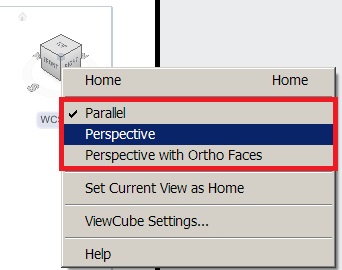
That's just because that template starts in a Perspective view, which can't really be "scaled".  Zooming with the mousewheel is also funky in Perspective view.... it zooms the center of the view, whereas zooming in Parallel projection centers the zoom based on the mouse location.  To change, use the PERSPECTIVE command, or right click the Viewcube.


PerspectiveView.jpg


Message 8 of 14

steve216586
Advisor
Advisor

That is why I answered the OP as "yes, it is normal behavior." I didn't want to mislead him into thinking he needed to fix or reinstall AutoCAD. I figured he knew how to manipulate the viewcube since he was working in 3D already. Maybe I assumed wrong? Smiley Frustrated

"No one can make you feel inferior without your consent. "-Eleanor Roosevelt
0 Likes
Message 9 of 14

Anonymous
Not applicable

Thanks nestly2 - I am using Autocad 2010.

I actually asked the question of the company that trained me and they said it was not possible to change viewport scale.

The VP was not locked and it makes no difference whether I use model space or paperspace.

Thanks for your feedback.

0 Likes
Message 10 of 14

Anonymous
Not applicable
Thanks - this concurs with the advise I recieved from my tainers that it was not possible.
0 Likes
Message 11 of 14

Anonymous
Not applicable

Thanks to everyone for your replies.

I will attach a sample drg when Autocad  2010 is available to me on a new PC.


0 Likes
Message 12 of 14

nestly2
Mentor
Mentor

I look forward to seeing the drawing/template because as noted previously, there are variables that may temporarily prevent Viewports from being scaled, there's no such thing as a viewport that can not be rescaled.

0 Likes
Message 13 of 14

Anonymous
Not applicable
Agreed you have to change to a different view before changing to paper view and creating your viewports otherwise the viewports can not be scaled.
0 Likes
Message 14 of 14

nestly2
Mentor
Mentor
Accepted solution

atwied wrote:
Agreed you have to change to a different view before changing to paper view and creating your viewports otherwise the viewports can not be scaled.

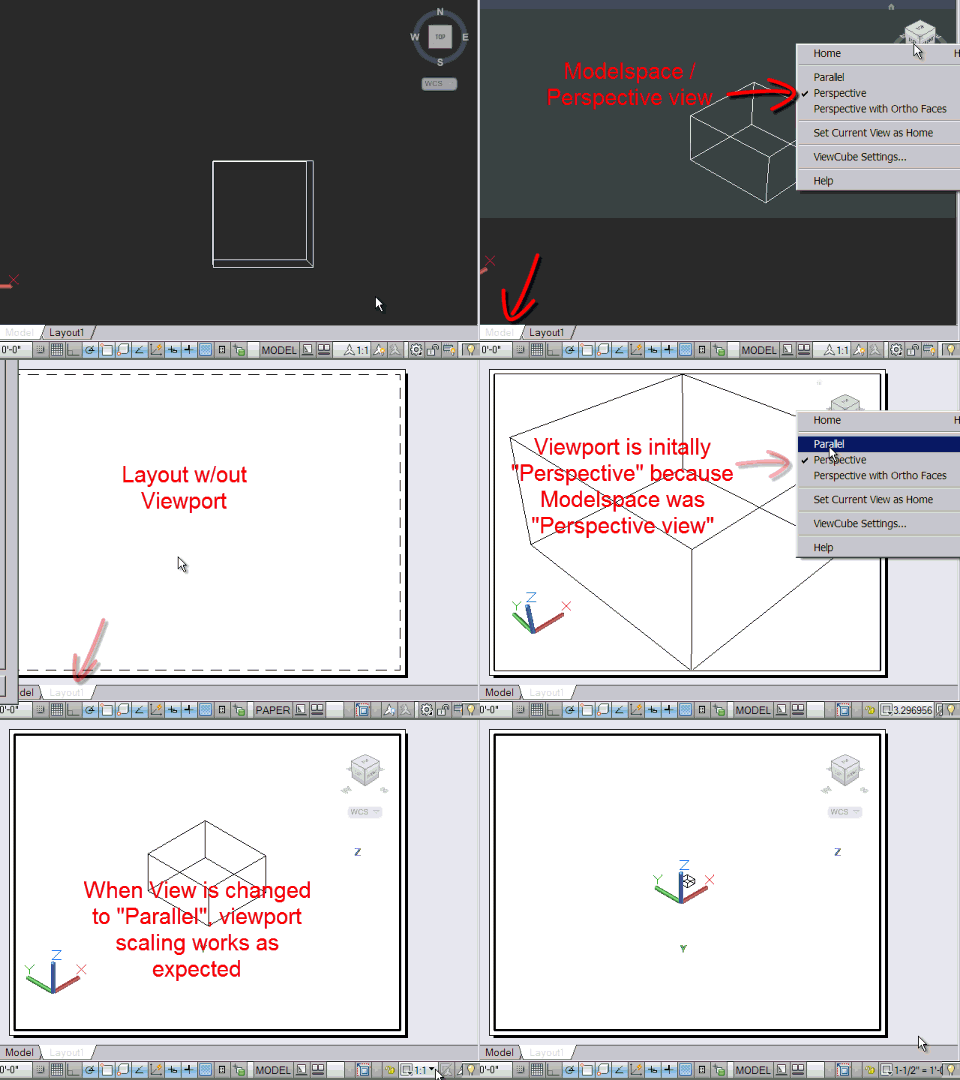
Yeah, I don't see it.  It should not matter which Template you start with, and it should not matter whether Modelspace is Perspective or Parallel view when the VP is created.  You can still change to Parallel anytime the VP is active and that will enable the VP to be scaled.


PERSPECTIVE and VPScaling.gif


0 Likes