MacOS High Sierra Compatibility for AutoCAD and AutoCAD LT for Mac

MacOS High Sierra Compatibility for AutoCAD and AutoCAD LT for Mac

john.vellek
Alumni Alumni
56,864 Views
51 Replies
Message 1 of 52

MacOS High Sierra Compatibility for AutoCAD and AutoCAD LT for Mac

john.vellek
Alumni
Alumni

AutoCAD for Mac Users,


The next release of the MacOS, High Sierra, is scheduled for public availability on September 25, 2017.  This upgrade to the operating system (OS) will introduce a new 64-bit file system “APFS” which is optimized for solid state drives. Please be aware that currently AutoCAD for Mac 2017 and previous versions are not designed to run on this new file system and will not function properly. We are actively working on fixing this issue.


Meanwhile, we encourage you to use our public beta for the pre-release version  of AutoCAD for Mac 2018 with High Sierra.


I also would like to provide a link to MacWorld.uk that details some applications that won't work with the new macOS. It is always smart to look before you leap.


[EDIT] updates are available for AutoCAD for Mac 2017 and AutoCAD LT for Mac 2017 to enable compatibility with High Sierra and to to increase performance. Updates can be found in your account page. 

Capture.PNG

The full update of AutoCAD for Mac 2017.2 can be found here

The full update of AutoCAD LT  for Mac 2017.2 can be found here


The patch for  AutoCAD for Mac 2017.2 can be found here

The patch for  AutoCAD LT  for Mac 2017.2 can be found here


Please see the attached Readme file for additional information.


John Vellek


Join the Autodesk Customer Council - Interact with developers, provide feedback on current and future software releases, and beta test the latest software!

Autodesk Knowledge Network | Autodesk Account | Product Feedback
Accepted solutions (1)
56,865 Views
51 Replies
Replies (51)
Message 2 of 52

urbanik.m
Observer
Observer


Thanks for the information. But I am having problems with new installation on my clean installed MacBook. I downloaded full installation with update 2017.2 (Autodesk_AutoCAD_2017_Mac_OSX_R2.dmg) but the problem with file system persists.


screenshot.pngI just signed up for the beta.autodesk.com and I do not see the 2018 beta in there.

Message 3 of 52

maxim_k
Consultant
Consultant

Welcome to Autodesk Forums!


Hi Matěj,

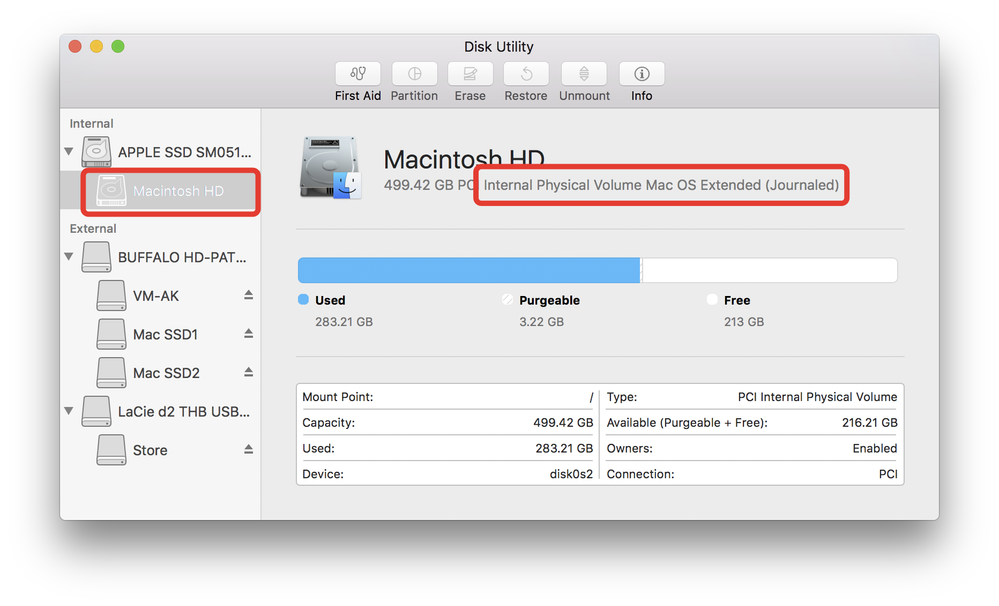
Do you have macOS High Sierra on your Mac? Can you check how the main partition is formatted on your disk via Disk Utility? Please post screen shot like this one:2017-09-27_09-38-52.png

Are you sure you are using the correct installer?


And about Beta testing - you need to wait for some time in order your request to be approved.


Maxim


Do you find the posts helpful? "LIKE" these posts!
Have your question been answered successfully? Click 'ACCEPT SOLUTION' button.


Maxim Kanaev
Architect
MARSS

MacACAD | Linkedin

Etiquette and Ground Rules of Autodesk Community
Message 4 of 52

wei503
Community Manager
Community Manager

2017.2 version supports both HFS+ and APFS case-insensitive format, and does not support the case-sensitive format. Please check if you are using case-sensitive format.


Thanks,
Wei


Wei Ma
AutoCAD QA Manager

0 Likes
Message 5 of 52

urbanik.m
Observer
Observer
I just clean installed my MacBook and it changed the HFS+ (non-case sensitive) to APFS case sensitive. I cannot change it though. I just think that I have to go back to Sierra and keep using HFS+ until Autodesk upfates the Autocad for Mac to install flawlessly on my computer.
0 Likes
Message 6 of 52

maxim_k
Consultant
Consultant

I believe - APFS case sensitive will NEVER be supported, the same way as HFS+ case sensitive is not supported.

In order to be able to install and use AutoCAD for Mac you need to use non-case sensitive file system.


Maxim


Do you find the posts helpful? "LIKE" these posts!
Have your question been answered successfully? Click 'ACCEPT SOLUTION' button.


Maxim Kanaev
Architect
MARSS

MacACAD | Linkedin

Etiquette and Ground Rules of Autodesk Community
0 Likes
Message 7 of 52

urbanik.m
Observer
Observer
Okay, thank you for the help. I will try to reformat the drive in case-insensitive APFS and install the macOS. Then I will try to install the Autocad. I will post my results here then.
Message 8 of 52

Darryl-CGA
Advocate
Advocate

I was confused by this and couldn't verify which "case" mine was looking at DU until I clicked on Info. Always used "Mac OS Extended (Journaled), but don't recall having to choose case, and now I can see that file format is not case-sensitive.


From DU>Macintosh HD>Info (line 9):


"Is case-sensitive : No"

0 Likes
Message 9 of 52

Anonymous
Not applicable

Im very sorry, but I can't believe what you are writing...? You are selling auto cad fo MAC, so you must do new version for 2017 and 2017 installer app which is working under High Sierra? ??? Clients pay for working auto cad not for malfunctioning auto cad. I have auto cad LT 2016 for mac on 1 computer, how I can now install 2017? Installer app doesn't work? For example. ? 

Message 10 of 52

maxim_k
Consultant
Consultant
Welcome to Autodesk Forums!

Hi Marek,

The installer or AutoCAD 2017 for Mac compatible with macOS High Sierra is here:

https://knowledge.autodesk.com/support/autocad-for-mac/downloads/caas/downloads/content/autocad-for-...


2016 version is still not supported, but I believe it will get an Update in near future.

Maxim

Do you find the posts helpful? "LIKE" these posts!
Have your question been answered successfully? Click 'ACCEPT SOLUTION' button.


Maxim Kanaev
Architect
MARSS

MacACAD | Linkedin

Etiquette and Ground Rules of Autodesk Community
Message 11 of 52

john.vellek
Alumni
Alumni

HI @Anonymous,


I suggest not using AutoCAD for Mac 2016 in High SIerra as it is not designed to run in that operating system and may cause you some problems. If you currently have the 2017 version installed on your Mac I suggest that you first uninstall it. Then, using the link in my first post for the Full install of AutoCAD 2017.2 run the installer which is designed for High Sierra.


If you feel that your AutoCAD for Mac 2017 was running properly in Sierra, then simply leave it installed and just run the update from my first post.


Please select the Accept as Solution button if my post solves your issue or answers your question.


John Vellek


Join the Autodesk Customer Council - Interact with developers, provide feedback on current and future software releases, and beta test the latest software!

Autodesk Knowledge Network | Autodesk Account | Product Feedback
Message 12 of 52

Anonymous
Not applicable

Does anyone know if 2016 has been updated to run on high sierra? What about those of us with perpetual licences? I'm not interested in renting my software thanks.

Message 13 of 52

john.vellek
Alumni
Alumni

Hi @Anonymous,


Unfortunately, at this time AutoCAD 2016 will not run/install on macOS High Sierra.  If/when a path or new build becomes available, I will make sure to come to the forum to post a notification.


Please select the Accept as Solution button if my post solves your issue or answers your question.


John Vellek


Join the Autodesk Customer Council - Interact with developers, provide feedback on current and future software releases, and beta test the latest software!

Autodesk Knowledge Network | Autodesk Account | Product Feedback
Message 14 of 52

Anonymous
Not applicable

If its not updated, can I get a refund?

Message 15 of 52

john.vellek
Alumni
Alumni

HI @Anonymous,


I encourage you to be patient in upgrading your OS to High Sierra. An update or patch is forthcoming for AutoCAD for Mac 2016 but I do no have a release date as of yet.  Here is an article that discusses compatibility for High Sierra.


Please select the Accept as Solution button if my post solves your issue or answers your question.


John Vellek


Join the Autodesk Customer Council - Interact with developers, provide feedback on current and future software releases, and beta test the latest software!

Autodesk Knowledge Network | Autodesk Account | Product Feedback
0 Likes
Message 16 of 52

Anonymous
Not applicable

Dear All, I will update osx high sierra , but unfortunately auto cad 2017 are not working. and i will download from auto cad site 2017.2 but thats also not working. Please help. I have my disc portion is APFS VOLUME . APFS (ENCRYPTED)

0 Likes
Message 17 of 52

Anonymous
Not applicable

IT,S NOT WORKING 

0 Likes
Message 18 of 52

Darryl-CGA
Advocate
Advocate

@Anonymous wrote:

If its not updated, can I get a refund?


Refund from Autodesk? Funny. You may be able to trade, get a discount, towards subscription. Have you even given much thought to why you don't want to "rent" your SW or worked out the cost compared to buying new SW every year or two (or the cost for not having SW that is out-of-date)? I also used to think I did not want a ACAD subscription at first, but I'm much more satisfied with the subscription then with buying ($1,200+/-). The subscription actually made sense once I looked into it. I can pay per month, or annual (discount), or three years I think it was,... I've had an annual subscription for 2-3 years now and the cost is much more affordable then the cost to buy and then having to pay in full again, and again, and again,.. for the next release. You always have the most recent version w/ subscription and can cancel any time (with monthly) and not lose money, or have an app that is out of date, or not compatible with latest Mac OS. You really should consider it if you're full time work, or even part time. And I hate ACAD (forced to use for work).

0 Likes
Message 19 of 52

Anonymous
Not applicable

2017.2 are not working on osx high sierra , i will download which you write, i have APFS (ENCRYPTED) Please help.

0 Likes
Message 20 of 52

john.vellek
Alumni
Alumni

HI @Anonymous,


I see that you are visiting as a new member to the AutoCAD for Mac forum. Welcome to the Autodesk Community!


Here is an article that describes the drive format that is compatible with AutoCAD 2017.2.


You need to make sure that it is case-insensitive.


Please select the Accept as Solution button if my post solves your issue or answers your question.


John Vellek


Join the Autodesk Customer Council - Interact with developers, provide feedback on current and future software releases, and beta test the latest software!

Autodesk Knowledge Network | Autodesk Account | Product Feedback
0 Likes