dimension disassociated while using DI(DIST) command

dimension disassociated while using DI(DIST) command

Anonymous
Not applicable
3,663 Views
14 Replies
Message 1 of 15

dimension disassociated while using DI(DIST) command

Anonymous
Not applicable

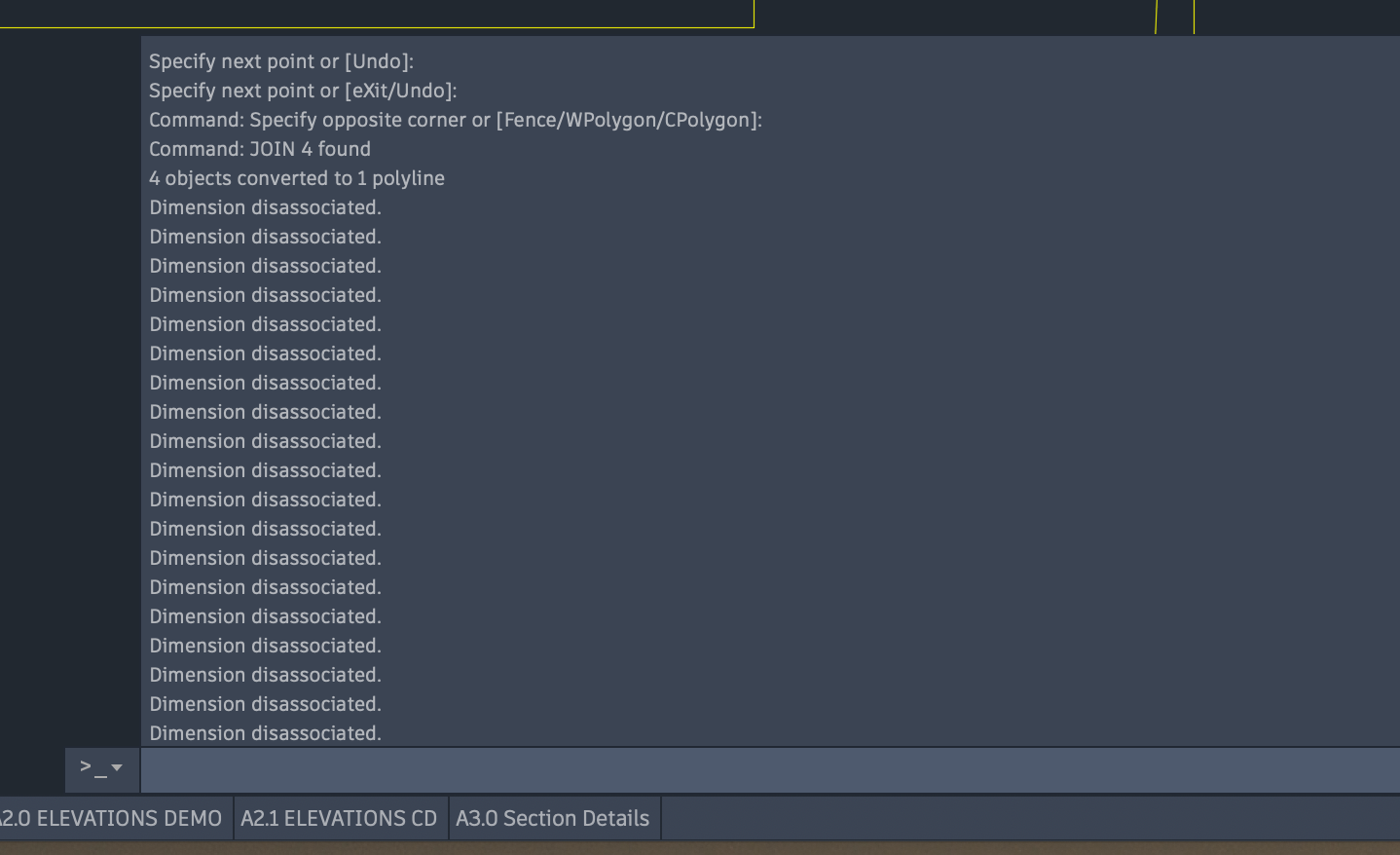
Since upgrading to AutoCAD for Mac 2020 I regularly get the message "dimension disassociated" when using the DI(DIST) command. Repeat the command and then the command works and I get a dimension. Is this a known bug? It happens nearly every time I make a dimension query and is wasting productive time. I've never had this happen with any previous version of the software.

0 Likes
Accepted solutions (1)
3,664 Views
14 Replies
Replies (14)
Message 2 of 15

pendean
Community Legend
Community Legend
You seem to be mixing AutoCAD function names so your post is a little confusing:
DIST is for measuring distances.
DImensioning is for placing DIM objects on screen that stay in place when you finish.

Are you dimensioning or just measuring distances?

Are the dimensions in place around the area you are doing what you are doing?

Are you in paperpspace?

Is 2020.1 update installed yet? It is required.
Are you using Object Snaps, or have them on/running?

0 Likes
Message 3 of 15

Anonymous
Not applicable

Thanks for the reply. I'm not dimensioning but just measuring distances. DI is just an abbreviation for DIST which I've always used. Maybe a holdover from my Windows days. 


There are no dimensions around where I'm trying to measure. 


It doesn't seem to matter whether I'm in paperspace or modelspace, I still have the issue.


I'm running 2020.1


Object Snaps are on.


Seems to be a quirk to this release as I've never had this come up in any previous version of the software. I've been using it since R10.


0 Likes
Message 4 of 15

maxim_k
Consultant
Consultant
Hi Cameron,

I haven't such issue on my side.
Does it happens always, even in new drawings with small portion of objects?
What do you see at the Command window when you start DI command before the message about disassociation appears?

Do you find the posts helpful? "LIKE" these posts!
Have your question been answered successfully? Click 'ACCEPT SOLUTION' button.


Maxim Kanaev
Architect
MARSS

MacACAD | Linkedin

Etiquette and Ground Rules of Autodesk Community
0 Likes
Message 5 of 15

Anonymous
Not applicable

Hi Maxim,


It seems to happen in any drawing, though I've not had time to start a new drawing from scratch and see if the problem shows up. 


I'll attach a screen shot of the command line so that you can see what is happening.

0 Likes
Message 6 of 15

maxim_k
Consultant
Consultant

>>>>I've not had time to start a new drawing from scratch and see if the problem shows up.
This sounds strange for me as you need only a couple of seconds to create new drawing and test DIST command in it.


What value is the DIMASSOC variable set to in your drawings?
Do you have some keyboard (mouse) manager application installed and running on your Mac?
Do you have this alert even there is no dimensions in the drawing (not only in Model, but in all Layouts)?
Have you tried to Reset AutoCAD?
Can you attach here one of your drawings where you have the issue with DIST command?


Do you find the posts helpful? "LIKE" these posts!
Have your question been answered successfully? Click 'ACCEPT SOLUTION' button.


Maxim Kanaev
Architect
MARSS

MacACAD | Linkedin

Etiquette and Ground Rules of Autodesk Community
0 Likes
Message 7 of 15

pendean
Community Legend
Community Legend
Post a video of your screen actions that trigger this problem, lets see what you see.
Here is a free tool for that https://knowledge.autodesk.com/support/autocad/learn-explore/caas/sfdcarticles/sfdcarticles/How-to-u...

Message 8 of 15

Anonymous
Not applicable

Hi Maxim,


The DIMASSOC variable set to 2. I can't remember the last time it's been set at anything else.

No mouse/keyboard manager application. I use a standard apple wireless keyboard and a Logitech M557 bluetooth mouse.

I'm getting this alert in both paperspace and modelspace. I'd have to create a drawing with no dimensions to see if it still happens.


I've not Reset AutoCad.


I also just had the same thing happen when I did a JOIN command. (Screen Shot attached). Just like with the DIST command, the command actually works but is followed by the words "Dimension disassociated" multiple times. This results in hiding the command result, making it appear not to have carried out the command.


0 Likes
Message 9 of 15

Anonymous
Not applicable

Hi Pendean,


I posted a couple of screen shoots further up to show the command and result. So far the only things triggering this behaviour are the commands "DIST" and "JOIN". 

0 Likes
Message 10 of 15

pendean
Community Legend
Community Legend
Your screenshots mean nothing, sorry. A video of you in action using that tool might reveal more.

Or it is time for you to backup all of your files, then remove and reinstall the program and update it again as discussed here https://knowledge.autodesk.com/support/autocad-for-mac/learn-explore/caas/sfdcarticles/sfdcarticles/... and https://knowledge.autodesk.com/customer-service/download-install/install-software/single-installatio... (bottom half of page)

0 Likes
Message 11 of 15

maxim_k
Consultant
Consultant
Accepted solution
Hi Cameron,

I believe you should try to Reset AutoCAD.
I had similar issue on my side:
AutoCAD starts to show an alert: "A vertex was added to a 2D pline which had only one vertex" every time I create new drawing or open existing drawing (for no reason - there was no any polylines in newly created drawings).
The problem gone away right after I reset AutoCAD.

Do you find the posts helpful? "LIKE" these posts!
Have your question been answered successfully? Click 'ACCEPT SOLUTION' button.


Maxim Kanaev
Architect
MARSS

MacACAD | Linkedin

Etiquette and Ground Rules of Autodesk Community
Message 12 of 15

Anonymous
Not applicable

Hi Maxim,


I reset AutoCad, as you suggested, and it seems to have taken care of the problem. Hopefully the glitch is gone. Thanks for your help.

0 Likes
Message 13 of 15

Anonymous
Not applicable

I am having the same issue. 

What do you mean by "Reset AutoCAD"?


I tried turning DIMASSOC to "0". Is that a bad idea?

0 Likes
Message 14 of 15

Anonymous
Not applicable
Nevermind- Turning DIMASSOC to 0 did not work.
0 Likes
Message 15 of 15

maxim_k
Consultant
Consultant

Welcome to Autodesk Forums!


Hi @Anonymous ,


>>>>What do you mean by "Reset AutoCAD"?

Use menu AutoCAD -> Reset AutoCAD


Do you find the posts helpful? "LIKE" these posts!
Have your question been answered successfully? Click 'ACCEPT SOLUTION' button.


Maxim Kanaev
Architect
MARSS

MacACAD | Linkedin

Etiquette and Ground Rules of Autodesk Community
0 Likes