Added Hatch Not Loading

Added Hatch Not Loading

Anonymous
Not applicable
5,702 Views
15 Replies
Message 1 of 16

Added Hatch Not Loading

Anonymous
Not applicable

Hi All,


Had to re-add custom hatches after having to "Reset Application Options".  The patterns are in the right location, but for some reason are not loading when I try to attach a hatch to an object.  Anyone know why this might be happening?


Thanks,


Trang

0 Likes
Accepted solutions (1)
5,703 Views
15 Replies
Replies (15)
Message 2 of 16

pendean
Community Legend
Community Legend
where exactly did you add them back? and how?
and where in the ATCH command did you try and find them? Be very specific.
0 Likes
Message 3 of 16

Anonymous
Not applicable

I typed in the hatch command; clicked on open library; clicked on the "Show All" and moved the cursor to add hatch then I added the patterns, but when it was done no new hatch patterns appeared in the "Show All" or the "Customs" section.  I then went to "Find in Finder" and all the files I had added are in that location. Here is the path that they are in User/Library/Application Support/Autodesk/roaming/AutoCAD 2013/R19.0/enu/Support.


Trang

0 Likes
Message 4 of 16

maxim_k
Consultant
Consultant
Hi,
I just checked and the way you provide for adding hatch patterns in AC 2013 with SP2 (on Mountain Lion) works for me just fine. Have not tested this on Mavericks.
But anyway:
- are you sure that patterns you are adding are valid hatch patterns, i.e. have you already used them?
- have you tried to quit AotoCAD and launch it again?
- try to put all your custom hatches in a separate folder somewhere inside your Home folder, add this folder to Support Files Search Path in AutoCAD Preferences ans see will they appear in hatch library.

Maxim

Do you find the posts helpful? "LIKE" these posts!
Have your question been answered successfully? Click 'ACCEPT SOLUTION' button.


Maxim Kanaev
Architect
MARSS

MacACAD | Linkedin

Etiquette and Ground Rules of Autodesk Community
0 Likes
Message 5 of 16

Anonymous
Not applicable

Hi,


All of these hatches worked for both Mountain Lion and Maverick before.  Could there be a glitch with Maverick when you do an Application Reset?  I tried restarting the computer and AutoCAD with no luck.  Even creating a folder as you suggested didn't work.  I did notice today that when I opened the "find in finder" that some of the hatches are showing up with a different icon and it reads as Alias (see attached image), but before they were imported they read as Adobe Photoshop Patterns file - it still doesn't explain why the others aren't showing up which all came from the same download hatch package that worked before.


Trang


0 Likes
Message 6 of 16

maxim_k
Consultant
Consultant

Hi Trang,

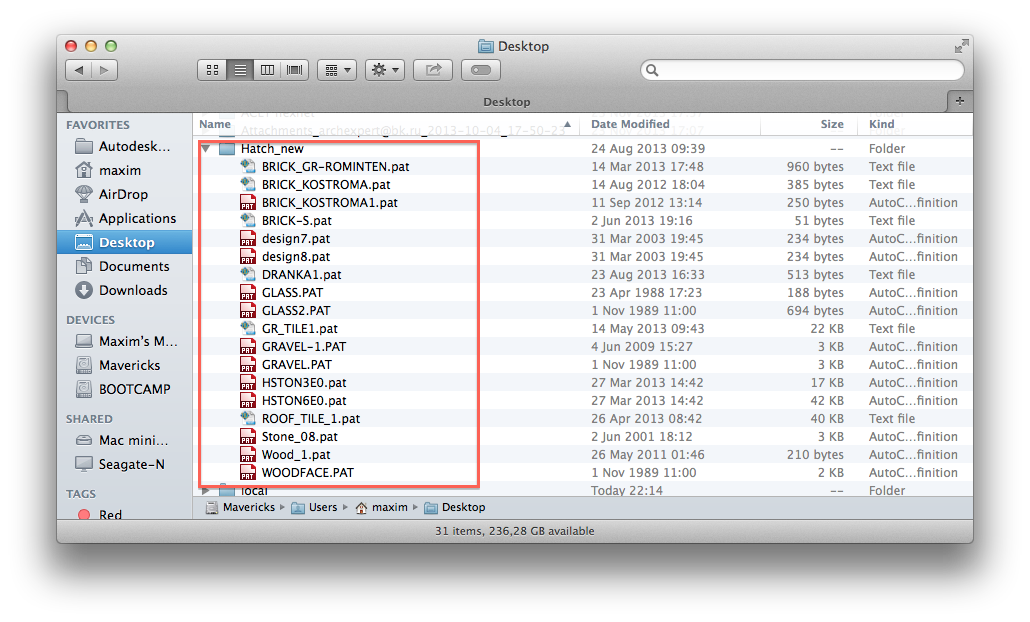
Just now I launched Mavericks with AC 2013, reset Application preferences. Now I add patterns which are in a folder on my Desktop:

Screen Shot 2013-12-06 at 22.27.27.png

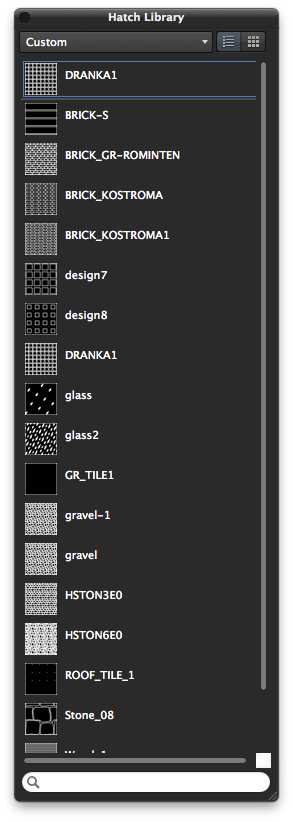
via Hatch Library window, an here is a result:

Screen Shot 2013-12-06 at 22.29.40.png


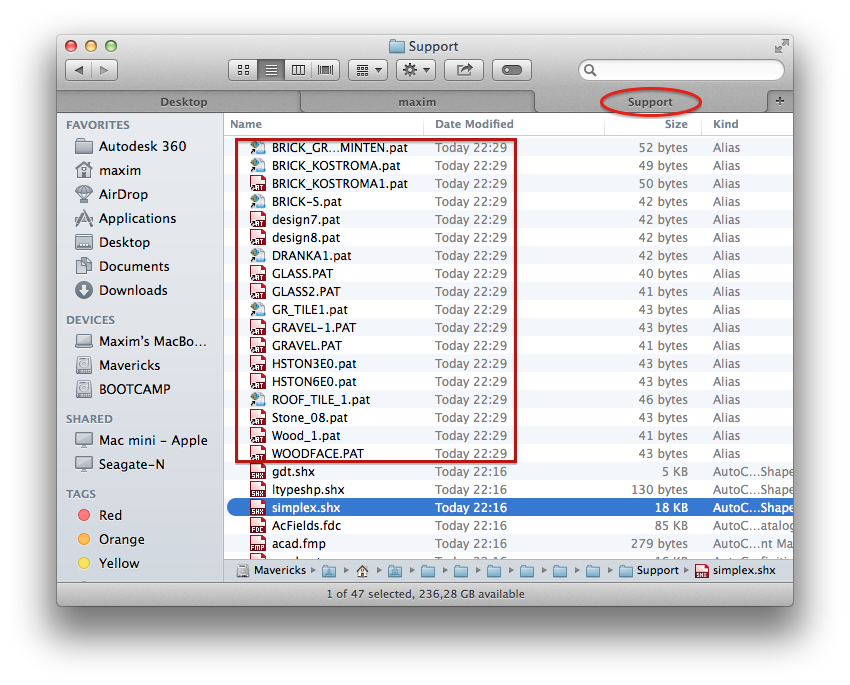
And here they are (as aliases) inside ~/Library/Application Support/Autodesk/roaming/AutoCAD 2013/R19.0/enu/Support folder:


Screen Shot 2013-12-06 at 22.30.26.png


Everything works fine, strange that you have issues with this...


Maxim


Do you find the posts helpful? "LIKE" these posts!
Have your question been answered successfully? Click 'ACCEPT SOLUTION' button.


Maxim Kanaev
Architect
MARSS

MacACAD | Linkedin

Etiquette and Ground Rules of Autodesk Community
0 Likes
Message 7 of 16

pendean
Community Legend
Community Legend
Can you share one or two or more of your hatch pattern files here?
0 Likes
Message 8 of 16

Anonymous
Not applicable

Hi Maxim,


Before I reset, I didn't have an issue with loading them either.  One thing I noticed is that when I tried to load one or a bunch of hatches, the rainbow wheel that indicates that it is loading doesn't show up anymore.  Here is what I see below.


Trang

0 Likes
Message 9 of 16

Anonymous
Not applicable

Hi  Dean,


Here are some of the patterns that use to work.


Trang

0 Likes
Message 10 of 16

maxim_k
Consultant
Consultant
What if you right-click (Ctrl-click) on one of the hatch pattern aliases when you open Finder with "Find in Finder" and select "Show original"? - Do you get to the real .PAT file in Finder?
I think at first that there could be some troubles with aliases on your system.

Maxim

Do you find the posts helpful? "LIKE" these posts!
Have your question been answered successfully? Click 'ACCEPT SOLUTION' button.


Maxim Kanaev
Architect
MARSS

MacACAD | Linkedin

Etiquette and Ground Rules of Autodesk Community
0 Likes
Message 11 of 16

maxim_k
Consultant
Consultant
Accepted solution

Look:


Screen Shot 2013-12-06 at 8.22.20 AM.png


I just deleted source .PAT files from my Desktop and get the same results as you - empty Custom section in Hatch Library.

That's whi I always use another way for adding Hatches to AutoCAD - special folder + adding it to Support Files Search Path.


Maxim


Do you find the posts helpful? "LIKE" these posts!
Have your question been answered successfully? Click 'ACCEPT SOLUTION' button.


Maxim Kanaev
Architect
MARSS

MacACAD | Linkedin

Etiquette and Ground Rules of Autodesk Community
0 Likes
Message 12 of 16

Anonymous
Not applicable

It says the original can't be found and when I tried to fix the alias it had an error message (see images)


Trang

0 Likes
Message 13 of 16

Anonymous
Not applicable

Thanks Maxim!  Adding a path in preferences worked!


Trang

0 Likes
Message 14 of 16

maxim_k
Consultant
Consultant
Where are stored (actually) the original PAT files on your System? Are they on Network drive?

Maxim

Do you find the posts helpful? "LIKE" these posts!
Have your question been answered successfully? Click 'ACCEPT SOLUTION' button.


Maxim Kanaev
Architect
MARSS

MacACAD | Linkedin

Etiquette and Ground Rules of Autodesk Community
0 Likes
Message 15 of 16

Anonymous
Not applicable

I had always stored a set of .pats on our network server and added them through the hatch command "Add Hatch", which then got transfered to my computer...didn't have an issue with this method before.  Adding the path through the preference command is the first time I went through that route - I do find it takes a long time to load the hatches?


Trang

0 Likes
Message 16 of 16

Anonymous
Not applicable

Adding a path to a folder of downloaded hatch patterns via prferences just makes AutoCAD crash and freeze. I've never been able to add downloaded hatch patterns to AutoCAD for Mac, I don't think the platform supports it.

0 Likes