AutoCAD Electrical "unknown command" issues

AutoCAD Electrical "unknown command" issues

Anonymous
Not applicable
2,776 Views
3 Replies
Message 1 of 4

AutoCAD Electrical "unknown command" issues

Anonymous
Not applicable

I have AutoCAD Electrical 2013 installed using a network license.  When I first installed it to my computer, everything worked fine.  The next time that I logged off and logged back on, none of the electrical commands work. (i.e. anything under the Schematic or Panel tab.)  I have also just recently noticed that not all of the tabs are included, like the Home tab, in the program anymore and they don't appear when right clicking to check which tabs to put on the ribbon.  I have reinstalled the program several times and it works fine after that , but whenever I log back off it quits working again.  I have tried to do some netloads of .dll files to see if it is because it's not loading one for some reason, but so far that has not worked either.  Also, I installed it on another computer on the same network and have the same problem, but the new computer was loading the program fine everytime until just recently (including logging on and off of course). Any ideas?  ...besides reinstalling.

0 Likes
Accepted solutions (1)
2,777 Views
3 Replies
Replies (3)
Message 2 of 4

lionSG
Advocate
Advocate
Accepted solution

Try to check if your CUI customization files are loaded correctly.

Type CUILOAD and check if ELECTRICAL is loaded anot.

Thanks.

Message 3 of 4

Anonymous
Not applicable

Thanks lionSG.  Yeah I did just look at that after my posting the above.  Only 1 or two of the files were showing.  I found the other files and reloaded them, but it seems to be a issue with CAD finding the files or something, the folder that they were found in was hidden for some reason.  Anyways, it seems to be working fine for the last few days.

0 Likes
Message 4 of 4

Anonymous
Not applicable

I had the "unknown command" problem and fixed it by going into the support directory:


"C:\Users\username\AppData\Roaming\Autodesk\AutoCAD Electrical 2015\R20.0\enu\Support\acaddoc.lsp"


and renaming acaddoc.lsp to something else (ie; acaddoc.lsp.old) so it would be ignored when ACAD Electrical

started up.


I then activated a project, opened a drawing and shazzam! the problem went away.

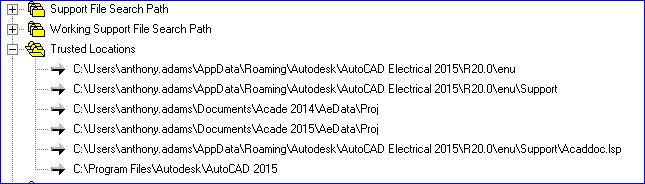
make sure the trusted locations has the support directory added.


acad-options.JPG

0 Likes