Kick ASS animation sequences

Kick ASS animation sequences

JohnDraisey
Contributor Contributor
4,369 Views
9 Replies
Message 1 of 10

Kick ASS animation sequences

JohnDraisey
Contributor
Contributor

Is there a method of kicking ASS animation sequences without having to use Command Line?

0 Likes
4,370 Views
9 Replies
Replies (9)
Message 2 of 10

Stephen.Blair
Community Manager
Community Manager

Use a render manager? For example, Deadline can do Arnold standalone jobs.

It's still a kick command line, but you have the Deadline GUI on top.


// Stephen Blair
// Arnold Renderer Support
0 Likes
Message 3 of 10

Mike_Farnsworth
Not applicable

Generally, the non-commandline options are to use one of the DCCs or lighting tools with batch rendering, such as Maya/MtoA with "export ass and kick" in the render settings, Katana/KtoA with disk renders, and so on. Kick itself is really meant for a frame at a time with a master .ass file at a time. So you would need some way to wrap up kick invocation with a GUI if you wanted something simpler.

0 Likes
Message 4 of 10

JohnDraisey
Contributor
Contributor

I looked at Deadline, and it looks really cool, so thanks for that @Stephen Blair. I'll check out "export ass and kick" in the MtoA settings @Mike Farnsworth. I started talking with former VFX artist Gene Crucean, and he's giving me free reign to fork his "Kick Ass GUI" project so that it's updated for Arnold 5.

https://github.com/crewshin/KickAssGUI

0 Likes
Message 5 of 10

Mike_Farnsworth
Not applicable

I think I remember that little project! That's cool, and let us know how it goes!

0 Likes
Message 6 of 10

Anonymous
Not applicable

there are some flag to render a sequence in command line?

0 Likes
Message 7 of 10

JohnDraisey
Contributor
Contributor

As far as I know, it only renders one frame at a time via Kick. But if you really need to render out a sequence of ASS files, you can write a Windows batch file that loops based off the number of frames in your sequence, applying a Kick command to each frame. Here's an example. ass-sequence.txt

0 Likes
Message 8 of 10

Stephen.Blair
Community Manager
Community Manager

What command line? kick? The maya render command? CINEMA 4D commandline.exe?

kick works with one ASS file at a time.

With Maya batch renders, you could do Export ASS and kick for a sequence. Check the MtoA docs for the batch render flag to set the render type to Export Ass and kick


// Stephen Blair
// Arnold Renderer Support
0 Likes
Message 9 of 10

Slava_91
Advocate
Advocate

Thanks for sample, it very useful!

It is possible to set range, from what frame start render?
In kick documentation I not find the desired flag, and so the .bat file first looks for the first frames and only then starts to render, if the sequence from the 1000 frame, then it will first search 1-999 frames, and after that start render sequence.

0 Likes
Message 10 of 10

pablo.valladares.r
Contributor
Contributor

Screen Shot 2022-05-07 at 03.55.22.png

Screen Shot 2022-05-07 at 03.51.31.png

Screen Shot 2022-05-07 at 03.50.22.png

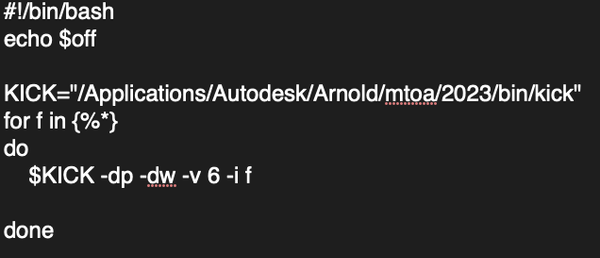
i try to write a script in MacOs terminal but i cant find the sequence files   

0 Likes