snap cvs/objects in projected intersection

snap cvs/objects in projected intersection

ryan6565
Participant Participant
460 Views
4 Replies
Message 1 of 5

snap cvs/objects in projected intersection

ryan6565
Participant
Participant

I'm wondering how to move cv's or objects in a projected view, meaning if I were in a side view snap them to another cv or curve of a different curve in said view in there projected intersection or anywhere on the curve. Coming from rhino there is a "project" button that you turn on that does exactly that and I would like to do this in alias. Right now if I try to select some cv's it not only moves them into another cv but also merges all of them into a single point. I turned on "snap projected intersection" but doesn't seem to do what I think it should be doing. Example below in rhino:


projected intersection.jpg

0 Likes
461 Views
4 Replies
Replies (4)
Message 2 of 5

BarryKimball
Autodesk
Autodesk

Since that is Rhino...it would be best to go to a Rhino forum for an answer.

0 Likes
Message 3 of 5

ryan6565
Participant
Participant

Hi Barry, I'm simply asking how to do something similar in Alias that's all...

0 Likes
Message 4 of 5

BarryKimball
Autodesk
Autodesk

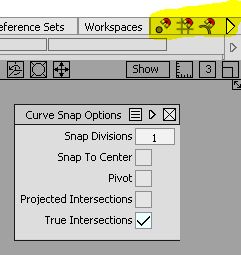
Ok, so I wont get into how you built those curves, but this is easy to do in Alias in various ways...the simplest in ortho views is to use the CTRL+MMB or RMB depending on the situation. There is also a small tick mark in the upper right corner of the Alias UI...open that tick mark and a menu appears allowing user control over other snapping features in Alias...see the attached image...yellow highlights the tick mark

0 Likes
Message 5 of 5

ryan6565
Participant
Participant

Thanks Barry!


Figured it out- I guess you have to do it in 2 steps, first use ctrl +alt MMB or RMB to get it vertical or horizontal of the end point that you are snapping to and then ctrl +alt RMB to snap it directly on the endpoint but keeps it locked down in the view. Before I was using LMB which just snaps the entire thing to the endpoint physically connecting it which is not what I wanted. Hopefully what I'm trying to do makes sense lol 

0 Likes