Split an object into two parts

Split an object into two parts

Anonymous
Not applicable
5,505 Views
7 Replies
Message 1 of 8

Split an object into two parts

Anonymous
Not applicable

Hi everyone ! 

I have trouble with a part of an airplane object from the simulator X-Plane 11. 

The engines parts are coming together (two), and I'm having troubles with that.

The best would be spliting the engines, in order to have only one instead of two in the file. 

Can someone do that for me please ? I don't have the software and the suffisant knowledge for that.

I attached a screenshot with what I have.

The file is an ".obj" file.
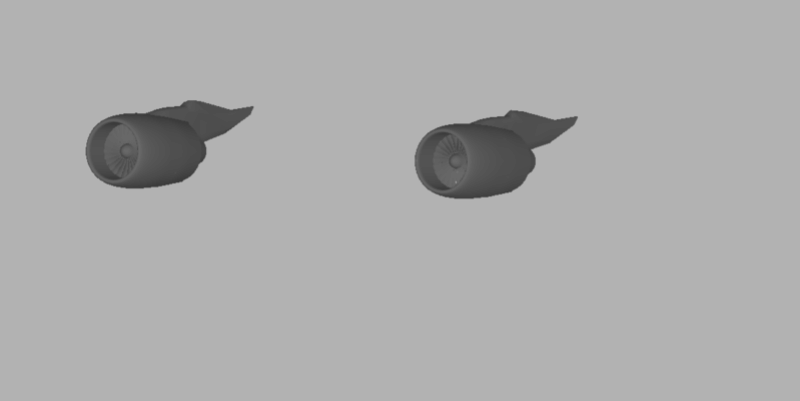
 

If someone can help me, I can send you the file by mp 🙂 

Regards 

0 Likes
5,506 Views
7 Replies
Replies (7)
Message 2 of 8

don_3259
Collaborator
Collaborator

hi mangakunk please explain this clearly what you want i can help you...thanks

Autodesk Student Amassdor
Guest & Visiting Lecturer
Ali Sajjad
0 Likes
Message 3 of 8

Anonymous
Not applicable

Hi Don ! 

Thanks for your reply !

To be simple, I would like to delete one engine in the file and have only one. 


Regards

0 Likes
Message 4 of 8

don_3259
Collaborator
Collaborator

ok send me file i that for you ... share file here

Autodesk Student Amassdor
Guest & Visiting Lecturer
Ali Sajjad
0 Likes
Message 5 of 8

Anonymous
Not applicable

Thank you for your help ! 

I sent you a mp ! 🙂 

0 Likes
Message 6 of 8

don_3259
Collaborator
Collaborator

file is not opening in 3ds max saying empty file

Autodesk Student Amassdor
Guest & Visiting Lecturer
Ali Sajjad
Message 7 of 8

Anonymous
Not applicable

Did you opened the two files ?

Whatever, no problems, thanks for trying to help me ! 🙂 

0 Likes
Message 8 of 8

Anonymous
Not applicable

Hi Mangakunk,

 If you import .obj file in 3ds max it'll be in the form of Editable mesh.

You can detach the object by selecting it from element subobject.


Hope it'll be useful for you.

If not do send me the file. I'll try fixing it..


det1.jpg 


0 Likes