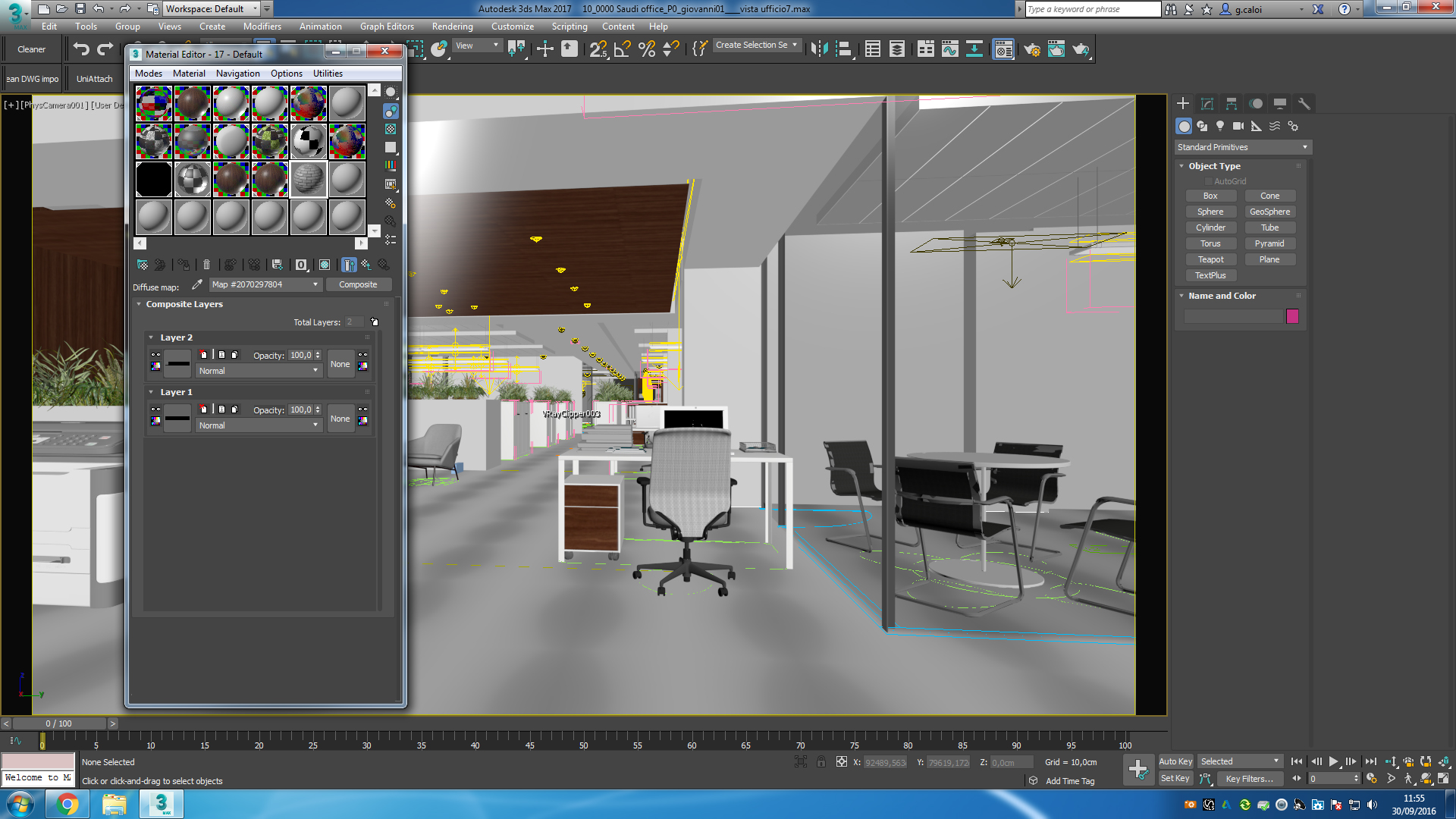
thumbnail composite material in 3dsmax 2017

thumbnail composite material in 3dsmax 2017

g.caloi
Participant Participant
7,360 Views
30 Replies
Message 1 of 31

thumbnail composite material in 3dsmax 2017

g.caloi
Participant
Participant

hi guys,


when i put a composite material in the material editor, i can't see anymore the thumbnail preview for each texture which is really annoying and i only see a black bar inside the thumbnail. till 3dsmax 2016 everything worked fine. How to fix this?


thank u guys

7,361 Views
30 Replies
Replies (30)
Message 21 of 31

Anonymous
Not applicable

Realy sad to hear that 😞 Thats was a hope and now it`s died...

So many bugs in things that already works perfect and was broken - moves from version to version withot fixing 😞 Also as a bug with FFD`s and with some other modifiers that was applied on a Grouped objects (with instanced objects inside)...

Message 22 of 31

Anonymous
Not applicable
That's insane but very typical of Autodesk. Only "work around" i have is i made a composite material with like 10 layers and i keep reusing it. I cant see the thumbnails but the order stays.

The out of order thing happens when you make a new layer. So if you make a layer, do nothing, leave and come back into the composite it will stay in that order.

Autodesk. You are the worst.
0 Likes
Message 23 of 31

Alfred.DeFlaminis
Alumni
Alumni

Hello all,


The tracker got updates about this issue just this morning, so please don't think that nothing is happening behind the scenes.  I know this is an important issue to many people.  Issues do have to be prioritized but that doesn't mean they're being ignored.  Please be patient.  


Best Regards,

0 Likes
Message 24 of 31

marksman123
Advocate
Advocate

PLEASE FIX THIS!!! Not being able to use a composite map as a 3d artist is unreal! Come on... Autodesk is a world class company... just fix this problem please! It's been like 8 months!!!!!!!!

Message 25 of 31

g.caloi
Participant
Participant

Installed max 2018.2 its ****in insane, the bug still there!!! noway

Message 26 of 31

RGhost77
Advisor
Advisor

Composite map has another bug (layers not properly reorders  inside of it ) and not fixed too...

https://forums.autodesk.com/t5/3ds-max-forum/can-t-reorder-composite-map-again-not-fixed-when/m-p/73...


Royal Ghost | veda3d.com
Message 27 of 31

Anonymous
Not applicable

Wow, I thought it was just me!


I think this may be Autodesk's less than subtle way to get everyone over to the slate material editor.

I've been fighting this bug since we upgraded to 2017.  I've stuck with the compact material editor but I just tried rearranging the layers in slate and it seems to have stuck.


Not ideal but it'll work...

0 Likes
Message 28 of 31

Alfred.DeFlaminis
Alumni
Alumni

Hello @Anonymous and welcome to the community,


It's not a conspiracy or anything.  Integrating the composite map with the new QT front end requires a lot of rewrites to portions of the composite map.  This issue and all others related to the composite map are logged in the tracker.  I personally want to see this issue fixed as well, this is an important one to me as well as you all. 


Best Regards,

0 Likes
Message 29 of 31

Anonymous
Not applicable

Just tried the latest update for 3dsmax 2018.4, and this problem is officially solved! Im sooo happy about this 🙂

Thanks a lot to everyone for your posts about this issue.

Message 30 of 31

RGhost77
Advisor
Advisor

Yep, fixed.. good. 🙂 But layer reorder doesn't... 😞


Royal Ghost | veda3d.com
0 Likes
Message 31 of 31

Anonymous
Not applicable

Indeed, it's weird because sometimes it lets you reorder without problem, however it also creates new nodes for every movement you do 😕

0 Likes