Plug-in Assembly Load Error when launching 3ds Max 2016

Plug-in Assembly Load Error when launching 3ds Max 2016

Anonymous
Not applicable
18,321 Views
30 Replies
Message 2 of 31

Plug-in Assembly Load Error when launching 3ds Max 2016

Anonymous
Not applicable

Hi


I have big problem with my 3dmax 


somebody  help me, 


when I launch 3ds I have Error Plug-In Assembly,  (attach jpg) 


Plug-in Assembly Load Error when launching  3ds Max


Best Regards,

Andrzej 

0 Likes
18,322 Views
30 Replies
Replies (30)
Message 21 of 31

Anonymous
Not applicable

Alfres Help 


Error still show up 

solutions given still did not remove the problem ,maybe I must record a video on YouTube


Andrzej 

0 Likes
Message 22 of 31

Alfred.DeFlaminis
Alumni
Alumni

Hello @Anonymous,


If you'd like I'm happy to view it.  I feel strongly that the issue has to do with security settings on your machine.  Running as admin killed the problem so we know it's a permissions issue in windows.  At this point I would look at your Anti-Virus/Windows Defender real-time protection settings, or .Net.  You probably need to exclude that .dll from their real-time scanning operations.  


Did you try adding a system variable as mentioned in this link?  Do you have some sort of group security policy in place on your machine?


Best Regards,

0 Likes
Message 23 of 31

Anonymous
Not applicable

Hi Alfred


I did everything that was written and it did not work (https://knowledge.autodesk.com/support/3ds-max/troubleshooting/caas/sfdcarticles/sfdcarticles/Plug-i...


do you think that reinstalling windows 10, something can help?


Andrzej 

0 Likes
Message 24 of 31

Alfred.DeFlaminis
Alumni
Alumni

Hello @Anonymous,


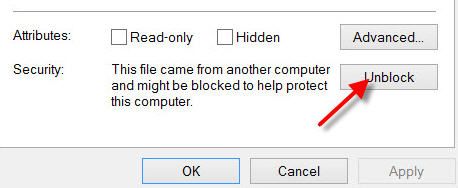
It's a tough question to answer, something is preventing that .dll from being accessed so presumably it can be fixed in the current installation of Windows. A quick google search does indicate that W10 will occasionally block assemblies and .dlls, and there seems to be an "unblock" feature on the file properties.  (Right click on file-> Properties.)  You should see a screen similar to the one below, is the "block" button checked?


unblock.jpg


Best Regards,

0 Likes
Message 25 of 31

Alfred.DeFlaminis
Alumni
Alumni

Hello @Anonymous,


I just wanted to follow up here, any progress on your issue?  I do want to get this resolved for you.  

Best Regards,

0 Likes
Message 26 of 31

Anonymous
Not applicable

hi Alfred


I'm sorry that it wrote back immediately but I was not at work - health problems

I do not see a Unblock checkbox, then the file is not blocked.

What do you think about reinstalling win 10 - this thing can help??????


my patience already ends 😞
I am shocked that the program for 4000 euro can not work with Win 10

0 Likes
Message 27 of 31

Alfred.DeFlaminis
Alumni
Alumni

Hello @Anonymous,


I hope you are feeling ok, and I'm sorry to hear about the health problems.


I don't think reinstalling Windows will help here, as the problem has to do with security/permissions on the OS level.  Reinstalling the OS won't change how the OS operates. I don't want any user to be frustrated and out of patience, but please keep in mind that officially 3ds Max 2016 is supported for Windows 7, 8, and 8.1.  Despite all that I'm still trying to help here.


We are left with 2 scenarios.


1) Run the program as Admin.  If you cannot drag and drop files into the viewport to open them, set your UAC in Windows to the lowest level and reboot to see if that will work for you.  If it doesn't work, it's at least a workaround for the .dll problem. 


2) Don't run the program as Admin.  In this case you'll get the .dll error because Windows 10 is blocking some of your .dlls.  Maybe setting UAC Down could help here too.   Google shows that you are not alone.  I supposed you could also try running in compatibility mode for W7 or W8.   Or, you may want to ask in forums for Microsoft because your operating system or AV is what is causing this problem.  I would look harder at your AV and/or Win Defender.  


Best Regards,

0 Likes
Message 28 of 31

Anonymous
Not applicable

Alfred, I would like you not to receive it personally, I know you really want to help me with this problem.


I understand the officially 3dmax 2016 dedicated to Windows 7, 8, and 8.1. but that does not change the fact had passed three months after its premiere Windows 10, maybe it's time to think about SP4.

I understand that not even worth to think about upgrading to 3dmax 2017 because she completely will not work with Windows 10

back to my problem with 3ds max 2016 and windows 10 - I will try your solution, I hope that it will help ...
the information you need about AV and / or Win Defender

Best Regards,

0 Likes
Message 29 of 31

Alfred.DeFlaminis
Alumni
Alumni

Hello @Anonymous,


Thank you, I do appreciate it.  If I am personally upset it's not because of anything about you, but because I haven't solved your issue yet.  I really do love 3ds Max and I want everyone to have the best experience possible.  If I came across badly in my previous post, I apologize.  I thank you for your patience and understanding.  


I am also curious if compatibility mode may help you, or running with UAC settings on the lowest level.  Thanks for keeping me updated.  


Best Regards,

0 Likes
Message 30 of 31

Anonymous
Not applicable

Gracias!!
Se solucionó.


Bendiciones.

Message 31 of 31

jon.bell
Alumni
Alumni

Hi @Anonymous,


I'm just reviving this old thread to note that this article mentions various solutions to this issue, and since the release of 3ds Max versions 2018-2021, this issue may no longer be encountered in Windows 10.


If you're still seeing this problem with recent versions of 3ds Max, can you please let us know? Thanks!


Jon A. Bell
Senior Technical Support Specialist, 3ds Max
0 Likes