mesh smoothing group problem

mesh smoothing group problem

Anonymous
Not applicable
28,313 Views
21 Replies
Message 1 of 22

mesh smoothing group problem

Anonymous
Not applicable

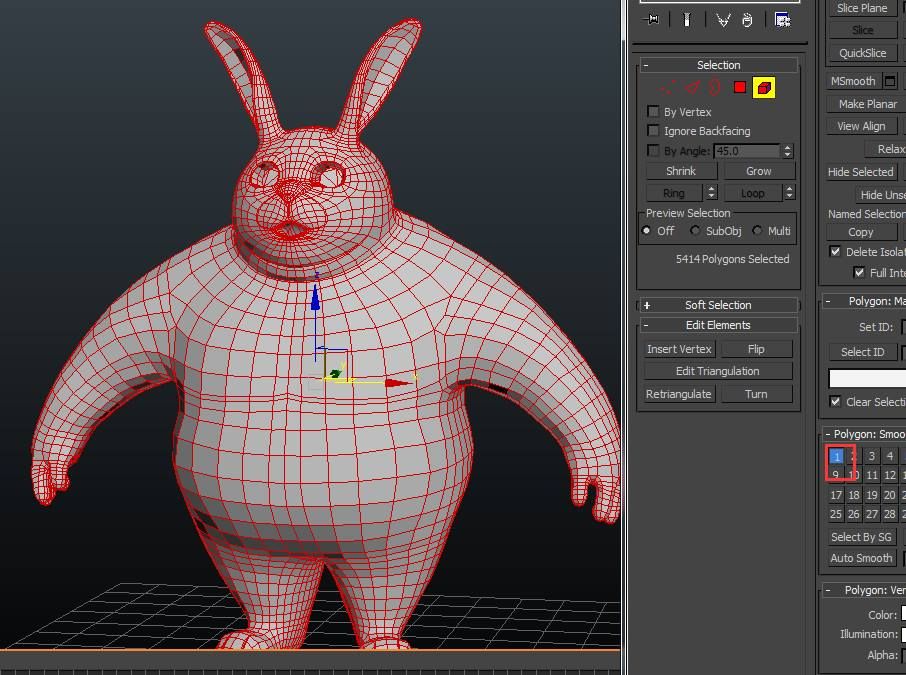
whats wrong with my mesh? I set all polygon's smoothing group to 1, but the face edge is still hard~it even affects my hair rendering, the hair based this mesh also looks very faced~no matter I use max hair or ornatrix or harfarm~result is the samep2.jpgp1.jpg

0 Likes
Accepted solutions (2)
28,314 Views
21 Replies
Replies (21)
Message 2 of 22

Anonymous
Not applicable

if I add editablepoly on the stack, smoothing group problem can be solved, but the fur rendering is still the same, I tried max hair, ornatrix and hairfarm, all the same~


0 Likes
Message 3 of 22

Alfred.DeFlaminis
Alumni
Alumni

Hello @Anonymous and welcome to the community,


I was reading about this on the Vray forums recently.  This is actually not a bug but a common issue when using area lights to render on low poly objects.  You can either switch to point lights or smooth your model more, otherwise this is common and normal.  (Screenshot below.)


example.jpg


Basically, you need to add a turbosmooth and set it to render iterations.  Should fix it right up.


Best Regards,

0 Likes
Message 4 of 22

Anonymous
Not applicable

well.....Smooth groups are just faking it for you in the viewport, innit ? It's not geometrically/physically smoothing your mesh...


Drag out a low res sphere, say 16 segs....with Smooth on.....render....yeah front on, it looks pretty 'smooth' but look at the profile and you can clearly see the divisions between polys...


0 Likes
Message 5 of 22

Anonymous
Not applicable

first, in my pic I used vraylight, so it is supposed to look very smooth, specially the rabbit model is not that low poly~ plus, it also not suppose to affect the fur rendering, I can get very smooth fur surface rendering with even lower mesh~just this one ,very strange~

0 Likes
Message 6 of 22

Alfred.DeFlaminis
Alumni
Alumni

Hello @Anonymous,


On a closer look you are getting over 100,000 instances of "invalid normal index" errors when I render here.  So you're right that there is something wrong, but the faceted faces when using GI with an area light are normal.  


I would do the following:


1) Reset the XForm on the bunny character.  

2) Apply an Edit Normals modifier, select all the normals, then press Unify.  You have 4 normals for each vertex which is odd, this should fix that.

3) Collapse the stack


I think then the problem is solved for your fur.  Can you please try that for me?


EDIT: Unifying the normals might create some patchy normal smoothing in the fingers.  You'll have to manually adjust the normals to fix those using the edit normals modifier and a little time.  Chances are this was imported with strange settings, you might try to reimport to see why these normals are split like this.  


Best Regards,


Message 7 of 22

Alfred.DeFlaminis
Alumni
Alumni

Hello @Anonymous,


I have an even easier fix for you.  I simply exported out the obj's and reimported them with "smooth" used for normals.  I have a screenshot below and I attached the file to this message.  Please let me know if you have any questions.


image rabbit.png

Message 8 of 22

Anonymous
Not applicable

it kills those hard edges on mesh, but still affects fur surface~no matter I use ornatrix or hairfarm, which means is nothing to do with fur plugins, still some normal problem remains I guess~1.jpg2.jpg

0 Likes
Message 9 of 22

Alfred.DeFlaminis
Alumni
Alumni

Hello @Anonymous,


Interesting. I don't have any hair plugins at work but I do own Hair Farm at home.  If you attach a stripped down simple hair farm version to a post I can look at it tonight.


When I use a sphere with 8 segments and no smoothing it looks fine with scanline and Hair and Fur.  I also did a test on your bear with Hair and Fur and scanline and those edges don't show up.  (Attached them both to this message.)  I'm using a point light though and not an area light.  I wonder, if you do your render test with a point light do you get the same results?  


It may have nothing to do with Hair plugins, but Hair and Fur seems fine with it, or I am doing something different.  Maybe you can advise me based on these files where the differences are, or attach another scene with the hair on it so I can take a look.  Thanks for taking the time to do that.  I also did  test with Vray rendering as geometry and attached that.  So there must be something else going on.  


Vray_test.jpg


Best Regards,

0 Likes
Message 10 of 22

Anonymous
Not applicable

thanx for your effort, I will do some test later on and keep you posted~ 

0 Likes
Message 11 of 22

Anonymous
Not applicable

q4.jpg

here is the result~quite obvious for those hard edges~I use a omni light and GI~

I attached the file with it~I use hairfarm for the fur and vray 3.4 for rendering~thanks for your help~

0 Likes
Message 12 of 22

Anonymous
Not applicable

hardedge_maxhair.jpg

here is the result of max hair rendering, still faced`````gone crazy now~hahha

0 Likes
Message 13 of 22

Alfred.DeFlaminis
Alumni
Alumni

Hello @Anonymous, thanks for the update!


It's weird how different our renders are.  Here's another for Max hair with Vray, using an Area light or 3.  I'll take a look at the hair farm version tonight when I get home.  Can you post the Max file for the max hair render above?  I'm not sure why these are so different but I do want to get to the bottom of it.  Thanks!


Fur_test_2.jpg


Best Regards,

0 Likes
Message 14 of 22

Anonymous
Not applicable

here is my hair and fur, very strange```btw, pls save your file as 2014 version,thank you, hope you can find something~

0 Likes
Message 15 of 22

Alfred.DeFlaminis
Alumni
Alumni
Accepted solution

Hello @Anonymous,


I had a chance to look at this with Hair Farm this weekend.  The default Hair Farm mesh geo (yellow/gold mesh) has no smoothing to it, and you need to add a HairMesh Smooth modifier below the Generate Hair modifier to smooth out the mesh for rendering.  It has very little overhead from what I've seen, and solves this problem right up.  (I don't know Ornatrix so you'll have to ask them the method for Ornatrix.)  I have attached a simple file.  For more specific questions about HairMesh Smooth, please direct them to Cyber Radiance.  


For Hair and Fur, I would recommend using Cut Length instead of Scale, and when I do that the problem seems to resolve.  Also, some styling helps here as well.


Please let me know if you have any questions.


Best Regards,

0 Likes
Message 16 of 22

Anonymous
Not applicable

if I render the file you gave me directly, the result it like this~have I done anything wrong?e.jpg

0 Likes
Message 17 of 22

Anonymous
Not applicable

oops, I think I need to update topology in hairmesh brush. anyway, it seems a solution, and I acutally use the same way to solve the problem in ornatrix, it just need to add hair on a smoothed mesh~however I still feel very strange about this~ if you say it is because of the low poly of base mesh, how come it appears randomly, if I create a default sphere and add fur on it, there is no any hard edge no matter how low poly the shere is~ 

but thanks anyway, really appreciate your support~just hope to get the real reason though~

0 Likes
Message 18 of 22

Alfred.DeFlaminis
Alumni
Alumni

Hello @Anonymous,


I'm not sure what more I can do here.  It seems this is a common issue since those Smooth modifiers exist, likely for this purpose.  I don't have enough experience with HF/Orn to expand too much but it might be a good idea to file a support ticket with Cyber Radiance or Ornatrix to get more information.  There's nothing wrong with the mesh once those normals are fixed, and with Hair and Fur it's working well for me.  I think that just leaves how those other hair plugins are handling smoothing groups.  (And again, the smooth seems to solve it so it's an issue with a known fix using those modifiers.)  


I'd be interested in hearing what they do say about it and if you post that in here that can only help the next person.  


Best Regards,

0 Likes
Message 19 of 22

Anonymous
Not applicable

ok~thank you very much

0 Likes
Message 20 of 22

Alfred.DeFlaminis
Alumni
Alumni

Hello @Anonymous,


I'm happy to help and also eager to learn more.  I don't have a lot of experience with Hair Farm or Ornatrix and if you get any more information from them about a better way to handle this issue I'd be very interested in that.  Thanks for taking the time to communicate with me through this thread.


Best Regards,

0 Likes