How to pin Modifier tab?

How to pin Modifier tab?

travis.designer.vn
Collaborator Collaborator
1,020 Views
2 Replies
Message 1 of 3

How to pin Modifier tab?

travis.designer.vn
Collaborator
Collaborator

Hi


I click Modifieres tab to popup as below:
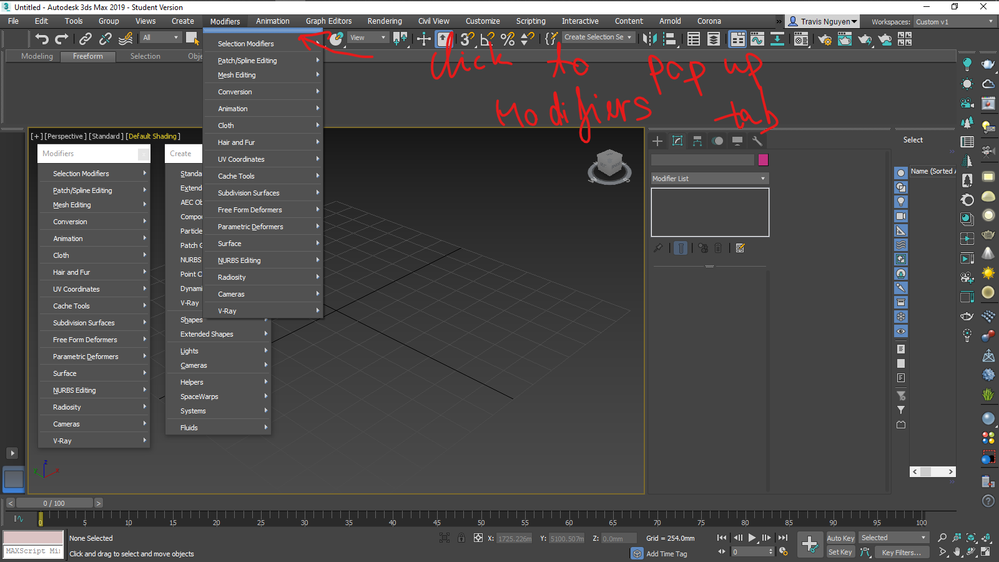
image.png


I save workspace, but It will be remove after I restart 3ds max.

I find a way to pin it on vertical view.

image.png


image.png

0 Likes
1,021 Views
2 Replies
Replies (2)
Message 2 of 3

jon.bell
Alumni
Alumni

Hi @travis.designer.vn ,


Thanks for your question! Instead of trying to pin the Modifier menus, could you use some of these workflow steps to help you navigate through modifiers more quickly?


How to customize and navigate quickly through the 3ds Max Modifier List

How to select and apply Object Modifiers quickly in 3ds Max


Please let us know if this helps!


Jon A. Bell
Senior Technical Support Specialist, 3ds Max
0 Likes
Message 3 of 3

travis.designer.vn
Collaborator
Collaborator

Hi @jon.bell 

I like popup Modifier because they are categorized and icon. When I move mouse to icon, they show me guide.


It's helpful with me. Are there other way to pin it? or save workspace?


Thank

0 Likes
