Camera information in relation to ground plane

Camera information in relation to ground plane

hansgauffin
Participant Participant
1,390 Views
7 Replies
Message 1 of 8

Camera information in relation to ground plane

hansgauffin
Participant
Participant

Hi! I have matched a camera to a background photo. I am trying to figure out how to get the information of the camera, degrees of rotation etc in relation to the groundplane. 

Is there a way to get this kind of info?

Thanks for any help.


0 Likes
1,391 Views
7 Replies
Replies (7)
Message 2 of 8

eodeo
Collaborator
Collaborator

If you have a video of the real world, you can "3d track" it via software like Boujou or pftrack. Even Adobe After Effects can track live footage and extrapolate a 3d camera out of it.


If you have a single image, you're out of luck for autumatic camera extraction, but if all you need is to add cg elements to a static image, all you need to do is eyeball perspective so it looks good/convincable. Max can help you do this with "perspective match" but you can do this fairly well with just toying arround with the perspective view.

0 Likes
Message 3 of 8

hansgauffin
Participant
Participant

Thank you four your reply! I´m afraid I may have put the question a litte unclear. I do know how to use the cameramatch function, and have already set up a photomatch to a static image. What I want is to get the values and parameters of the matched camera such as angle, distance, rotation etc. in relation to the ground plane. Some of the objects in the photo that I have matched is tilted (in the photo) and I am figuring out a way to calculate the amount of tilting by doing some reverse camera match by rotating the CG object with the same (but reversed) values as the camera was rotated.


0 Likes
Message 4 of 8

eodeo
Collaborator
Collaborator

If you know the exact camera settings and values of some of the objects in the scene, you can re-create the virtual scene pretty acuratly even with a single image.


If however, all you have is a single image and you want the exact camera settings and valus for any of the objects you're out of luck. It's eyeballing it all the way. This may not be a bad thing since it gives you ranges that work well with the given image and can be fairly easy to add cg objects to the scene.


If you just want the settings based on a single image, you're going to have a hard time. Our eyes are not the most trustworthy things in the universe so generating an exact match in 3d out of a dubious picture may be more that a bit tricky.

0 Likes
Message 5 of 8

hansgauffin
Participant
Participant

Hi! Sorry for being unclear. I use photomatch to match a photo since I already have a model of one objects in the picture. I then use campoints to match the CG object with the object in the photo. I have used this method earlier with 100 % sucess.


I am now in trouble since the object I am trying to match with the CG model is tilted to an unknown degree (in the photo). I have matched the object perfectly with photomatch but since the object is tilted in the photo, the camera is now in a wrong position.

What I want is to "reverse" the photomatch so that I can tilt the CG object as close as possible as the object was when the photo was shot.


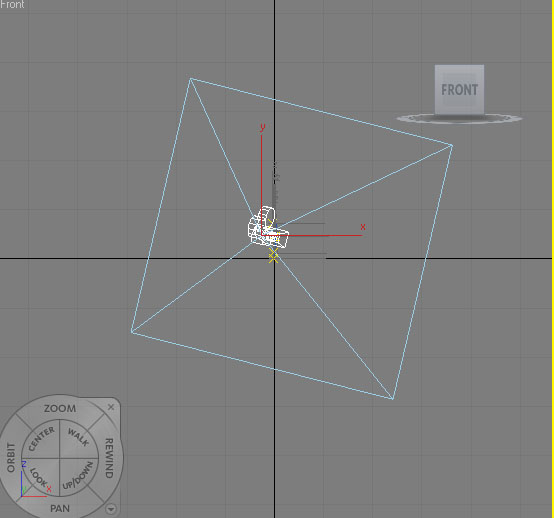
The closest I can come is to select the camera and use the rectangle that surrounds it in the various views (front, right, top) to calculate the amount of tilting of the camera, but It would be a lot easier if the parameters of the camera were known since I lack the mathematical knowledge for this.


As the picture shows, the amount of tilting of the camera (in relation to the ground-plane) is showed by the rectangle surrounding the camera. I´d like to know if this information is available in text values instead of trying to calculate it myself?

0 Likes
Message 6 of 8

hansgauffin
Participant
Participant

I realise that the original camera position (as in the photo) would not be completely found this way, but I am still curious if the values of the 3Ds max camera is possible to get?

0 Likes
Message 7 of 8

eodeo
Collaborator
Collaborator

If you have the camera already and you just want to have its transform values (position and rotation) you can use transform type in dialog box by selecting camera and then pressing f12 while being in move or rotate mode.


In another words, select the camera, and then press f12.

"w" will chose move and thus show position of the camera.

"e" will chose rotate and thus show rotation of the camera.

0 Likes
Message 8 of 8

hansgauffin
Participant
Participant

Thank you! Thats what I needed, I never realised transformation values was available for cameras just as with objects! Problem Solved


0 Likes