Steel Beams Verification

Steel Beams Verification

Anonymous
Not applicable
2,929 Views
6 Replies
Message 1 of 7

Steel Beams Verification

Anonymous
Not applicable

Hello,


While designing some simple steel beams, I found some conflicts regarding the member type defined. As you can see in these examples below, for a simple supported beam witth 7m span and transversal supports at each 1/3span, for each type of member I got different results.

Imgaem 1.png


The member types used are the following:

Member1.pngMember2.png

Member3.png


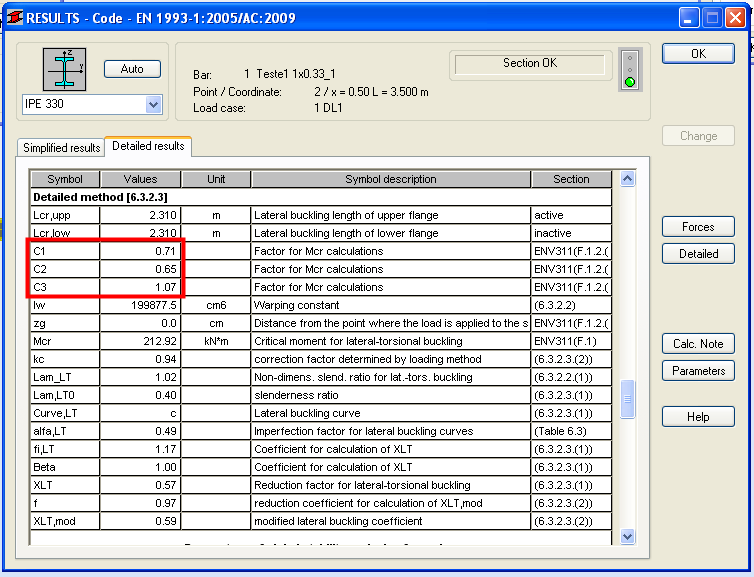
As shown on next tables from de steel module verification, how can be possible to get such different results? I think it have to be with C1,C2 and C3 coeficientes that Robot use based on previous ENV 1993, that is a clearly missguided aproximation.

Results.pngTipo1.pngTipo2.png


So, can you help me understand what is going on answering two questions:

  1. What is the correct way to model those elements in bending for the steel design checks?
  2. When Robot will update bending designs according to EN 1993:2005, using Cmi coefficients from annex A?

Thanks,

Dirgs

0 Likes
Accepted solutions (1)
2,930 Views
6 Replies
Replies (6)
Message 2 of 7

Artur.Kosakowski
Autodesk Support
Autodesk Support

1. As for Mcr calculations it is important to know how bending changes on parts among between the bracings then the correct definition should be that you have the member lengths coefficients as 1s and use the internal bracing dialog to indicate their positions. For a beam built from a chain of smaller elements you should first create a supermember that includes these smaller bars and then assign the same parameters as for the member that is a single bar.


2. According to my knowledge it is how Cmi is calculated. Could you give more details on what you think is wrong please?


Artur Kosakowski
0 Likes
Message 3 of 7

Anonymous
Not applicable

Hy Artur,


  1. Ok, global element with length coefficient 1 and internal bracing definition is the correct way;
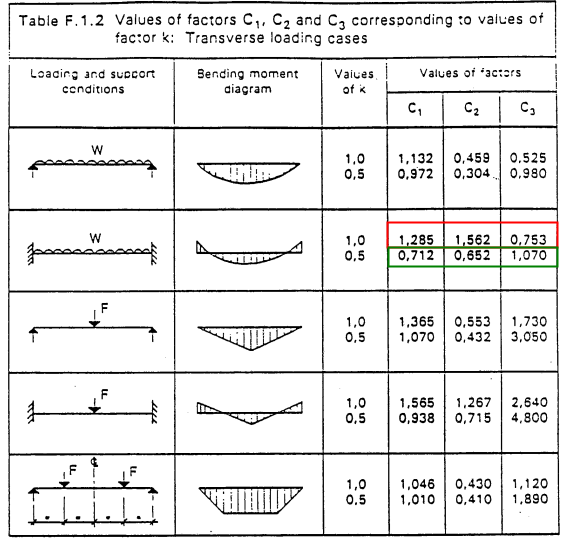
  2. For what I could understand, it isn't. Referring to previous results images, you can verify that C1, C2 and C3 coefficients are obtained directly from ENV F.1.2. table

ENV Table.png


It seems a simplification that is not justified, as it hugely affects Mcr and bending resistance and since latest version of standards already give expressions to define Cmi coefficients in a more accurate way (Table A.2 from Annex A of EN 1993-1:2005).


Thanks,

Dirgs


0 Likes
Message 4 of 7

Artur.Kosakowski
Autodesk Support
Autodesk Support

I think that C1,C2 and C3 are different than Cmi. The prior are used for calculations of Mcr for lateral buckling verification whereas the latter are use to determine the kij interaction factors for global stability check under combined bending and axial compression (formulas 6.61 and 6.62). As far as I can see EN 1993-1:2005 in 6.3.2.2(3) there is no formula provided for calculations of Mcr which can be found either in ENV or some national annexes instead.


If you find your post answered press the Accept as Solution button please. This will help other users to find solutions much faster. Thank you.


Artur Kosakowski
Message 5 of 7

Anonymous
Not applicable

Yes, I made a confusion between C1, C2 and C3 with Cmi coefficients.


However, I'm still surprised by the difference in each beam type regarding the modeling option. I expected to get pretty much the same result for each one of the beams.
Although you already said to use member length coefficient as 1 and internal bracing dialog, could you explain how K factor is obtained? Since it varies from 1 and 0.5 and it has such a big impact on Mcr, I wish to understand the path that Robot do when I choose one type of beam member.


Thanks,

Dirgs

0 Likes
Message 6 of 7

Artur.Kosakowski
Autodesk Support
Autodesk Support
Accepted solution

When you use the intermediate bracing points Robot can check the values of bending moments at these points and is able to correctly recognize what happens with them along the length of each of the segments. For other definitions program does not know anything about the locations of segments and uses the 'modified length' and values of bending moments form the ends of a bar instead.


If you find your post answered press the Accept as Solution button please. This will help other users to find solutions much faster. Thank you.


Artur Kosakowski
0 Likes
Message 7 of 7

dimogrec
Advocate
Advocate

Dirgs, in a member with intermediate-internal bracings (restrains) personally I use Table F.1.1 to get C1 value (and C3 if needed) for the "critical" member segment. So I choose "uniform or varying linearty" Load Type in Member Definition type.


Load_type.jpg

0 Likes