Hello Carmen,
First of all, if you want to check if it is NOT set, you need to test for === null .
var messages = [];
if(item.SUPPLIER_QUALITY_MANUAL === null){

  messages.push('A response must be entered for "Supplier Quality Manual" ');

}
returnValue(messages);
From your comment about the "SUPPLIER_QUALITY_MANUAL field is in a different workspace from the workspace ", it seems that this field is on the Affected/Managed Item (the item you want to revision) and not on the workflow item directly (the revisioning item).
In both cases I assume that the radio button is from a custom picklist with yes and no, correct?
One thing to help you, you can set the "default" value of the SUPPLIER_QUALITY_MANUAL so your new items will never be "empty"/null. Except of course if you actually "always" want the user to manually set a value.
Here is the field description that I used for the code below:
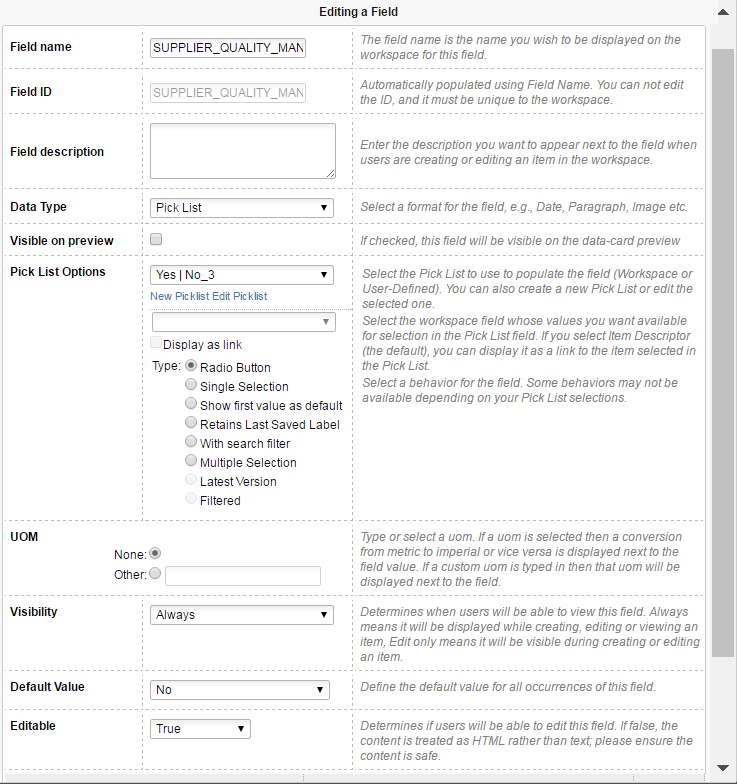
Here is an example if it is the case (that the field is actually from the linked item in the Managed/Affected Item Tab. You need to loop through each linked revision controlled items under that revisioning item.
var messages = [];

var wfiSize = item.workflowItems.length;

var i;
for( i=0;i<wfiSize;i++){

 var wfi = item.workflowItems[i].item;


 if(wfi.SUPPLIER_QUALITY_MANUAL === null){

   messages.push('A response must be entered for "Supplier Quality Manual" ');

 }else if(wfi.SUPPLIER_QUALITY_MANUAL === "Yes"){

   //Do something if it shouldn't be yes

 }else if(wfi.SUPPLIER_QUALITY_MANUAL === "No"){

   //Do something if it shouldn't be no
 }
}
returnValue(messages);
And here the example if the field is on the Revisioning item itself (like you have in your example):
var messages = [];

if(item.SUPPLIER_QUALITY_MANUAL === null){

    messages.push('A response must be entered for "Supplier Quality Manual" ');

}else if(item.SUPPLIER_QUALITY_MANUAL === "Yes"){

    //Do something if it shouldn't be yes

}else if(item.SUPPLIER_QUALITY_MANUAL === "No"){

    //Do something if it shouldn't be no
}
returnValue(messages);
 Dany Poudrier
PLM Product Manager


