


Message 1 of 6
Bug with Toolpath Pattern Losing Toolpaths

- Mark as New
- Bookmark
- Subscribe
- Mute
- Subscribe to RSS Feed
- Permalink
- Report
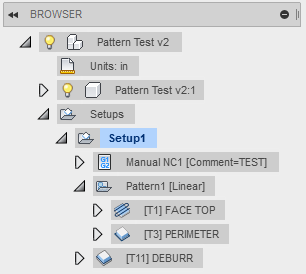
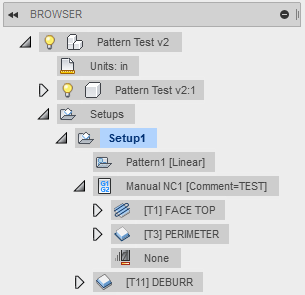
I found an issue where moving a toolpath immediately after a pattern causes all the operations in the pattern to move to the toolpath that was moved. I've attached a couple pictures to help explain. The first shows before moving the Manual NC1 operation and the second shows after moving Manual NC1 to after Pattern1. As you can see the two operations that were in Pattern1 have moved to Manual NC1. Unless I notice right away and undo the move I haven't been able to get the operations back and if i save the file and reopen it the operations are still gone. I've also attached my f3d file I tested this with to aid in fixing the issue.



 Kudo button - If it resolves your issue, press Accept as Solution!


