Auto-suggest helps you quickly narrow down your search results by suggesting possible matches as you type.
Showing results for
Show only
|
Search instead for
Did you mean:
This page has been translated for your convenience with an automatic translation service. This is not an official translation and may contain errors and inaccurate translations. Autodesk does not warrant, either expressly or implied, the accuracy, reliability or completeness of the information translated by the machine translation service and will not be liable for damages or losses caused by the trust placed in the translation service.Translate
kind of... i guess i am trying to say more distinctly that I want to use "Link" codes to define a boundary though. Where I think your idea was considering more featurelines.
@ceethreedee.com I'm not sure how a link would define a boundary. Wouldn't it be a point code instead? A point code defines a featureline, which should be able to define a boundary.
I'm pretty confident this was available in 2011 version. Not sure why they would get rid of it. I used to put a MarkPoint at the very edge of my subassembly with a specific code for the sole reason of creating my surface boundary.
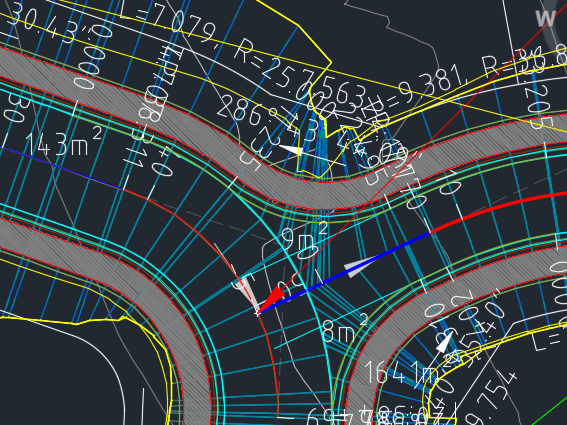
A link is represented in plan view by a four sided, closed shape. Two assembly instances each have one link and these represent two sides. Then connect the respective end points of those and you have four sides.
I think he's looking for the outer boundary of those combined shapes to be used as the corridor surface boundary.
But I don't think this would work as you'd have to have one link that goes all the way from on side of the corridor to the other.
OK @doni49 thanks I get it. Perhaps the goal is to create a small surface for just a small part of the corridor?
Anyway, the point code used to work great (except at bow-tie locations). You just had to put the same code on the very outside point on both sides of your assembly. I miss that feature.
yes a small surface for a section of a corridor. this feature would work simolar to the "corridor exents" feature.. but it would "shrinkwrap" the selected link codes.
NB. Point codes take too long to define. particularly when yiu have intersections or multiple baselines..unleas you can batch add point codes and they join themselvea together at the ends maybe?