Community
- Forums Home
- >
- AutoCAD Community
- >
- AutoCAD Customization Forum
- >
- Visual LISP, AutoLISP and General Customization forum
- >
- Menu Load from Lisp File
Visual LISP, AutoLISP and General Customization
Turn on suggestions
Auto-suggest helps you quickly narrow down your search results by suggesting possible matches as you type.
 This page has been translated for your convenience with an automatic translation service. This is not an official translation and may contain errors and inaccurate translations. Autodesk does not warrant, either expressly or implied, the accuracy, reliability or completeness of the information translated by the machine translation service and will not be liable for damages or losses caused by the trust placed in the translation service.
Translate
This page has been translated for your convenience with an automatic translation service. This is not an official translation and may contain errors and inaccurate translations. Autodesk does not warrant, either expressly or implied, the accuracy, reliability or completeness of the information translated by the machine translation service and will not be liable for damages or losses caused by the trust placed in the translation service.
Translate
Reply
Topic Options
- Subscribe to RSS Feed
- Mark Topic as New
- Mark Topic as Read
- Float this Topic for Current User
- Bookmark
- Subscribe
- Printer Friendly Page
Message 1 of 3


11-02-2012
01:29 AM
- Mark as New
- Bookmark
- Subscribe
- Mute
- Subscribe to RSS Feed
- Permalink
- Report
11-02-2012
01:29 AM
Menu Load from Lisp File
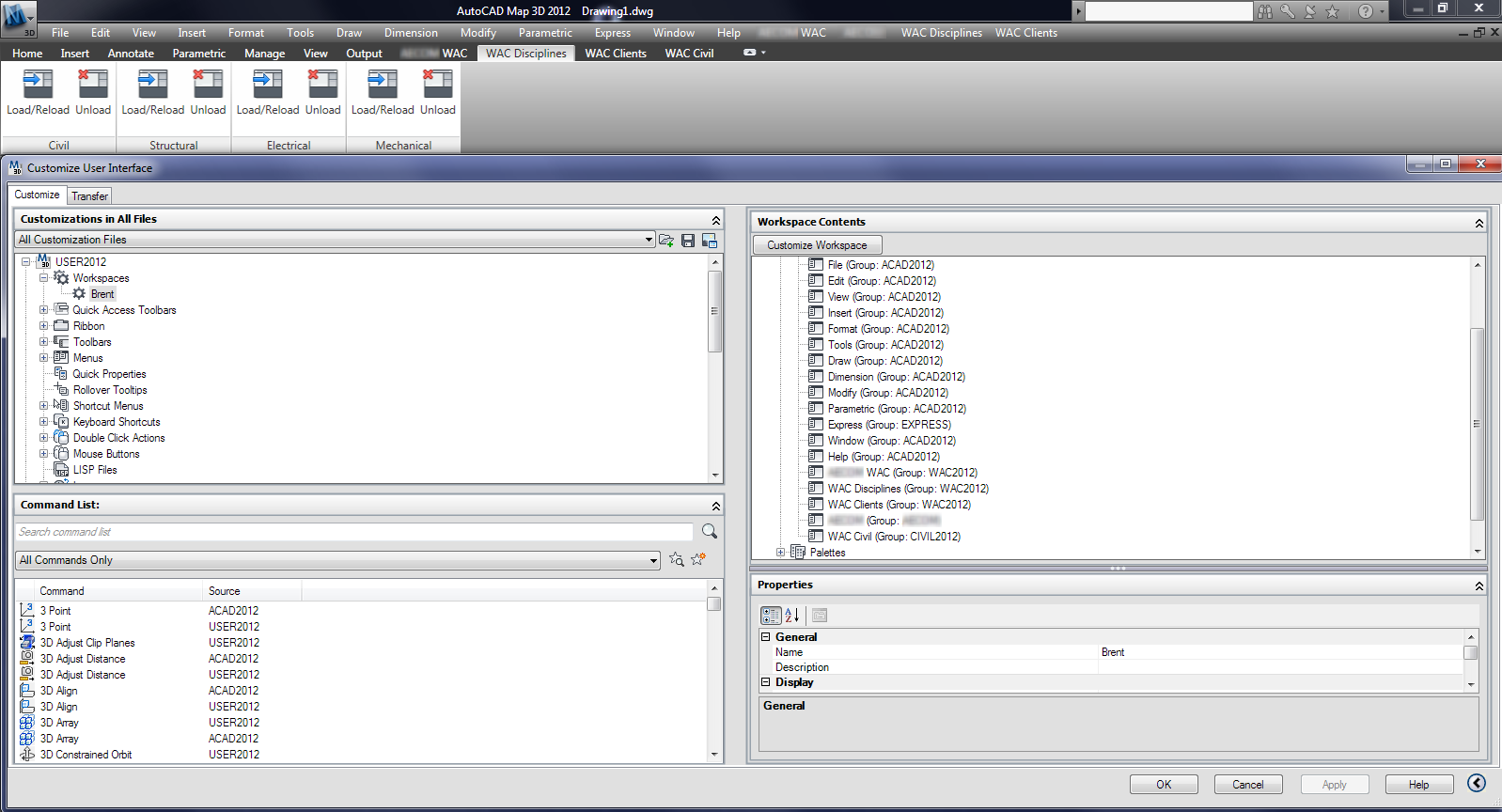
I have loaded our Civil cui file into AutoCAD with a lisp file calling CUILOAD.
The ribbon shows, but the menu does not, however, when I go into the CUI File and examine it, my workspace shows that the Civil menu should be showing (see attached image). Is there a way around this?
2 REPLIES 2
Message 2 of 3


11-02-2012
03:00 PM
- Mark as New
- Bookmark
- Subscribe
- Mute
- Subscribe to RSS Feed
- Permalink
- Report
11-02-2012
03:00 PM
Open the CUI and expand Workspaces in the upper-left pane.
Highlight the desired Workspace, right-click and select "Current".
Now that it is current, and still highlighted, look in the lower-right pane and tailor your display to your liking.
Next, see the "Customize Workspace" button? Select that.
The display will flicker, and now boxes with and without green checkmarks inside are showing.
In the upper-left pane, expand tree and check or uncheck to your liking.
In the upper-right pane, expand and arrange the order to your liking (drag & drop).
Select the "Apply" button.
Select the "Done" button.
Right-click the desired Workspace and select "Current" again (this is an iffy item on some versions).
Select the "Apply" button.
Select the "OK" button.
???
Scot-65
A gift of extraordinary Common Sense does not require an Acronym Suffix to be added to my given name.
Message 3 of 3

11-02-2012
07:41 PM
- Mark as New
- Bookmark
- Subscribe
- Mute
- Subscribe to RSS Feed
- Permalink
- Report
11-02-2012
07:41 PM
HI....
step1) convert CUI to MNU
step2) compile menu file (*.mnu) to LISP generator with the programne "COMNULSP.exe"
result on idsk topoxcad.lsp"
step3)you run the autocad.exe or acad.exe
step4)you load "topoxcad.lsp" inacad.exe
step5)you enter at line command "C:Q2" or (defun C:Q2"
i hope, my solution work fine ... you send to me, the private message........

Reply
Topic Options
- Subscribe to RSS Feed
- Mark Topic as New
- Mark Topic as Read
- Float this Topic for Current User
- Bookmark
- Subscribe
- Printer Friendly Page