Community
- Forums Home
- >
- AutoCAD Community
- >
- AutoCAD Customization Forum
- >
- Visual LISP, AutoLISP and General Customization forum
- >
- Measure in millimeters but display values in meters...
Visual LISP, AutoLISP and General Customization
Turn on suggestions
Auto-suggest helps you quickly narrow down your search results by suggesting possible matches as you type.
 This page has been translated for your convenience with an automatic translation service. This is not an official translation and may contain errors and inaccurate translations. Autodesk does not warrant, either expressly or implied, the accuracy, reliability or completeness of the information translated by the machine translation service and will not be liable for damages or losses caused by the trust placed in the translation service.
Translate
This page has been translated for your convenience with an automatic translation service. This is not an official translation and may contain errors and inaccurate translations. Autodesk does not warrant, either expressly or implied, the accuracy, reliability or completeness of the information translated by the machine translation service and will not be liable for damages or losses caused by the trust placed in the translation service.
Translate
Measure in millimeters but display values in meters...
18 REPLIES 18
Reply
Topic Options
- Subscribe to RSS Feed
- Mark Topic as New
- Mark Topic as Read
- Float this Topic for Current User
- Bookmark
- Subscribe
- Printer Friendly Page
Message 1 of 19


07-13-2010
04:14 AM
- Mark as New
- Bookmark
- Subscribe
- Mute
- Subscribe to RSS Feed
- Permalink
- Report
07-13-2010
04:14 AM
Measure in millimeters but display values in meters...
Hi,
The attached lsp puts tick marks at equal distances along a line/polyline and tags them with the distanace value from the start point. I draw using millimeter units but things like chainage should be displayed in meter units. Using this routine displays the values in millimeter units which I then 'find and replace' to edit their values to meters.
Can someone take a look at the lisp to see if it can be altered to input the mm value at the start but output the meter value to the text values?
Attached jpg graphically shows my request.
Regards
Sean
18 REPLIES 18
Message 2 of 19

07-13-2010
05:52 AM
- Mark as New
- Bookmark
- Subscribe
- Mute
- Subscribe to RSS Feed
- Permalink
- Report
07-13-2010
05:52 AM
For you TEXT creation, line:
(list (cons 1 (rtos chainage 2 3)))
could be changed;
to something like;
(list (cons 1 (strcat (rtos (/ chainage 1000.0) 2 3 ) "m " ) ) )
S
Message 3 of 19


07-13-2010
05:53 AM
- Mark as New
- Bookmark
- Subscribe
- Mute
- Subscribe to RSS Feed
- Permalink
- Report
07-13-2010
05:53 AM
@sean.keohane wrote:.... I draw using millimeter units but things like chainage should be displayed in meter units. Using this routine displays the values in millimeter units which I then 'find and replace' to edit their values to meters.
....
You should be able to do it by changing this line:
(list (cons 1 (rtos chainage 2 3)))
to something like this:
(list (cons 1 (strcat (rtos (/ chainage 1000) 2 1) "m")))
Kent Cooper, AIA 
Message 4 of 19
07-13-2010
06:00 AM
- Mark as New
- Bookmark
- Subscribe
- Mute
- Subscribe to RSS Feed
- Permalink
- Report
07-13-2010
06:00 AM
Thanks very much to both of you, that worked perfectly.
I appreciate your help,
Regards,
Sean
Message 5 of 19
02-07-2013
12:22 AM
- Mark as New
- Bookmark
- Subscribe
- Mute
- Subscribe to RSS Feed
- Permalink
- Report
02-07-2013
12:22 AM
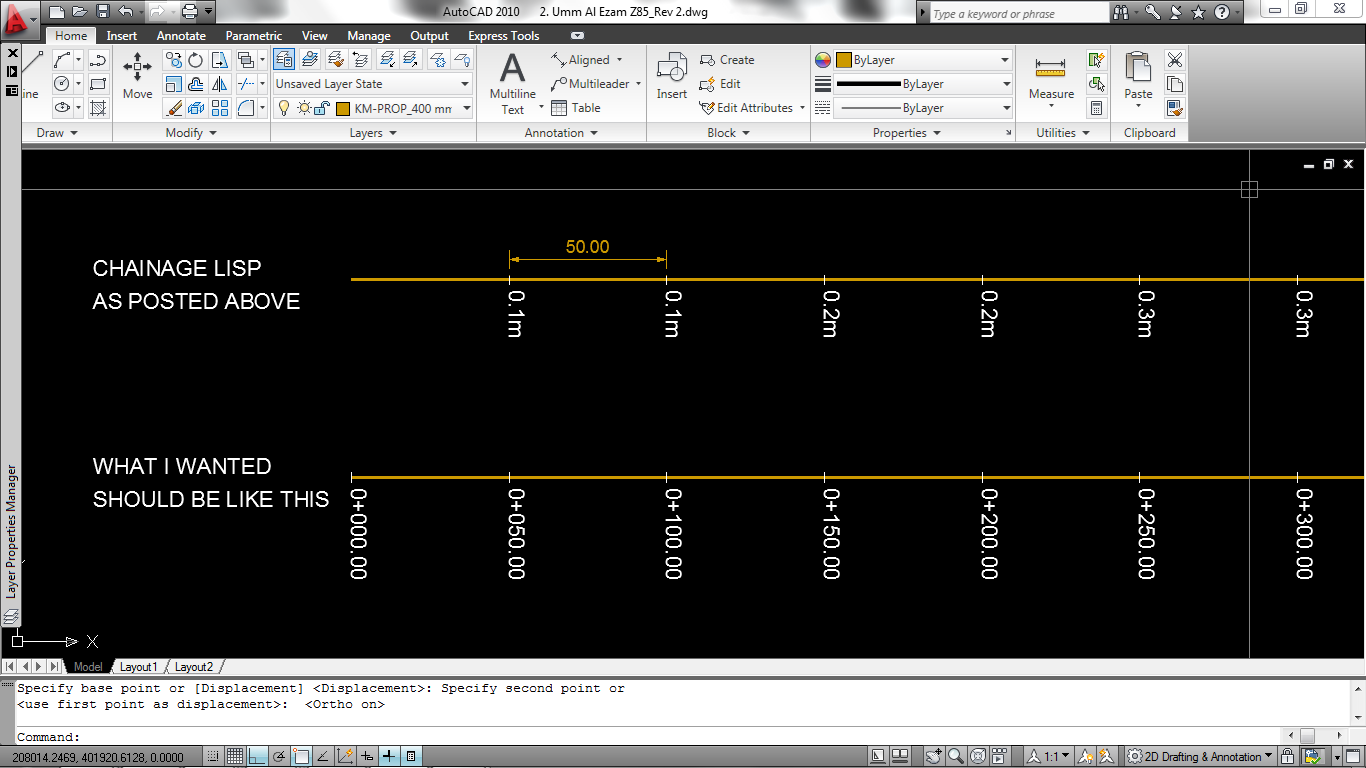
I have used the lisp discussed above but unfortunately the label (0+050.00, 0+100.00, etc) doesn't show, only the tick.
Also, I have seen drawings that has a tick interval of 50m but the label is placed only every 100m. The tick length on the place where there is label is longer that the one without label. Can you please reconfigure the above lisp so it would fit in my description?
Thank you in advance.
Message 6 of 19


02-07-2013
01:53 AM
- Mark as New
- Bookmark
- Subscribe
- Mute
- Subscribe to RSS Feed
- Permalink
- Report
02-07-2013
01:53 AM
@Anonymous wrote:I have used the lisp discussed above but unfortunately the label (0+050.00, 0+100.00, etc) doesn't show, only the tick.
Also, I have seen drawings that has a tick interval of 50m but the label is placed only every 100m. The tick length on the place where there is label is longer that the one without label. Can you please reconfigure the above lisp so it would fit in my description?
Thank you in advance.
Text Style issues, you can use a existing textstyle name
....
(list (cons 50 (+ bearing PI)))
	   (list (cons 7 "YourTextStyle" ))
	   '((41 . 1.0)
	     (51 . 0.0)
	     (71 . 0)
	     (72 . 0)
	     (11 0.0 0.0 0.0)
	     (210 0.0 0.0 1.0)
	     (100 . "AcDbText")
	     (73 . 0)
	     )
....
)
or remove it altogether . which will use the current TEXTSTYLE
HTH
EDIT: Almost forgot, for your format
...
(list (cons 1 (strcat "0+" (rtos chainage 2 2))))
...

Message 7 of 19
02-07-2013
02:21 AM
- Mark as New
- Bookmark
- Subscribe
- Mute
- Subscribe to RSS Feed
- Permalink
- Report
02-07-2013
02:21 AM
Thank you very much for the swift reply.
I have used your latest suggestion but it didn't work out as I expected.
I wanted to remove the "m" on the suffix of each label. The label on the starting point (0+000.00) doesn't show.
Labels should look like this:
0+000.00
0+050.00
0+100.00
0+150.00
etc.
Also, the increment that I have entered is 50m. Why is it that the label doesn't have a 50m interval?
Please have a look on the attached jpeg file in order to have a clear idea on what I wanted.
Thanks again.
Message 8 of 19
02-07-2013
03:10 AM
- Mark as New
- Bookmark
- Subscribe
- Mute
- Subscribe to RSS Feed
- Permalink
- Report
02-07-2013
03:10 AM
@Anonymous wrote:Thank you very much for the swift reply.
I have used your latest suggestion but it didn't work out as I expected.
I wanted to remove the "m" on the suffix of each label. The label on the starting point (0+000.00) doesn't show.
Labels should look like this:
0+000.00
0+050.00
0+100.00
0+150.00
etc.
Also, the increment that I have entered is 50m. Why is it that the label doesn't have a 50m interval?
Please have a look on the attached jpeg file in order to have a clear idea on what I wanted.
Thanks again.
works fine here in 2009
(defun c:Chainage (/)
(vl-load-com)
(defun _Line (p b o)
       (entmake
	 (append
	   '((0 . "line")
	     (100 . "AcDbEntity")
	     (67 . 0)
	     (410 . "Model")
	     (8 . "C_Chainage")
	     (100 . "AcDbLine")
	     )
	   (list (cons 10 (polar p b o)))
	   (list (cons 11 (polar p (+ b PI) o)))
	   '((210 0.0 0.0 1.0))
	   )
	 )
  )
(defun _text (p b o h c)
       (entmake
	 (append
	   '((0 . "TEXT")
	     (100 . "AcDbEntity")
	     (67 . 0)
	     (410 . "Model")
	     (8 . "C_Chainage")
	     (100 . "AcDbText")
	     )
	   (list (cons 10 (polar p (+ b PI) (* o 2.0)))
		 )
	   (list (cons 40 h))
	   (list (cons 1 (strcat "0+"
				 (if (setq ld (nth (strlen (rtos  c 2 0)) '(x  "00" "0")))
				   	ld "")
				 (rtos c 2 2))))
	   (list (cons 50 (+ b PI)))

	   '((41 . 1.0)
	     (51 . 0.0)
	     (71 . 0)
	     (72 . 0)
	     (11 0.0 0.0 0.0)
	     (210 0.0 0.0 1.0)
	     (100 . "AcDbText")
	     (73 . 0)
	     )
	   )
	 )
  )
(defun _ang (p1 p2)(+ (angle p1 p2) (/ PI 2.0)))

(setq dist (getdist "Type in chainage increment: "))
  (setq offset (getdist "Type in tick size: "))
  (setq height (getdist "Type in iso text height: "))
  (setq	ss (ssget)
	count 0
	dist dist
	offset offset
	height height
	)
  (repeat (sslength ss)
    (setq ent	   (ssname ss count)
	  obj	   (vlax-ename->vla-object ent)
	  chainage dist
	  )
    (_line (setq p (vlax-curve-getstartpoint obj))
	   (setq bearing (_ang p (vlax-curve-getPointAtDist obj (+ chainage 0.001))))
		   offset)
    (_text p bearing offset height 0.0)
    (while
      (and
	(setq point1 (vlax-curve-getPointAtDist obj chainage))
	(setq point2 (vlax-curve-getPointAtDist obj (+ chainage 0.001)))
	)
       (setq bearing (+ (angle point1 point2) (/ PI 2.0)))
       (_line point1 bearing offset)
       (_text point1 bearing offset height chainage)

       (setq chainage (+ chainage dist))
       )
    (setq count (1+ count))
    )
  )
HTH
BTW: what of the last point?
Message 9 of 19
02-07-2013
03:15 AM
- Mark as New
- Bookmark
- Subscribe
- Mute
- Subscribe to RSS Feed
- Permalink
- Report
02-07-2013
03:15 AM
Great! Works perfectly now.
This would be of great help and I will be forever grateful to you.
Thanks a lot and God bless!
Message 10 of 19
02-07-2013
03:22 AM
- Mark as New
- Bookmark
- Subscribe
- Mute
- Subscribe to RSS Feed
- Permalink
- Report
02-07-2013
03:22 AM
@Anonymous wrote:Great! Works perfectly now.
This would be of great help and I will be forever grateful to you.
Thanks a lot and God bless!
You are welcome. even though this thread is a year ang change old the credit still goes to the original author @sean.keohane
Cheers
Message 11 of 19
02-07-2013
03:39 AM
- Mark as New
- Bookmark
- Subscribe
- Mute
- Subscribe to RSS Feed
- Permalink
- Report
02-07-2013
03:39 AM
I'm sorry but there seem to be a small glitch. I have tried it in polyline that is more than 1000m and it didn't work.
You see, when the chainage reaches 1,000m the label should be 1+000.00, 1+050.00, 1+100.00, etc (if the increment entered is 50m). "1+" stands for 1 kilometer. 2+000.00 means 2 km + 000.00 m and so on.
Again, thanks in advance.
Message 12 of 19
02-07-2013
04:12 AM
- Mark as New
- Bookmark
- Subscribe
- Mute
- Subscribe to RSS Feed
- Permalink
- Report
02-07-2013
04:12 AM
@Anonymous wrote:I'm sorry but there seem to be a small glitch. I have tried it in polyline that is more than 1000m and it didn't work.
You see, when the chainage reaches 1,000m the label should be 1+000.00, 1+050.00, 1+100.00, etc (if the increment entered is 50m). "1+" stands for 1 kilometer. 2+000.00 means 2 km + 000.00 m and so on.
Again, thanks in advance.
Before i go any further. can you tell me what would be the longest possible length you have on your chainage?
Message 14 of 19

02-07-2013
04:21 AM
- Mark as New
- Bookmark
- Subscribe
- Mute
- Subscribe to RSS Feed
- Permalink
- Report
02-07-2013
04:21 AM
Hi,
>> I am working with water network in Qatar
And what product do you use? If you have Civil3D you don't need any LISP, you can assign labeling with exactly that type of distance you describe.
- alfred -
------------------------------------------------------------------------------------
Alfred NESWADBA
Ingenieur Studio HOLLAUS ... www.hollaus.at ... blog.hollaus.at ... CDay 2024
------------------------------------------------------------------------------------
(not an Autodesk consultant)
Alfred NESWADBA
Ingenieur Studio HOLLAUS ... www.hollaus.at ... blog.hollaus.at ... CDay 2024
------------------------------------------------------------------------------------
(not an Autodesk consultant)
Message 15 of 19
02-07-2013
04:32 AM
- Mark as New
- Bookmark
- Subscribe
- Mute
- Subscribe to RSS Feed
- Permalink
- Report
02-07-2013
04:32 AM
I am sorry but I haven't used civil 3d up to now. ? I am using Autocad 2010 and I have not time yet studying civil 3d as the work at hand needs to be submitted in a day or two. ? Thanks a lot to those that could help me on this.
Message 16 of 19
02-07-2013
04:41 AM
- Mark as New
- Bookmark
- Subscribe
- Mute
- Subscribe to RSS Feed
- Permalink
- Report
02-07-2013
04:41 AM
@Anonymous wrote:
I am working with water network in Qatar and 1 line of pipe can go sometimes as far as 10 or even 20km.
Okay
I include a quick fix
(defun _pad ().....
see attached file
Message 18 of 19
04-30-2014
02:01 AM
- Mark as New
- Bookmark
- Subscribe
- Mute
- Subscribe to RSS Feed
- Permalink
- Report
04-30-2014
02:01 AM
Hi
How can I change the justification of the text to middle left?
I also want to replace the text to mtext so that it could have the option to have a background mask.
Thank you

Reply
Topic Options
- Subscribe to RSS Feed
- Mark Topic as New
- Mark Topic as Read
- Float this Topic for Current User
- Bookmark
- Subscribe
- Printer Friendly Page