Community
- Forums Home
- >
- AutoCAD Community
- >
- AutoCAD Customization Forum
- >
- Visual LISP, AutoLISP and General Customization forum
- >
- Re: Batch convert DGN to DWG
Visual LISP, AutoLISP and General Customization
Turn on suggestions
Auto-suggest helps you quickly narrow down your search results by suggesting possible matches as you type.
 This page has been translated for your convenience with an automatic translation service. This is not an official translation and may contain errors and inaccurate translations. Autodesk does not warrant, either expressly or implied, the accuracy, reliability or completeness of the information translated by the machine translation service and will not be liable for damages or losses caused by the trust placed in the translation service.
Translate
This page has been translated for your convenience with an automatic translation service. This is not an official translation and may contain errors and inaccurate translations. Autodesk does not warrant, either expressly or implied, the accuracy, reliability or completeness of the information translated by the machine translation service and will not be liable for damages or losses caused by the trust placed in the translation service.
Translate
Reply
Topic Options
- Subscribe to RSS Feed
- Mark Topic as New
- Mark Topic as Read
- Float this Topic for Current User
- Bookmark
- Subscribe
- Printer Friendly Page
- « Previous
-
- 1
- 2
- Next »
Message 1 of 38


11-23-2011
01:46 AM
- Mark as New
- Bookmark
- Subscribe
- Mute
- Subscribe to RSS Feed
- Permalink
- Report
11-23-2011
01:46 AM
Batch convert DGN to DWG
Hi All,
My work needs to convert thousands of DGN files to DWG. We are using AutoCAD 2012. Is it possible to batch convert dgn files with a LISP and a mapping file? Anyone have a LISP for this?
Any help is appreciated.
Arul
37 REPLIES 37
Message 21 of 38

04-27-2012
02:17 AM
- Mark as New
- Bookmark
- Subscribe
- Mute
- Subscribe to RSS Feed
- Permalink
- Report
04-27-2012
02:17 AM
I suspect that the action of opening a new drawing stops the execution of the lisp routine in the original drawing unttil the focus is returned to the original drawing. This is the reason I use a different mode for DGNIMPORT in AutoCAD 2012. I think that I'm not able to find a solution for AutoCAD version 2011.
Message 22 of 38
05-30-2012
09:26 PM
- Mark as New
- Bookmark
- Subscribe
- Mute
- Subscribe to RSS Feed
- Permalink
- Report
05-30-2012
09:26 PM
first thankx sir
i try this tool in autocad 2012 but it is not working sir,some option is comming (Enter filename for DGN import:)
i need thiis lisp ,so plse reply send me my mail ,what iam do,
thanking you sir
mohan
Message 24 of 38


10-08-2012
01:46 AM
- Mark as New
- Bookmark
- Subscribe
- Mute
- Subscribe to RSS Feed
- Permalink
- Report
10-08-2012
01:46 AM
I've managed to batch convert multiple DGN files using 3rd party software.
After, I've written my lisp
...

(command "-mapimport" "DGN_V7_V8" nn3 "Y" "c:\\hatch.ipf" "I" "yes" "")

...
and tested it on one DGN
i've bought and installed this:
http://www.cadfx.com/batchscr/
and applyed my lisp on bunch of empty DWG files named as DGN files so when using DWGNAME variable i managed to import dgn...
Message 25 of 38
04-03-2013
11:54 AM
- Mark as New
- Bookmark
- Subscribe
- Mute
- Subscribe to RSS Feed
- Permalink
- Report
04-03-2013
11:54 AM
I updated the paths for tx1, tx2 and tx3. I left tx4 as "default". When I tried running the lsp, I got the error msg:
Command: DGNI
; error: bad argument type: FILE nil
What am I doing wrong?
Thanks!!
Message 26 of 38
09-10-2013
03:40 PM
- Mark as New
- Bookmark
- Subscribe
- Mute
- Subscribe to RSS Feed
- Permalink
- Report
Message 27 of 38

02-09-2014
01:52 AM
- Mark as New
- Bookmark
- Subscribe
- Mute
- Subscribe to RSS Feed
- Permalink
- Report
Message 28 of 38

07-08-2014
12:34 AM
- Mark as New
- Bookmark
- Subscribe
- Mute
- Subscribe to RSS Feed
- Permalink
- Report
07-08-2014
12:34 AM
Dear Sir, I found your message dated 27/11/2014 but I don't know how to contact you and send the dgn file to you?! Pl help! Thx!
Message 30 of 38
02-23-2015
10:07 AM
- Mark as New
- Bookmark
- Subscribe
- Mute
- Subscribe to RSS Feed
- Permalink
- Report
02-23-2015
10:07 AM
I've figured out a solution to my question. My UNDO function is messed up so I had to come up with a workaround. I am a LISP newbie so this isn't pretty or refined, but it works for me. I am using AutoCAD Design Suite 2015. It is unfair to add my name to M. Moolhuysen's work, but if it doesn't work then it isn't right to blame him, so you can blame me. The good parts belong to Moolhuysen.
Message 31 of 38
02-23-2015
10:08 AM
- Mark as New
- Bookmark
- Subscribe
- Mute
- Subscribe to RSS Feed
- Permalink
- Report
02-23-2015
10:08 AM
;* DGN_batch_modified.LSP - Converts a list of Microstation *.dgn drawings into AutoCAD *.dwg drawings
;                  Start command by typing DGNI
;
;                  Make the necessary adjustments to the following variables:
;                  ---------------------------------------------------------
;                  tx1 = path and name of a file that holds a list with names for all the *.dgn's to be imported,
;                        names of *.dgn drawings may be written without extension, as well as with extension,
;                        in plain text format, no return after the last line.
;                  tx2 = the path for the input folder, containing the actual *.dgn files to import.
;                  tx3 = the path for the output folder, where the drawings converted into *.dwg will be saved,
;                        (routine assumes that the *.dwg files do not exist yet)
;                  tx4 = name of the drawing model to import
;
;
;                  The routine reads drawing names from the file given in tx1 line-for-line.
;                  In each loop it performs a DGNIMPORT from the folder given as tx2 into the existing AutoCAD drawing,
;                  does a Zoom Extends, saves the converted drawing result as *.dwg in the folder given as tx3,
;                  and finally restores the drawing to its original state, ready to receive the next DGNIMPORT loop.
;
;                  The DELAY command for 1000 milliseconds (1 second) is needed to provide sufficient separation
;                  between the DGNIMPORT and SAVEAS processes (otherwise it starts to mix up drawings).
;
;                  The DGNIMPORT command trips when the name of the *.dgn to be imported contains a comma,
;                  I advise to rename drawings having this issue.
;
;                  Written by M. Moolhuysen. Modified by C. Matthews
;
;                  This software may not be sold as commercial product or included as part of a commercial product.


(defun C:DGNI (/ fil tx1 tx2 tx3 tx4 tx5)
  (setq tx1 "C:\\Users\\yourname\\Desktop\\Batch_Folder\\files.txt"            ;; example variable: file holding a list of *.dgn's names to be imported.
        tx2 "C:\\Users\\yourname\\Desktop\\Batch_Folder\\Input_Folder\\"       ;; example variable: input folder.
        tx3 "C:\\Users\\yourname\\Desktop\\Batch_Folder\\Output_FOlder\\"      ;; example variable: output folder.
        tx4 "Default"                                                          ;; example variable: drawing model name
  )
  (setvar "DGNIMPORTMODE" 1)
  (setq fil (open tx1 "r")
        tx5 (read-line fil))         ; repeats program until all lines from the list with *.dgn drawing names are read.
  (while tx5                         ; strips an extension with length of 3 characters from the drawing name, if present.
    (if (wcmatch tx5 "*`.???")
      (setq tx5 (substr tx5 1 (- (strlen tx5) 4)))
    )
    (command "_UNDO" "_MARK"
             "_-DGNIMPORT" (strcat tx2 tx5) tx4 "" ""
             "_ZOOM" "_E"
             "._DELAY" 500
             "_SAVEAS" "2007(LT2007)" (strcat tx3 tx5)
    )
	(command "_ERASE" "ALL" "")                ;erases everything on the page after the save
	(command "_.purge" "_all" "" "_no")        ;purges everything so you don't carry it over to the next drawing
	(command "_.purge" "_regapp" "" "_no")
	(command "_QNEW")                          ;opens a new drawing
    (setq tx5 (read-line fil))
  )
   (close fil)
  (command "_QUIT" "_Y")
  (princ)
)
Message 32 of 38

04-02-2015
01:49 PM
- Mark as New
- Bookmark
- Subscribe
- Mute
- Subscribe to RSS Feed
- Permalink
- Report
04-02-2015
01:49 PM
what we need is a link with a folder that contains all the elements needed for this usful tool. compleate with read me instructions, so people only need to coppy the file locations in properties and the use find replace in note pad, to modify the lisp.
also instructions on how to quickly jenerate that first list with the names, otherwise we spend only a little more time creating the lisp than we would other wise spend doing it manualy
you know... for the neafights
Message 33 of 38
04-20-2015
05:45 AM
- Mark as New
- Bookmark
- Subscribe
- Mute
- Subscribe to RSS Feed
- Permalink
- Report
04-20-2015
05:45 AM
I can only help with the last part of your question. To make the .txt file is kind of convoluted, but here goes: 1. Type CMD in start window 2. cd to the folder you want to output ie cd c:\files 3. then dir > c:\users\"yourname"\files.txt That creates a file. You will then need Excel to copy out only the parts you need since there will be many columns. To separate out the text into individual text boxes in Excel: 1. Open Excel 2. Click on the Data tab 3. Select "From Text" 4. Choose the file and select "Fixed" and it should size correctly. You may need to move where it divides the data. That gets you all the file names in a column. Select the column and copy and then paste into a .txt file and you are good to go.
Message 34 of 38
10-05-2016
06:07 AM
- Mark as New
- Bookmark
- Subscribe
- Mute
- Subscribe to RSS Feed
- Permalink
- Report
10-05-2016
06:07 AM
I just wanted to say this change you made helped me out a lot. Before I could only do one conversion at a time which was a pain.. It kept asking me if i wanted to undo all y or n. Also, an easy way to get the files you want is to go to cmd ( command prompt) , go to the directory you are needing to be in with the cd c:\"directory name" and type dir /b/n > filename.txt this clears all the dates and stuff off and only list the files. I know this post is old but it has saved me so much time I wanted to say thank you! to both of you for making this conversion lisp.
Message 35 of 38
04-10-2017
03:28 AM
- Mark as New
- Bookmark
- Subscribe
- Mute
- Subscribe to RSS Feed
- Permalink
- Report
04-10-2017
03:28 AM
In the attachment version allowing you to select input and output folder.
Message 36 of 38

04-10-2017
03:29 PM
- Mark as New
- Bookmark
- Subscribe
- Mute
- Subscribe to RSS Feed
- Permalink
- Report
04-10-2017
03:29 PM
From the old DOS era:
cd c:\data\acad\blocks\verbindingsartikelen >>>>>>>>> Change to the top subdir of your DNG files.
dir *.dng /s /b > c:\data\acad\dnglst.txt >>>>>>>>>>> Change where you want to store your TXT file
Save above lines to a file called DirLST.bat in a convenient place. Once prepared double click on DirLST.bat from Explorer. It will create the file dnglst.txt , which is immediately usable in the conversion lsp, containing all *DNG files complete with pathnames down to all subdirectories below the original
Message 37 of 38

Anonymous
in reply to:
Anonymous
02-10-2019
06:43 AM
- Mark as New
- Bookmark
- Subscribe
- Mute
- Subscribe to RSS Feed
- Permalink
- Report
02-10-2019
06:43 AM
Cannot seem to get working. I am sure I am doing something wrong. Please advise.
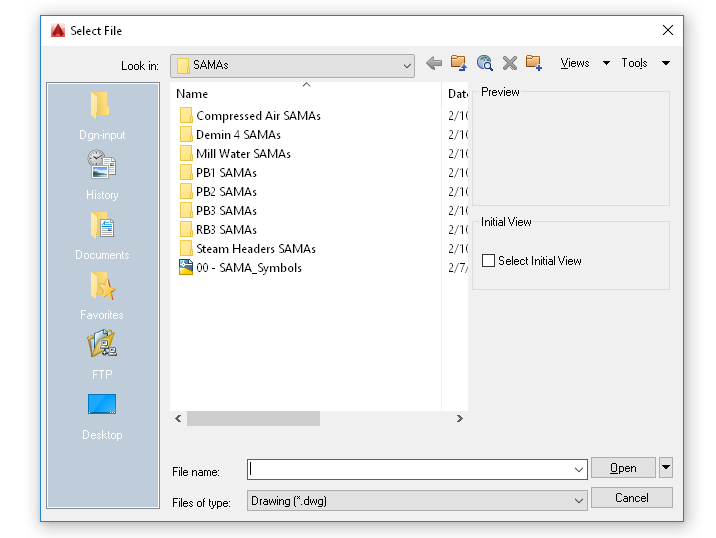
Running the lsp. Auto cad opens and the select file window comes up to the last location where files were opened from.
No DGNIMPORT window, just the above.
I can run DGNIMPORT directly from command line and import one file at a time with no issue.
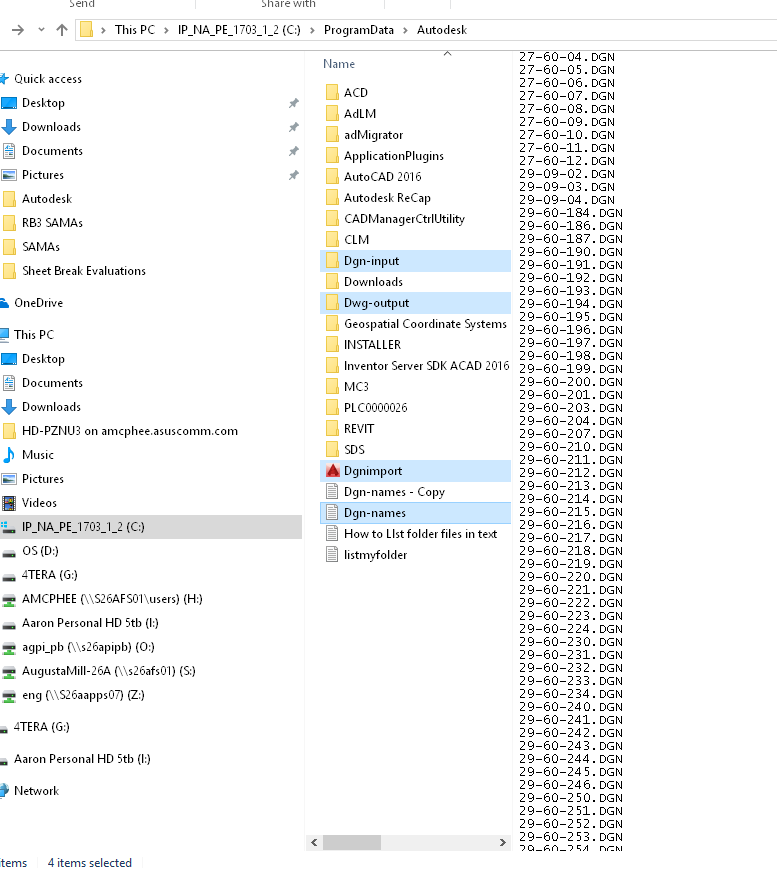
I have placed the below LSP and place it in c:\programdata\audodesk
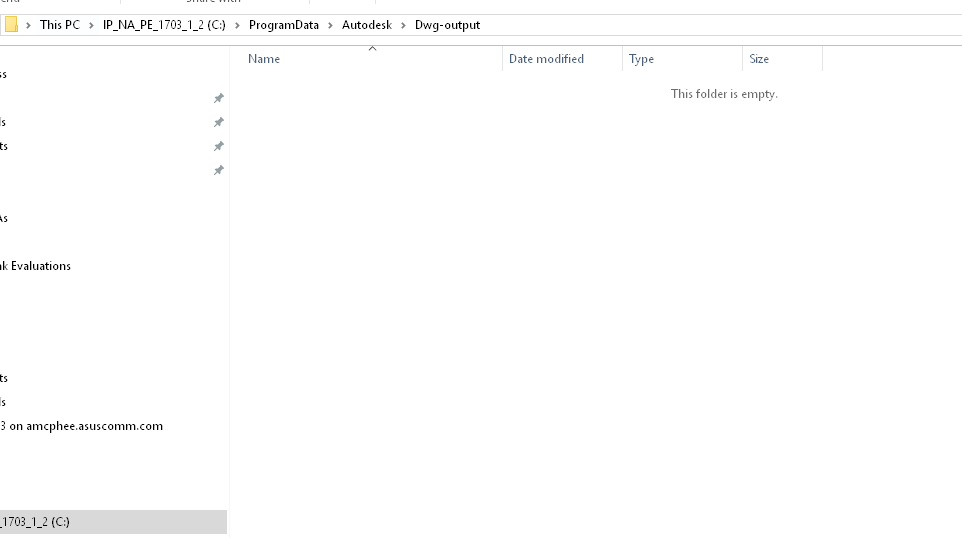
I have built two folders in the same location: Dgn-input and Dwg-output
I have placed all DGN's that I want to convert into the Dgn-input folder
I have made a flat text file of DGN files and saved it as Dgn-names in c:\programdata\audodesk
I can save each imported file to DWG.
I cannot select multiple DGN's within Acad.
;DGNIMPORT.LSP - Converts a list of Microstation *.dgn drawings into AutoCAD *.d
; Start command by typing DGNI
;
; Make the necessary adjustments to the following variables:
; ---------------------------------------------------------
; tx1 = path and name of a file that holds a list with names for all the *.dgn's to be imported,
; names of *.dgn drawings may be written without extension, as well as with extension,
; in plain text format, Do NOT have a return after the last line.
; tx2 = the path for the input folder, containing the actual *.dgn files to import.
; tx3 = the path for the output folder, where the drawings converted into *.dwg will be saved,
; (routine assumes that the *.dwg files do not exist yet)
; tx4 = name of the drawing model to import
;
;
; The routine reads drawing names from the file given in tx1 line-for-line.
; In each loop it performs a DGNIMPORT from the folder given as tx2 into the existing AutoCAD drawing,
; does a Zoom Extends, saves the converted drawing result as *.dwg in the folder given as tx3,
; and finally restores the drawing to its original state, ready to receive the next DGNIMPORT loop.
;
; The DELAY command for 1000 milliseconds (1 second) is needed to provide sufficient separation
; between the DGNIMPORT and SAVEAS processes (otherwise it starts to mix up drawings).
;
; The DGNIMPORT command trips when the name of the *.dgn to be imported contains a comma,
; I advise to rename drawings having this issue.
;
(defun C:DGNI (/ fil tx1 tx2 tx3 tx4 tx5)
(setq tx1 "C:\\ProgramData\Autodesk\Dgn-names.txt" ; example variable: file holding a list of *.dgn's names to be imported.
setq tx2 "C:\\ProgramData\Autodesk\Dgn-input"\ ; example variable: input folder.
setq tx3 "C:\\ProgramData\Autodesk\Dwg-output"\ ; example variable: output folder.
setq tx4 "Default" ; example variable: drawing model name )
(setvar "DGNIMPORTMODE" 1)
(setq fil (open tx1 "r") tx5 (read-line fil)) ; repeats program until all lines from the list with *.dgn drawing names are read.(while tx5 strips an extension with length of 3 characters from the drawing name, if present.
(if (wcmatch tx5 "*`.???")
(setq tx5 (substr tx5 1 (- (strlen tx5) 4))))
(command "_UNDO" "_MARK" "_-DGNIMPORT" (strcat tx2 tx5)tx4 "" ""
"_ZOOM" "_E"
"._DELAY" 1000
"_SAVEAS" "2007(LT2007)" (strcat tx3 tx5)
"_UNDO" "_BACK")
(setq tx5 (read-line fil)))
(close fil)
(command "_QUIT" "_Y")
(princ))
Message 38 of 38
12-22-2022
10:49 AM
- Mark as New
- Bookmark
- Subscribe
- Mute
- Subscribe to RSS Feed
- Permalink
- Report
12-22-2022
10:49 AM
Hi Gabriel. Can you write this batch lisp? The DGN is not supported by this chat. Can you catch the file in my Drive?
https://drive.google.com/file/d/1IfRTG9qQYfqFWHDqqaOxrTPHmfyXQo3M/view?usp=share_link
Many thanks!
- « Previous
-
- 1
- 2
- Next »
Reply
Topic Options
- Subscribe to RSS Feed
- Mark Topic as New
- Mark Topic as Read
- Float this Topic for Current User
- Bookmark
- Subscribe
- Printer Friendly Page
- « Previous
-
- 1
- 2
- Next »

