Community
- Forums Home
- >
- AutoCAD Community
- >
- AutoCAD Customization Forum
- >
- Visual LISP, AutoLISP and General Customization forum
- >
- Re: [AutoCAD Electrical 2012] How to GET and SET drawing descriptions
Visual LISP, AutoLISP and General Customization
Turn on suggestions
Auto-suggest helps you quickly narrow down your search results by suggesting possible matches as you type.
 This page has been translated for your convenience with an automatic translation service. This is not an official translation and may contain errors and inaccurate translations. Autodesk does not warrant, either expressly or implied, the accuracy, reliability or completeness of the information translated by the machine translation service and will not be liable for damages or losses caused by the trust placed in the translation service.
Translate
This page has been translated for your convenience with an automatic translation service. This is not an official translation and may contain errors and inaccurate translations. Autodesk does not warrant, either expressly or implied, the accuracy, reliability or completeness of the information translated by the machine translation service and will not be liable for damages or losses caused by the trust placed in the translation service.
Translate
[AutoCAD Electrical 2012] How to GET and SET drawing descriptions
2 REPLIES 2
Reply
Topic Options
- Subscribe to RSS Feed
- Mark Topic as New
- Mark Topic as Read
- Float this Topic for Current User
- Bookmark
- Subscribe
- Printer Friendly Page
Message 1 of 3


11-16-2011
10:18 AM
- Mark as New
- Bookmark
- Subscribe
- Mute
- Subscribe to RSS Feed
- Permalink
- Report
11-16-2011
10:18 AM
[AutoCAD Electrical 2012] How to GET and SET drawing descriptions
Hi Dears,
I have a simple question: how to programatically in AutoLisp GET and SET the drawing descriptions from Drawing Properties (Description 1, 2 and 3) in AutoCAD Electrical 2012 ?
I need change this values through a script in LISP.
Thanks in advance!
2 REPLIES 2
Message 2 of 3


11-16-2011
11:16 AM
- Mark as New
- Bookmark
- Subscribe
- Mute
- Subscribe to RSS Feed
- Permalink
- Report
11-16-2011
11:16 AM
I don't use Electrical, but if it is the same as AutoCAD, the properties will be found under the SummaryInfo Object.
The SummaryInfo Object is a property of the ActiveDocument:
(setq acsum
    (vla-get-summaryinfo
        (vla-get-activedocument (vlax-get-acad-object))
    )
)
This Object has the following properties and methods:
; IAcadSummaryInfo: IAcadSummaryInfo Interface
; Property values:
;   Author = ""
;   Comments = ""
;   HyperlinkBase = ""
;   Keywords = ""
;   LastSavedBy = ""
;   RevisionNumber = ""
;   Subject = ""
;   Title = ""
; Methods supported:
;   AddCustomInfo (2)
;   GetCustomByIndex (3)
;   GetCustomByKey (2)
;   NumCustomInfo ()
;   RemoveCustomByIndex (1)
;   RemoveCustomByKey (1)
;   SetCustomByIndex (3)
;   SetCustomByKey (2)
Hence you can set / retrieve the standard properties using such functions as:
(vla-get-author acsum)
(vla-put-author acsum "Me")

(vla-get-title acsum)
(vla-put-title acsum "My Title")

(vla-get-comments acsum)
(vla-put-comments acsum "My Comments")

(vla-get-subject acsum)
(vla-put-subject acsum "My Subject")

(vla-get-revisionnumber acsum)
(vla-put-revisionnumber acsum "1")

(vla-get-lastsavedby acsum)
(vla-put-lastsavedby acsum "Me")

(vla-get-hyperlinkbase acsum)
(vla-put-hyperlinkbase acsum "My HyperlinkBase")

(vla-get-keywords acsum)
(vla-put-keywords acsum "My Keywords")
The Custom Drawing Properties can be accessed using the various Methods of the SummaryInfo Object, for example to retrieve an association list of all Custom Drawing Properties, consider the following function:
(defun LM:GetCustomProperties ( summaryinfo / i key value result )
    (repeat (setq i (vla-NumCustomInfo summaryinfo))
        (vla-GetCustomByIndex summaryinfo (setq i (1- i)) 'key 'value)
        (setq result (cons (cons key value) result))
    )
    result
)

(LM:GetCustomProperties acsum)
Or to get or set a specific Custom Property using the name (or key) of that property, consider the methods:
(vla-getcustombykey acsum "My Key")

(vla-setcustombykey acsum "My Key" "My Value")
Note that the above methods will error should the key not be found in the Custom Drawing Properties.
Finally, to add a new Custom Drawing Property, use the vla-addcustominfo function:
(vla-addcustominfo acsum "My Custom Prop" "My Custom Value")

Message 3 of 3
11-17-2011
02:34 AM
- Mark as New
- Bookmark
- Subscribe
- Mute
- Subscribe to RSS Feed
- Permalink
- Report
11-17-2011
02:34 AM
Lee,
Thank you for answer!
But, I need have access others drawing descriptions specific of the Electrical.
For example: This is default properties from AutoCAD (Electrical too) :

But, I need access another page/information, specific of AutoCAD Electrical:
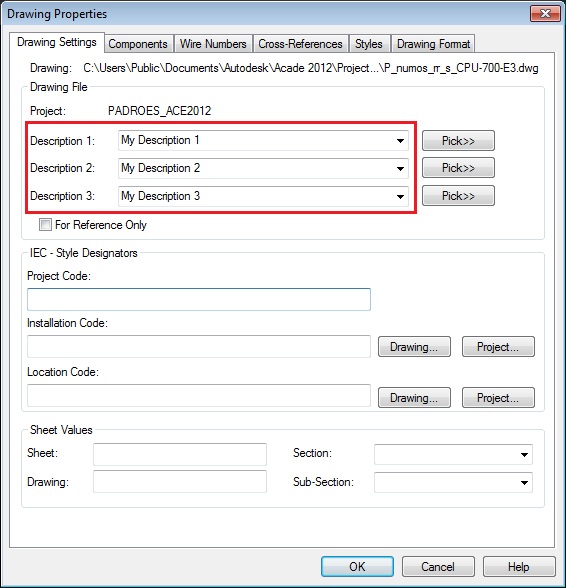
Did you understand ?

Reply
Topic Options
- Subscribe to RSS Feed
- Mark Topic as New
- Mark Topic as Read
- Float this Topic for Current User
- Bookmark
- Subscribe
- Printer Friendly Page

