Community
- Forums Home
- >
- AutoCAD Community
- >
- AutoCAD Customization Forum
- >
- Visual LISP, AutoLISP and General Customization forum
- >
- Arc text exploding problem
Visual LISP, AutoLISP and General Customization
Turn on suggestions
Auto-suggest helps you quickly narrow down your search results by suggesting possible matches as you type.
 This page has been translated for your convenience with an automatic translation service. This is not an official translation and may contain errors and inaccurate translations. Autodesk does not warrant, either expressly or implied, the accuracy, reliability or completeness of the information translated by the machine translation service and will not be liable for damages or losses caused by the trust placed in the translation service.
Translate
This page has been translated for your convenience with an automatic translation service. This is not an official translation and may contain errors and inaccurate translations. Autodesk does not warrant, either expressly or implied, the accuracy, reliability or completeness of the information translated by the machine translation service and will not be liable for damages or losses caused by the trust placed in the translation service.
Translate
Reply
Topic Options
- Subscribe to RSS Feed
- Mark Topic as New
- Mark Topic as Read
- Float this Topic for Current User
- Bookmark
- Subscribe
- Printer Friendly Page
Message 1 of 9

Anonymous
2009 Views, 8 Replies
08-16-2011
10:47 PM
- Mark as New
- Bookmark
- Subscribe
- Mute
- Subscribe to RSS Feed
- Permalink
- Report
08-16-2011
10:47 PM
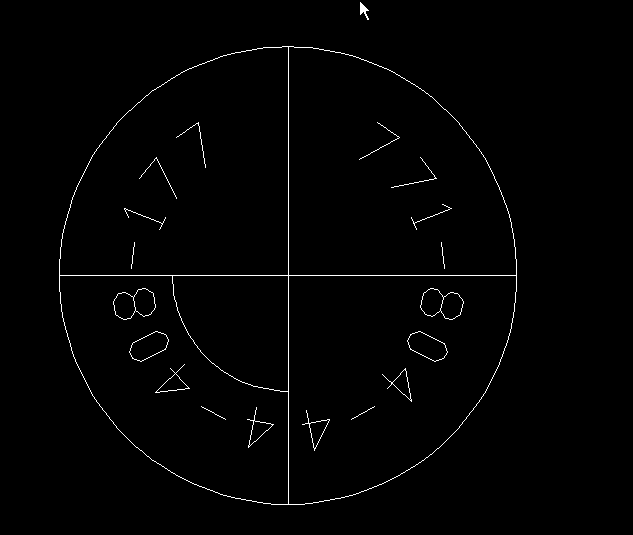
I have encounter some text exploding problem. As shown in attachment, I would like to know if there any possible way I can explode the text into polyline or single line and maintain it within the position and style?
Solved! Go to Solution.
Solved by pbejse. Go to Solution.
8 REPLIES 8
Message 2 of 9
Anonymous
in reply to:
Anonymous
08-17-2011
05:12 AM
- Mark as New
- Bookmark
- Subscribe
- Mute
- Subscribe to RSS Feed
- Permalink
- Report
08-17-2011
05:12 AM
Just use the explode command to explode the mirrored arc text. It worked with AutoCAD 2010. See attached.
Message 3 of 9
Anonymous
in reply to:
Anonymous
08-17-2011
10:27 PM
- Mark as New
- Bookmark
- Subscribe
- Mute
- Subscribe to RSS Feed
- Permalink
- Report
08-17-2011
10:27 PM
Hi, what i require is the text can be direct explode without changes its orientation. If i use the normal explode, i will sort of reverse direction.Any idea to do it or type a mirror arc text directly?


Message 5 of 9
08-17-2011
11:02 PM
- Mark as New
- Bookmark
- Subscribe
- Mute
- Subscribe to RSS Feed
- Permalink
- Report
08-17-2011
11:02 PM
Wow, that's the end result i need. Mind i ask what do you mean by plot with DBX? Can give a little more details. Thanks.
Message 6 of 9
08-17-2011
11:18 PM
- Mark as New
- Bookmark
- Subscribe
- Mute
- Subscribe to RSS Feed
- Permalink
- Report
08-17-2011
11:18 PM
First add the DXB plot
Options
Plot and Publish
Add or Configure Plotters
Add-A-Plotter Wizard
Next
Next
Autocad DXB File
When you plot you will DXB file.pc3 or whatever you named it
Try it out to have a feel for it
To insert the DXB format
DXBIN

Message 7 of 9
08-17-2011
11:41 PM
- Mark as New
- Bookmark
- Subscribe
- Mute
- Subscribe to RSS Feed
- Permalink
- Report
08-17-2011
11:41 PM
ok,just now give it a try and it's good.By the way, not sure if i have done wrongly or not, cause when i insert the dbx file, the explode text is not in scale 1:1, though when plotting time, i make it to be plot in scale 1:1.is it i need to rescale it back to original size everytime? Please advise.
Additonally, is there way we can direct type a mirror text as shown in my previous attachment.? Previously i use to block the text and mirror the block.
Message 8 of 9
08-17-2011
11:55 PM
- Mark as New
- Bookmark
- Subscribe
- Mute
- Subscribe to RSS Feed
- Permalink
- Report
08-17-2011
11:55 PM
I guess you could plot to scale, didnt really gave it much thought
as for a newly created ARCTEXT you can use a Text Style with backwards option, that might work
EDIT:
I tried 1:1 on your drawing, it works fine, I used ISO A0, no need to scale down/up, make sure you uncheck FIT TO SCALE
Message 9 of 9
08-23-2011
12:55 AM
- Mark as New
- Bookmark
- Subscribe
- Mute
- Subscribe to RSS Feed
- Permalink
- Report
08-23-2011
12:55 AM
Hi i have try again the dxb plotting again...I still somehow when i use the DXBIN command to insert the DXB file, it still not in scale 1:1..I have attach along the pdf to show my setting during plot out. Then i notice that when i input time, it won't ask me to pick a insert point also.
Reply
Topic Options
- Subscribe to RSS Feed
- Mark Topic as New
- Mark Topic as Read
- Float this Topic for Current User
- Bookmark
- Subscribe
- Printer Friendly Page