Community
- Forums Home
- >
- AutoCAD Community
- >
- AutoCAD Customization Forum
- >
- VBA forum
- >
- Re: Windows taskbar problem with Autocad 2010 vba enabler in windows 7 x64
VBA
Discuss AutoCAD ActiveX and VBA (Visual Basic for Applications) questions here.
Turn on suggestions
Auto-suggest helps you quickly narrow down your search results by suggesting possible matches as you type.
 This page has been translated for your convenience with an automatic translation service. This is not an official translation and may contain errors and inaccurate translations. Autodesk does not warrant, either expressly or implied, the accuracy, reliability or completeness of the information translated by the machine translation service and will not be liable for damages or losses caused by the trust placed in the translation service.
Translate
This page has been translated for your convenience with an automatic translation service. This is not an official translation and may contain errors and inaccurate translations. Autodesk does not warrant, either expressly or implied, the accuracy, reliability or completeness of the information translated by the machine translation service and will not be liable for damages or losses caused by the trust placed in the translation service.
Translate
Windows taskbar problem with Autocad 2010 vba enabler in windows 7 x64
16 REPLIES 16
Reply
Topic Options
- Subscribe to RSS Feed
- Mark Topic as New
- Mark Topic as Read
- Float this Topic for Current User
- Bookmark
- Subscribe
- Printer Friendly Page
Message 1 of 17

Anonymous
4601 Views, 16 Replies
02-26-2010
06:02 AM
- Mark as New
- Bookmark
- Subscribe
- Mute
- Subscribe to RSS Feed
- Permalink
- Report
02-26-2010
06:02 AM
Windows taskbar problem with Autocad 2010 vba enabler in windows 7 x64
I installed vba enabler on a new computer in order to test out our old vba plotting scripts in windows 7 x64.
The script worked perfectly, but with the vba enabler arose another problem:
Whenever autocad loads the vba subsystem after I use a command like vbaide or vbaload (even without loading any script) Autocad cannot be restored from windows taskbar after minimizing. Not by clicking task bar or by alt+tab. Only way to restore or close it is by using task manager.
Once I restore autocad using task manager it works well, as long as I don't minimize it again. Restarting autocad solves the problem until you load the vba subsystem again. Killing vba server process in taskmanager while autocad is still running doesn't help.
This effectively prevents us from using any the scripts on about a half of the computers in our office.
Has anyone come across this problem?
Any suggestions how to solve the problem?
Edit:
I managed to replicate the problem with vista 64-bit. In vista (unlike windows 7) there is a taskbar context menu option to restore the window, which seems to work. Edited by: anttikauppi3482 on Mar 1, 2010 10:47 AM
The script worked perfectly, but with the vba enabler arose another problem:
Whenever autocad loads the vba subsystem after I use a command like vbaide or vbaload (even without loading any script) Autocad cannot be restored from windows taskbar after minimizing. Not by clicking task bar or by alt+tab. Only way to restore or close it is by using task manager.
Once I restore autocad using task manager it works well, as long as I don't minimize it again. Restarting autocad solves the problem until you load the vba subsystem again. Killing vba server process in taskmanager while autocad is still running doesn't help.
This effectively prevents us from using any the scripts on about a half of the computers in our office.
Has anyone come across this problem?
Any suggestions how to solve the problem?
Edit:
I managed to replicate the problem with vista 64-bit. In vista (unlike windows 7) there is a taskbar context menu option to restore the window, which seems to work. Edited by: anttikauppi3482 on Mar 1, 2010 10:47 AM
16 REPLIES 16
Message 2 of 17
Anonymous
in reply to:
Anonymous
03-01-2010
02:19 PM
- Mark as New
- Bookmark
- Subscribe
- Mute
- Subscribe to RSS Feed
- Permalink
- Report
03-01-2010
02:19 PM
I have EXACTLY the same problem.
The problem was present with vista 64-bit, and is even worse with Windows 7 64-bit.
This is a major problem, since as soon as Acad gets minimized it gets stuck in the toolbar. With no way to ever get it back.(or is there a way to config Windows 7's contextual menu to behave differently?).
I can't close or minimize the VBA window, I can't close or restore the Acad Window. I can't ctrl + Break out of code,
All I can do is Ctrl-Alt-Del and close task.
The problem doesn't exist with Inventor 2010. Inventor.
Any help would be appreciated as this has been a major thorn in my side for quite some while now. And its getting out of hand with Windows 7.
The problem was present with vista 64-bit, and is even worse with Windows 7 64-bit.
This is a major problem, since as soon as Acad gets minimized it gets stuck in the toolbar. With no way to ever get it back.(or is there a way to config Windows 7's contextual menu to behave differently?).
I can't close or minimize the VBA window, I can't close or restore the Acad Window. I can't ctrl + Break out of code,
All I can do is Ctrl-Alt-Del and close task.
The problem doesn't exist with Inventor 2010. Inventor.
Any help would be appreciated as this has been a major thorn in my side for quite some while now. And its getting out of hand with Windows 7.
Message 3 of 17
Anonymous
in reply to:
Anonymous
03-02-2010
11:35 AM
- Mark as New
- Bookmark
- Subscribe
- Mute
- Subscribe to RSS Feed
- Permalink
- Report
03-02-2010
11:35 AM
I am having the same problem!!!!! I am loosing work. Does anybody have an answer for this??? Everytime I minimize my AutoCAD it won't let me restore it. I have to CTRL+ALT+Delete.
Message 4 of 17
Anonymous
in reply to:
Anonymous
03-03-2010
05:56 AM
- Mark as New
- Bookmark
- Subscribe
- Mute
- Subscribe to RSS Feed
- Permalink
- Report
03-03-2010
05:56 AM
anttikauppi3482 wrote:
> I installed vba enabler on a new computer in order to test out our
> old vba plotting scripts in windows 7 x64.
>
> This effectively prevents us from using any the scripts on about a
> half of the computers in our office.
My guess is that Autodesk isn't going to fix this, since VBA is likely
to be removed for good soon.
Time to start porting the code to something else.
--
R.K. McSwain
http://cadpanacea.com
> I installed vba enabler on a new computer in order to test out our
> old vba plotting scripts in windows 7 x64.
>
> This effectively prevents us from using any the scripts on about a
> half of the computers in our office.
My guess is that Autodesk isn't going to fix this, since VBA is likely
to be removed for good soon.
Time to start porting the code to something else.
--
R.K. McSwain
http://cadpanacea.com
Message 5 of 17
Anonymous
in reply to:
Anonymous
03-03-2010
02:47 PM
- Mark as New
- Bookmark
- Subscribe
- Mute
- Subscribe to RSS Feed
- Permalink
- Report
03-03-2010
02:47 PM
> {quote:title=anttikauppi3482 wrote:}{quote}
> I managed to replicate the problem with vista 64-bit. In vista (unlike windows 7) there is a taskbar context menu option to restore the window, >which seems to work.
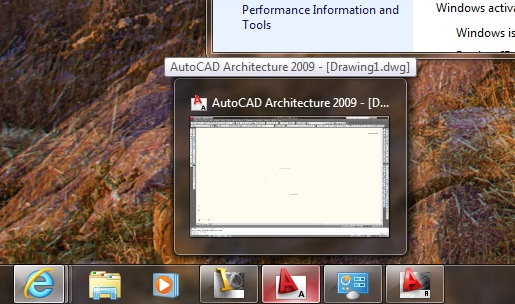
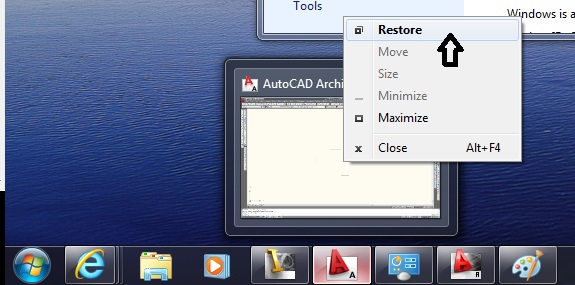
That menu still exists with Windows 7 , its just a little more hidden. Mouse over the task bar item until the preview window appears, then right click on THAT window to get the option to restore the Acad Window.
Having to do that everytime the Acad window gets minimized will probably get real old real fast for the end users tho.
> I managed to replicate the problem with vista 64-bit. In vista (unlike windows 7) there is a taskbar context menu option to restore the window, >which seems to work.
That menu still exists with Windows 7 , its just a little more hidden. Mouse over the task bar item until the preview window appears, then right click on THAT window to get the option to restore the Acad Window.
Having to do that everytime the Acad window gets minimized will probably get real old real fast for the end users tho.
Message 6 of 17
Anonymous
in reply to:
Anonymous
03-04-2010
07:18 AM
- Mark as New
- Bookmark
- Subscribe
- Mute
- Subscribe to RSS Feed
- Permalink
- Report
03-04-2010
07:18 AM
Yes, the method described by jpboutin works for me also. I'm really hoping Autodesk is working day and night on a new version of the VBA Enabler, because it's already getting old....
I tried using Camtasia to record the process, but that first preview window doesn't show up on the recording....weird.
Will be interested to see how long this takes to get solved.
I tried using Camtasia to record the process, but that first preview window doesn't show up on the recording....weird.
Will be interested to see how long this takes to get solved.
Message 7 of 17
Anonymous
in reply to:
Anonymous
03-07-2010
02:22 PM
- Mark as New
- Bookmark
- Subscribe
- Mute
- Subscribe to RSS Feed
- Permalink
- Report
03-07-2010
02:22 PM
rmichaeltorrey wrote:
> I'm
> really hoping Autodesk is working day and night on a new version of
> the VBA Enabler
Keep hoping. I'm pretty sure they are not.
--
R.K. McSwain
http://cadpanacea.com
> I'm
> really hoping Autodesk is working day and night on a new version of
> the VBA Enabler
Keep hoping. I'm pretty sure they are not.
--
R.K. McSwain
http://cadpanacea.com
Message 8 of 17


03-07-2010
08:06 PM
- Mark as New
- Bookmark
- Subscribe
- Mute
- Subscribe to RSS Feed
- Permalink
- Report
03-07-2010
08:06 PM
As already posted VBA is dead. move to .NET
--------------------------------------------
http://www.generation-nt.com/us/discontinuation-vba-licensing-program-help-163978351.html
Removal of VBA from Autodesk products
What’s happening?
As in AutoCAD® 2010, AutoCAD 2011 will not ship with VBA (Microsoft® Visual
Basic® for Applications) module “in the box” – and will require a separate
download. In addition, AutoCAD 2011 will be the last release to include VBA
support. That is, there will be no VBA support in AutoCAD 2012 – just over
one year from now (which means the VBA module will no longer even be
available as a separate download). This applies to all AutoCAD-based
products including AutoCAD® Architecture, AutoCAD® MEP, AutoCAD® Map 3D,
AutoCAD® Civil 3D®, AutoCAD® Mechanical, AutoCAD® Electrical and so on.
Why is it happening?
Microsoft has discontinued the VBA licensing program and made it clear that
they do not plan to provide VBA product enhancements in the future.
Microsoft discontinued the sale of new VBA distribution licenses in July 1,
2007. (Please visit http://msdn.microsoft.com/en-us/isv/bb190538.aspx to read
Microsoft’s statement). This has resulted in our decision to start
discontinuing VBA in Autodesk products now so that we can devote our
resources to more forward-looking technologies.
DavidT
Austin, TX
--------------------------------------------
http://www.generation-nt.com/us/discontinuation-vba-licensing-program-help-163978351.html
Removal of VBA from Autodesk products
What’s happening?
As in AutoCAD® 2010, AutoCAD 2011 will not ship with VBA (Microsoft® Visual
Basic® for Applications) module “in the box” – and will require a separate
download. In addition, AutoCAD 2011 will be the last release to include VBA
support. That is, there will be no VBA support in AutoCAD 2012 – just over
one year from now (which means the VBA module will no longer even be
available as a separate download). This applies to all AutoCAD-based
products including AutoCAD® Architecture, AutoCAD® MEP, AutoCAD® Map 3D,
AutoCAD® Civil 3D®, AutoCAD® Mechanical, AutoCAD® Electrical and so on.
Why is it happening?
Microsoft has discontinued the VBA licensing program and made it clear that
they do not plan to provide VBA product enhancements in the future.
Microsoft discontinued the sale of new VBA distribution licenses in July 1,
2007. (Please visit http://msdn.microsoft.com/en-us/isv/bb190538.aspx to read
Microsoft’s statement). This has resulted in our decision to start
discontinuing VBA in Autodesk products now so that we can devote our
resources to more forward-looking technologies.
DavidT
Austin, TX
---------------------------

(defun botsbuildbots() (botsbuildbots))
(defun botsbuildbots() (botsbuildbots))
Message 9 of 17

05-03-2010
04:19 PM
- Mark as New
- Bookmark
- Subscribe
- Mute
- Subscribe to RSS Feed
- Permalink
- Report
05-03-2010
04:19 PM
it would be far more useful for people if suggestions/solutions were offered to this problem, rather than simply saying "get over it & move to .NET". moving to .NET represents a great deal of work for many CAD managers/I.T. managers and it's not as simple as spending a day to make everything new and shiny in .NET and then problems are solved. we understand that VBA is being deprecated, but in the meantime it's still supported because it's still available from Autodesk, even if it's a separate download. it would be great if they would expend some effort as to figuring out how to make it work right in 64-bit for as long as they are going to make it available to use in the current version of AutoCAD.
since i'm sure none of us are holding our breaths for that to happen, what's useful here is suggestions for what might help, not snide remarks about migrating to .NET. if you don't have anything to offer, don't respond. there's plenty of other forums out there that encourage trolls and i'm sure you'll be welcome there.
meanwhile, i am also having this same issue on Windows 7 64-bit. i found another forum post that referred to this issue and someone seemed to think that it related to menu access somehow. i know that we have one VBA macro that loads a CUI file with some custom menus, but disabling the call to this macro didn't change anything. i strongly suspect the problem is with the 64-bit VBA enabler itself, which means it's not likely that any of us (unfortunately) are going to come up with a solution, and only Autodesk is going to be able to solve it, also not likely.
if anyone does have ideas about what the root cause might be and they're solvable by changing the VBA code, please post your suggestions.
since i'm sure none of us are holding our breaths for that to happen, what's useful here is suggestions for what might help, not snide remarks about migrating to .NET. if you don't have anything to offer, don't respond. there's plenty of other forums out there that encourage trolls and i'm sure you'll be welcome there.
meanwhile, i am also having this same issue on Windows 7 64-bit. i found another forum post that referred to this issue and someone seemed to think that it related to menu access somehow. i know that we have one VBA macro that loads a CUI file with some custom menus, but disabling the call to this macro didn't change anything. i strongly suspect the problem is with the 64-bit VBA enabler itself, which means it's not likely that any of us (unfortunately) are going to come up with a solution, and only Autodesk is going to be able to solve it, also not likely.
if anyone does have ideas about what the root cause might be and they're solvable by changing the VBA code, please post your suggestions.
Message 10 of 17
05-03-2010
06:49 PM
- Mark as New
- Bookmark
- Subscribe
- Mute
- Subscribe to RSS Feed
- Permalink
- Report
05-03-2010
06:49 PM
There is a difference between available and supported,
the latter would imply that updates are forthcoming.
They are not.
Due to the fact that VBA will only run as a 32 bit application
and will only run as an out-of-process application you will
continue to see side effects and slow execution of code.
By simply installing the VBA enabler you will
significantly slow down AutoCAD, it doesn't
matter if there is any code is actually loaded and
running.
the latter would imply that updates are forthcoming.
They are not.
Due to the fact that VBA will only run as a 32 bit application
and will only run as an out-of-process application you will
continue to see side effects and slow execution of code.
By simply installing the VBA enabler you will
significantly slow down AutoCAD, it doesn't
matter if there is any code is actually loaded and
running.
---------------------------
(defun botsbuildbots() (botsbuildbots))
(defun botsbuildbots() (botsbuildbots))
Message 11 of 17
Anonymous
in reply to:
Anonymous
09-16-2010
07:02 AM
- Mark as New
- Bookmark
- Subscribe
- Mute
- Subscribe to RSS Feed
- Permalink
- Report
09-16-2010
07:02 AM
I'm glad I've stumbled upon this thread. I'm about as fluent w/ VBA programming as I am w/ speaking Spanish, "Yo no hablo..."
I've been able to keep current some routines that our previous CAD Manager wrote and have been able to come up w/ my own simple ones, but that's about the extent of my programming abilities. When we had AutoCAD 2010, it was installed on 32 bit machines only. We've started replacing some of these machines w/ 64 bit Windows 7 machines and I started to put AutoCAD 2011 on them. I quickly realized that some of our VBA routines did not work in 2011. My initial thought was that something changed in 2011 that caused these not to work, so I reverted them back to 2010. It sounds like the main issue is the 64 bit compatibility and not 2011. So now I guess I need to learn how to speak Spanish in French (or something like that) since the little bit of VBA I know is now going to be useless as .NET becomes the language of use.
Message 12 of 17


07-14-2011
03:57 PM
- Mark as New
- Bookmark
- Subscribe
- Mute
- Subscribe to RSS Feed
- Permalink
- Report
07-14-2011
03:57 PM
I'm having the same problem in AutoCAD 2011.
I have found that setting TASKBAR to 0 helps but does not solve the problem. I know that the "true" solution is to re-write all of our old VBA code in VB.NET, but that will have to wait. We're in a "transition".
Does anyone have a solution or an acceptable work-around?
Thanks,
Constantine

Message 14 of 17
Anonymous
in reply to:
Anonymous
01-05-2012
02:39 PM
- Mark as New
- Bookmark
- Subscribe
- Mute
- Subscribe to RSS Feed
- Permalink
- Report
01-05-2012
02:39 PM
I'm really glad I found this. Here are additional symptioms for those who can't move off VBA
Some more information regarding symptoms:
In Windows 7 64bit Aero Theme:
* Alt+Tab does not restore AutoCAD 2011
* Win+Tab does not restore AutoCAD 2011
In Windows 7 64bit Classic Theme:
* Alt+Tab does DOES restore AutoCAD 2011
* Win+Tab is not supported by the Windows Classic Theme.
In either theme:
* Using the minimize button [ _ ] to minimize AutoCAD 2011 will cause it not be restored without Task Manager
* Clicking on the task bar icon for AutoCAD while restored or maximized will cause it to minimize correctly and it can be restored.
* If you launch two instances of AutoCAD, the second instance will behave normally.
I really want to avoid writing a script to launch two AutoCADs and killing the first instance every time AutoCAD is launched 
Message 15 of 17
04-11-2012
10:48 AM
- Mark as New
- Bookmark
- Subscribe
- Mute
- Subscribe to RSS Feed
- Permalink
- Report
04-11-2012
10:48 AM
I have Autocad Architecture 2009 & 2012
Windows 7 Professional 64 bit OS and have the same problem only with Autocad Architecture 2009.
Autocad Architecture 2012 will minimize and maximize like they are supposed to.
None of the solutions xdanmeyerx suggested worked for me.
The solution that works for me is to hover over the icon on the taskbar (see 1.jpg Attached)
right click to get the shortcut menu (see 2.jpg Attached) then click on restore.
Any other way Autocad just pops up for 1 second then minimizes again
Message 16 of 17
Anonymous
in reply to:
Anonymous
04-11-2012
11:03 AM
- Mark as New
- Bookmark
- Subscribe
- Mute
- Subscribe to RSS Feed
- Permalink
- Report
04-11-2012
11:03 AM
So I should have closed this thread earlier, but we found out what the issue was.
The VBLOAD command in ACAD.LSP causes this issue.
After removing the VBLOAD command from AutoCAD's statup (acad.lsp) it worked just fine. We then uninstalled the VBA Enabler becuase it was no longer needed.
Using the VBA Enabler will cause this issue on Windows 7 x64. We reached out to Autodesk and they mentioned that VBA is no longer officially supported and they suggested that we move to VB.NET.
We just finished the long effort of recoding our custom scripts to VB.NET and everything is just fine.
Hope that helps!

Reply
Topic Options
- Subscribe to RSS Feed
- Mark Topic as New
- Mark Topic as Read
- Float this Topic for Current User
- Bookmark
- Subscribe
- Printer Friendly Page