- Home
- /
- Community Archive - Read Only
- /
- Simulation Mechanical Community
- /
- Simulation Mechanical Ideas
Announcements
The Simulation Mechanical Idea Board has been closed down and placed in read-only mode following a recent discontinuation announcement. Please see our supporting FAQ for more information.
Turn on suggestions
Auto-suggest helps you quickly narrow down your search results by suggesting possible matches as you type.
Simulation Mechanical Ideas (Read-Only)
Share ideas for future product features directly with the Simulation Mechanical team and collaborate on existing suggestions with your peers.
Options
- Mark all as New
- Mark all as Read
- Float this item to the top
- Subscribe
- Bookmark
- Subscribe to RSS Feed
Idea Statuses
- Gathering Support 171
- Under Review 0
- Future Consideration 5
- Accepted 12
- Implemented 39
- Archived 0

Most of the time is very difficult to transfer results to a client. I usually do a report but sometimes they want to explore all the model. A result viewer that we can share with a client will be a tool to explain the results of a simulation
Show More

 Andrew.Sartorel
I'm posting this for a subscription customer:
In Simulation Mechanical it isnt possible to export the deformed 3D model to a Step, Iges or STL file. I would like to see functionality implemented to allow for exporting to a CAD neutral format like STEP.
Show More
I often work with large plate structures with many overlapping parts that are welded or bolted. Using midplane mesh should be the best way to achieve this to achieve a reasonable run time/accuracy compromise. With the help of your support staff, we have explored the many ways to achieve this but have found that midplane meshing is too hard to use (see my posts or history with subscription centre). I found that I have to resort to using 20 node brick elements often only 1 element thick to achieve a reasonable run time/accuracy compromise. What would be very helpful is to add a way of adding contacts between midplane meshed parts just like between solid elements (i.e. bonded, welded contacts etc). Hopefully this could be done automatically or manually. In addition, It would be great if we could add bolts to midplane meshed parts just like solid meshed parts. Along with this, it would be wonderful to have an easy method of adding welds between midplane meshed parts.
Show More
Some time you have a skeleton from FrameGenerator that you need to analyze more deep than Frame Analysis. It would be very useful to send a part to SIM MECH that contains 2D or 3D Sketches. Then at Sim Mech, uses beam elementos to simplify the modelling.... Thanks.
Show More

 avasiliev
on
08-02-2014
10:33 PM
Submitted on
08-02-2014
10:33 PM
Status:
Gathering Support
avasiliev
on
08-02-2014
10:33 PM
Submitted on
08-02-2014
10:33 PM
Status:
Gathering Support
 AstroJohnPE
on
03-04-2014
12:50 PM
Submitted on
03-04-2014
12:50 PM
Status:
Implemented
AstroJohnPE
on
03-04-2014
12:50 PM
Submitted on
03-04-2014
12:50 PM
Status:
Implemented
I would like the ability to work on one design scenario while another scenario is busy doing something else. For example, if a model is meshing in design scenario 1, or if the analysis is running in design scenario 1, I would like to be able to setup a model in design scenario 2, 3, whatever.
Show More
 DWhiteley
on
08-14-2014
06:12 AM
Submitted on
08-14-2014
06:12 AM
Status:
Implemented
DWhiteley
on
08-14-2014
06:12 AM
Submitted on
08-14-2014
06:12 AM
Status:
Implemented
Keep the Slider for the Analysis log at the end/bottom of the results at all times whilst the analysis is running. You have to keep moving it down manually!
Show More
Fatigue tool is great in many sense but the currect application is 32bit and fails to work on large models. Can we upgrade the fatigue tool to 64bit so one can work with larger models. Alternatively, the interface can be adjusted to selectively transfer parts to fatigue tools. Currently this can be done only after whole model is read into the fatigue wizard application, which creates the bottle neck. It may be just easier to add this filter funtionality to enable working with larger models.
Show More
Hi, This is so obvious to me that I am very unpleasantly surprised that this is not possible in Simulation: Units conversion on input. I use INVENTOR a lot and for example when force magnitude is to be specified I can input 100kN, 1000N, 3000MN, and so on. this is also for other unites like pressure where I can specify 2000N/330mm^2 and this works not mantioning obout som thing like 3500kN/(250mm*250mm/4*PI)/(2*PI). Why this basics are not in the user interface of Simulation where you deal with units even more than in inventor? Cris.
Show More
Hello, I would love to see an element "selection box" option similar to AutoCad's implemented on SimMech. For those who doesn't know it: when you drag the mouse to select elements from left to right, you only select elements entirely inside the box you dragged. When you drag the mouse from right to left, any element with even a small part inside the box will be selected. Thanks for reading Yossef El Didi
Show More
 bill_king
on
08-05-2014
10:11 AM
Submitted on
08-05-2014
10:11 AM
Status:
Gathering Support
bill_king
on
08-05-2014
10:11 AM
Submitted on
08-05-2014
10:11 AM
Status:
Gathering Support
When performing a modal analysis, you can get a lot of modes with low or near zero mass participation. The results is a lot of garbage data. When moving on to a random vib or other vib analysis whose input data is from the modal run, the inputs are overwhelming to the solution. The suggestion is to put a threshold parameter of "minimum reported mass participation" in the model that will delete the results under that threshold, thereby delivering a clean input set to the random vib analyses.
Show More
 bryan_mcnatt
on
09-05-2014
08:22 AM
Submitted on
09-05-2014
08:22 AM
Status:
Accepted
bryan_mcnatt
on
09-05-2014
08:22 AM
Submitted on
09-05-2014
08:22 AM
Status:
Accepted
I'd like to be able to quickly see the 3D visualization of beams while in the FEA Editor without having to run 'Check Model' to see them in Results. Running 'Check Model' on a beam- or truss-only model is generally very quick and not a problem. However, I'm using more mixed meshes now and many are very large models. So the Check Model step just to see if I have all the desired beam cross-sections and all the right orientations can take a while.
Show More
I suggest that torsional stresses be reported for beam elements, currently clearly missing from the "worst" stress result combination. Other FEA codes provide this function. Certainly, we aren't considering the "worst" stress if we ignore potententially controlling torsional stresses.
Show More


I request that an offset option is made available for plate elements, similar to the beam offset.
Without plate offests, plate reinforcements for pressure vessels can not be realistically represented in the software.
Show More

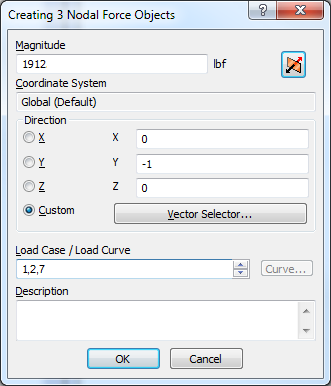
We often use different Design scenarios to analyze the same geometry with different loading combinations. Ideally we would just use one Design Scenario and multiple Load Cases. Since a load can only be applied to one Load Case, it forces users to either duplicate the loads if used in multiple combinations, or use the Combine Load Cases tool in the Results Options which increases the complexity of a project. I would rather see an option that let users assign a load to multiple load cases in the load creation dialog. This could be done by using commas between the load case numbers, or a more advanced dialog that is similar to the Combine Load Case tools were a table of load cases and multipliers could be entered. Or perhaps a new tool that is separate from the dialog boxes could be created. The user could assign different loads to Load Cases and use multipliers in a table. The loads could be assigned to named groups(ex. Live Load, Dead Load, Pressure) and those groups could be used in the tables as well. With named groups you could export commonly used combinations (ex. 1/2 Wind + LL + DL) and import the combinations in new models. Any loads created could be assigned to the appropriate group and the combinations would be automatically configured. Currently if the model changes, we delete all of the design scenarios except for the 'Base DS', change the Base DS and recreate all of the loading combinations in new design scenarios by activating or suppressing the necessary loads and constraints. A feature or tool like this would significantly reduce design times, especially when geometry changes arise.
Show More
 benalain13
on
08-08-2014
05:49 AM
Submitted on
08-08-2014
05:49 AM
Status:
Gathering Support
benalain13
on
08-08-2014
05:49 AM
Submitted on
08-08-2014
05:49 AM
Status:
Gathering Support
Hi, Really interested in getting pressure contact as an output after a MES analysis. EVerybody does that and uses that... ALAIN
Show More
avasiliev
on
08-02-2014
11:10 PM
Submitted on
08-02-2014
11:10 PM
Status:
Gathering Support
I often need to work with models that contain a big number of parts (solid or surface). And speed of interactions with Autodesk Simulation are very slow. You need to import an assembly or comlpex part - wait for a long You need to change property of parts (thikness, material, type of elements ...) - wait again. And so on. Compared to other CAE software, such as Ansys, Femap, Abaqus it is look like an AS parking brake is not off. whether this situation will change for the better in the future?
Show More
benalain13
on
03-11-2016
07:16 AM
Submitted on
03-11-2016
07:16 AM
Status:
Gathering Support
Hi We would like to have a full associativity with Simstudio in the sense that all the BC, material and loads are conserved when going a second time to Sim Mech Actually it is only running perfectly with MoldFlow Thanks
Show More
 fbraido
on
03-10-2016
08:43 AM
Submitted on
03-10-2016
08:43 AM
Status:
Gathering Support
fbraido
on
03-10-2016
08:43 AM
Submitted on
03-10-2016
08:43 AM
Status:
Gathering Support
It would be extremely useful to be able to select the nodes belonging to a non-planar surface (a tube, for instance) and apply a pressure normal to that surface without having to define a new normal point at the center of each tube. Many other FEM softwares do that already.
Show More
jcraig
on
02-26-2016
12:23 PM
Submitted on
02-26-2016
12:23 PM
Status:
Gathering Support
I would appreciate it if some time went into improving cpu usage with the SOLIDX.exe solid meshing engine. I have a 10core 3.1Ghz processor that is not utilized at all by the SOLIDX.exe engine. It uses approximately 5% of my cpu and only runs the cpu at 41% frequency. Currently meshing takes me much longer than running an analysis. When an analysis runs my CPU is maxed out with all 10 cores running at 105% frequency. I don't know how this cound be acomplished but it seems like there is a lot of room for improvement.
Show More
Categories
-
360
2 -
Architecture
7 -
Automation
21 -
CAD Connections
23 -
Customer Involvement
16 -
Geometry
46 -
Interoperability
50 -
LX
1 -
Materials
15 -
Meshing
42 -
Packaging
5 -
Solver
50 -
UX
15 -
Visualization & Collaboration
57