Community
- Forums Home
- >
- AutoCAD Community
- >
- AutoCAD Customization Forum
- >
- .NET forum
- >
- Re: how to use a Block Properties Table of a a Dynamic Block using .NET API?
.NET
Turn on suggestions
Auto-suggest helps you quickly narrow down your search results by suggesting possible matches as you type.
 This page has been translated for your convenience with an automatic translation service. This is not an official translation and may contain errors and inaccurate translations. Autodesk does not warrant, either expressly or implied, the accuracy, reliability or completeness of the information translated by the machine translation service and will not be liable for damages or losses caused by the trust placed in the translation service.
Translate
This page has been translated for your convenience with an automatic translation service. This is not an official translation and may contain errors and inaccurate translations. Autodesk does not warrant, either expressly or implied, the accuracy, reliability or completeness of the information translated by the machine translation service and will not be liable for damages or losses caused by the trust placed in the translation service.
Translate
how to use a Block Properties Table of a a Dynamic Block using .NET API?
15 REPLIES 15
SOLVED
Reply
Topic Options
- Subscribe to RSS Feed
- Mark Topic as New
- Mark Topic as Read
- Float this Topic for Current User
- Bookmark
- Subscribe
- Printer Friendly Page
Message 1 of 16


03-07-2013
04:52 AM
- Mark as New
- Bookmark
- Subscribe
- Mute
- Subscribe to RSS Feed
- Permalink
- Report
03-07-2013
04:52 AM
Hello,experts
I have a question,It's about "Block Properties Table",I want to use a Block Properties Table to manage a Dynamic
Block.
I have defiened a Dynamic Block a and its Block Properties Table in Autocad2010,this is the screenshot of the
Block Properties Table(a1:d1=100,d2=200;a2:d1=100,d2=400;a3:d1=100,d2=600.)
Now I want to insert the Dynamic Block using .NET API.after I input a command,the block of a2(d1=100,d2=400)
is inserted.
I have the code about it from Help,but the code is not complete,Can you help me finish the code which can achieve my goal?
Thank you very much!
this is the Dynamic Block
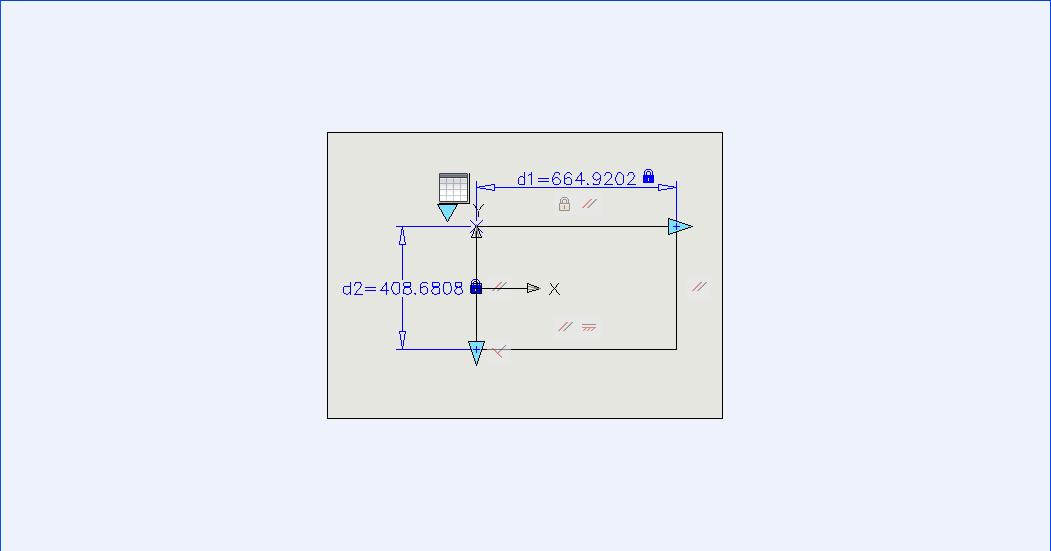
this is the the screenshot of the Block Properties Table

the result:

the code about it from Help:
[CommandMethod("readBlockTable")]
static public void CmdReadBlockTable()
{
Editor ed = Application.DocumentManager.
MdiActiveDocument.Editor;
// select a block reference
PromptEntityOptions peo = new PromptEntityOptions(
"Select a dynamic block reference: ");
peo.SetRejectMessage("Only block reference");
peo.AddAllowedClass(typeof(BlockReference), false);
PromptEntityResult per = ed.GetEntity(peo);
if (per.Status != PromptStatus.OK) return;
ObjectId blockRefId = per.ObjectId;
// get the database and start a transaction
Database db = Application.DocumentManager.
MdiActiveDocument.Database;
using (Transaction trans = db.
TransactionManager.StartTransaction())
{
// open the dynamic block reference
BlockReference blockRef = trans.GetObject(
blockRefId, OpenMode.ForRead) as BlockReference;
if (!blockRef.IsDynamicBlock) return;
// get the dynamic block table definition
BlockTableRecord blockDef = trans.GetObject(
blockRef.DynamicBlockTableRecord,
OpenMode.ForRead) as BlockTableRecord;
// open the extension dictionary
if (blockDef.ExtensionDictionary.IsNull) return;
DBDictionary extDic = trans.GetObject(
blockDef.ExtensionDictionary, OpenMode.ForRead)
as DBDictionary;
// open the ENHANCEDBLOCK dictionary
Autodesk.AutoCAD.Internal.DatabaseServices.EvalGraph graph =
trans.GetObject(extDic.GetAt("ACAD_ENHANCEDBLOCK"),
OpenMode.ForRead) as EvalGraph;
int[] nodeIds = graph.GetAllNodes();
foreach (uint nodeId in nodeIds)
{
// open the node ID
DBObject node = graph.GetNode(nodeId,
OpenMode.ForRead, trans);
// check is if the correct type
if (!(node is BlockPropertiesTable)) continue;
// convert the object
BlockPropertiesTable table =
node as BlockPropertiesTable;
// ok, we have the data, let's show it...
// get the number of columns
int columns = table.Columns.Count;
int currentRow = 0;
foreach (
BlockPropertiesTableRow row
in table.Rows)
{
currentRow++;
}
}
}
}
Solved! Go to Solution.
Solved by Alexander.Rivilis. Go to Solution.
15 REPLIES 15
Message 2 of 16


03-07-2013
07:02 AM
- Mark as New
- Bookmark
- Subscribe
- Mute
- Subscribe to RSS Feed
- Permalink
- Report
03-07-2013
07:02 AM
I've done minimum tests with provided dwg-file:
using System;
using System.Collections.Generic;
using Autodesk.AutoCAD.Runtime;
using Autodesk.AutoCAD.ApplicationServices;
using Autodesk.AutoCAD.DatabaseServices;
using Autodesk.AutoCAD.Geometry;
using Autodesk.AutoCAD.EditorInput;
using Autodesk.AutoCAD.Internal.DatabaseServices;
using AcAp = Autodesk.AutoCAD.ApplicationServices;
using AcDb = Autodesk.AutoCAD.DatabaseServices;
using AcGe = Autodesk.AutoCAD.Geometry;
using AcEd = Autodesk.AutoCAD.EditorInput;
using AcId = Autodesk.AutoCAD.Internal.DatabaseServices;

[assembly: CommandClass(typeof(Rivilis.BPTTest))]

#pragma warning disable 618

namespace Rivilis
{

  public class BPTTest
  {
    [CommandMethod("InsBlockWithBPT")]
    public static void InsBlockWithBPT()
    {
      AcAp.Document doc = AcAp.Application.DocumentManager.MdiActiveDocument;
      AcEd.Editor ed = doc.Editor;
      AcDb.Database db = doc.Database;
      AcEd.PromptResult rs = ed.GetString("\nEnter block name: ");
      if (rs.Status != PromptStatus.OK) return;
      AcDb.ObjectId idBTR = AcDb.ObjectId.Null, idBref;
      using (AcDb.BlockTable bt = db.BlockTableId.Open(OpenMode.ForRead) as AcDb.BlockTable) {
        if (bt != null) idBTR = bt[rs.StringResult];
      }
      if (idBTR.IsNull) {
        ed.WriteMessage("\nDatabase has not block \"{0}\"", rs.StringResult);
        return;
      }
      AcEd.PromptPointResult rsp = ed.GetPoint("\nEnter position: ");
      if (rsp.Status != PromptStatus.OK) return;

      using (AcDb.Transaction tr = doc.TransactionManager.StartTransaction()) {
        AcDb.BlockTableRecord btr =
          tr.GetObject(idBTR, OpenMode.ForRead) as AcDb.BlockTableRecord;
        AcDb.BlockTableRecord btrSpace =
          tr.GetObject(db.CurrentSpaceId, OpenMode.ForWrite) as AcDb.BlockTableRecord;
        if (btr != null && btrSpace != null) {
          AcDb.BlockReference brf =
            new AcDb.BlockReference(rsp.Value.TransformBy(ed.CurrentUserCoordinateSystem), idBTR);
          idBref = btrSpace.AppendEntity(brf);
          tr.AddNewlyCreatedDBObject(brf, true);
          if (brf.IsDynamicBlock) {
            AcDb.BlockTableRecord btrDyn =
              tr.GetObject(brf.DynamicBlockTableRecord, OpenMode.ForRead) as AcDb.BlockTableRecord;
            if (btrDyn != null && !btrDyn.ExtensionDictionary.IsNull) {
              AcDb.DBDictionary extDic =
                tr.GetObject(btrDyn.ExtensionDictionary, OpenMode.ForRead) as AcDb.DBDictionary;
              if (extDic != null) {
                AcId.EvalGraph graph =
                  tr.GetObject(extDic.GetAt("ACAD_ENHANCEDBLOCK"), OpenMode.ForRead) as AcId.EvalGraph;
                int[] nodeIds = graph.GetAllNodes();
                foreach (uint nodeId in nodeIds) {
                  DBObject node = graph.GetNode(nodeId, OpenMode.ForRead, tr);
                  if (!(node is BlockPropertiesTable)) continue;
                  AcDb.BlockPropertiesTable bpt = node as AcDb.BlockPropertiesTable;
                  int currentRow = SelectRowNumber(ref bpt);
                  AcDb.BlockPropertiesTableRow row = bpt.Rows[currentRow];
                  List<string> nameProps = new List<string>();
                  for (int i = 0; i < bpt.Columns.Count; i++) {
                    nameProps.Add(bpt.Columns[i].Parameter.Name);
                  }
                  AcDb.DynamicBlockReferencePropertyCollection dynPropsCol =
                    brf.DynamicBlockReferencePropertyCollection;
                  foreach (AcDb.DynamicBlockReferenceProperty dynProp in dynPropsCol) {
                    int i = nameProps.FindIndex(delegate(string s) { return s == dynProp.PropertyName; });
                    if (i >= 0 && i < nameProps.Count) {
                      try {
                        dynProp.Value = row[i].AsArray()[0].Value;
                      } catch {
                        ed.WriteMessage("\nCan not set to {0} value={1}",
                          dynProp.PropertyName, row[i].AsArray()[0].Value);
                      }
                    }
                  }
                }
              }
            }
          } else {
            ed.WriteMessage("\nBlock \"{0}\" is not dynamic", rs.StringResult);
          }
        }
        tr.Commit();
      }
    }

    public static int SelectRowNumber(ref BlockPropertiesTable bpt)
    {
      AcEd.Editor ed = AcAp.Application.DocumentManager.MdiActiveDocument.Editor;
      int columns = bpt.Columns.Count;
      int rows = bpt.Rows.Count;
      int currentRow = 0, currentColumn = 0;
      ed.WriteMessage("\n");
      for (currentColumn = 0; currentColumn < columns; currentColumn++) {
        ed.WriteMessage("{0}; ", bpt.Columns[currentColumn].Parameter.Name);
      }
      foreach (BlockPropertiesTableRow row in bpt.Rows) {
        ed.WriteMessage("\n[{0}]:\t", currentRow);
        for (currentColumn = 0; currentColumn < columns; currentColumn++) {
          TypedValue[] columnValue = row[currentColumn].AsArray();
          foreach (TypedValue tpVal in columnValue) {
            ed.WriteMessage("{0}; ", tpVal.Value);
          }
          ed.WriteMessage("|");
        }
        currentRow++;
      }

      AcEd.PromptIntegerResult res;
      string.Format("0-{0}", rows - 1);

      while ((res = ed.GetInteger(string.Format("\nSelect row number (0-{0}): ", rows - 1))).Status == PromptStatus.OK) {
        if (res.Value >= 0 && res.Value <= rows) return res.Value;
      }
      return -1;
    }
  }
}
Відповідь корисна? Клікніть на "ВПОДОБАЙКУ" цім повідомленням! | Do you find the posts helpful? "LIKE" these posts!
Находите сообщения полезными? Поставьте "НРАВИТСЯ" этим сообщениям!
На ваше запитання відповіли? Натисніть кнопку "ПРИЙНЯТИ РІШЕННЯ" | Have your question been answered successfully? Click "ACCEPT SOLUTION" button.
На ваш вопрос успешно ответили? Нажмите кнопку "УТВЕРДИТЬ РЕШЕНИЕ"
Alexander Rivilis / Александр Ривилис / Олександр Рівіліс
Programmer & Teacher & Helper / Программист - Учитель - Помощник / Програміст - вчитель - помічник
Facebook | Twitter | LinkedIn

 |  |
Message 3 of 16


03-07-2013
12:24 PM
- Mark as New
- Bookmark
- Subscribe
- Mute
- Subscribe to RSS Feed
- Permalink
- Report
03-07-2013
12:24 PM
Dynamic block uses the extension dictionary ACAD_ENHANCEDBLOCK in DynamicBlockTableRecord to store all dynamic block definitions (grips, visibility values,...), and DynamicBlockReferencePropertyCollection in BlockReference to stores instances of those dynamic definitions.
Your Block Properties Table with three defined columns (user1, d1, d2) is stored in ACAD_ENHANCEDBLOCK, and the option of this Block Properties Table is stored in DynamicBlockReferencePropertyCollection. So to change the display of this dynamic block, you just set DynamicBlockReferenceProperty.Value of a found DynamicBlockReferenceProperty.Name.
The Block Properties Table inside the dynamic block uses the first column (user1) as a key field to identify the presentation of this block, so just use the code snippet to update its dynamic attribute: if PropertyName == "user1" then Value = "a3"
using (Transaction trans = db.TransactionManager.StartTransaction())
{
    // open the dynamic block reference
    BlockReference blockRef = trans.GetObject(blockRefId, OpenMode.ForRead) as BlockReference;
    if (!blockRef.IsDynamicBlock) return;
    DynamicBlockReferencePropertyCollection properties = blockRef.DynamicBlockReferencePropertyCollection;
    for (int i = 0; i < properties.Count; i++)
    {
        DynamicBlockReferenceProperty property = properties[i];
        if (property.PropertyName == "user1")
        {
            property.Value = "a3"; // Change your option here

            // Need code to update the dynamic block after updating a property from block properties table

            break;
        }
    }
    trans.Commit();
}
This above code does change the value of a block properties table but does not update the block display itself. Even I run REGEN or close it and open again. So we need the API to update dynamic block geometry entities after changing its custom attributes.
-Khoa
Message 4 of 16
03-07-2013
02:12 PM
- Mark as New
- Bookmark
- Subscribe
- Mute
- Subscribe to RSS Feed
- Permalink
- Report
03-07-2013
02:12 PM
Hi, Khoa!
Did you looked to my code? You can see that my code set not only "user1" parameter but also "d1" and "d2" to the correspondent with Block Properties Table values.
Відповідь корисна? Клікніть на "ВПОДОБАЙКУ" цім повідомленням! | Do you find the posts helpful? "LIKE" these posts!
Находите сообщения полезными? Поставьте "НРАВИТСЯ" этим сообщениям!
На ваше запитання відповіли? Натисніть кнопку "ПРИЙНЯТИ РІШЕННЯ" | Have your question been answered successfully? Click "ACCEPT SOLUTION" button.
На ваш вопрос успешно ответили? Нажмите кнопку "УТВЕРДИТЬ РЕШЕНИЕ"
Alexander Rivilis / Александр Ривилис / Олександр Рівіліс
Programmer & Teacher & Helper / Программист - Учитель - Помощник / Програміст - вчитель - помічник
Facebook | Twitter | LinkedIn
| |
Message 5 of 16
03-07-2013
02:39 PM
- Mark as New
- Bookmark
- Subscribe
- Mute
- Subscribe to RSS Feed
- Permalink
- Report
03-07-2013
02:39 PM
Hi Alexander,
I came up with my answer before your post and only had chance to post after the lunch. I did not see carefully your code and even tried to run it. Anyway, I just gave the idea of the difference between ACAD_ENHANCEDBLOCK and DynamicBlockReferencePropertyCollection. No need to lookup ACAD_ENHANCEDBLOCK extension dictionary unless we want to change the dynamic block definition. Just to use DynamicBlockReferencePropertyCollection if we want to change dynamic block custom attributes.
-Khoa
Message 6 of 16
03-07-2013
02:49 PM
- Mark as New
- Bookmark
- Subscribe
- Mute
- Subscribe to RSS Feed
- Permalink
- Report
03-07-2013
02:49 PM
@khoa.ho wrote:
...Just to use DynamicBlockReferencePropertyCollection if we want to change dynamic block custom attributes...
Yes. But you have to know not only "user1" value, but also values of "d1" and "d2". And those values are in BlockPropertiesTable.
P.S.: This topic has a "history" in ObjectARX board.
Відповідь корисна? Клікніть на "ВПОДОБАЙКУ" цім повідомленням! | Do you find the posts helpful? "LIKE" these posts!
Находите сообщения полезными? Поставьте "НРАВИТСЯ" этим сообщениям!
На ваше запитання відповіли? Натисніть кнопку "ПРИЙНЯТИ РІШЕННЯ" | Have your question been answered successfully? Click "ACCEPT SOLUTION" button.
На ваш вопрос успешно ответили? Нажмите кнопку "УТВЕРДИТЬ РЕШЕНИЕ"
Alexander Rivilis / Александр Ривилис / Олександр Рівіліс
Programmer & Teacher & Helper / Программист - Учитель - Помощник / Програміст - вчитель - помічник
Facebook | Twitter | LinkedIn
| |
Message 7 of 16
03-07-2013
02:59 PM
- Mark as New
- Bookmark
- Subscribe
- Mute
- Subscribe to RSS Feed
- Permalink
- Report
03-07-2013
02:59 PM
Hi Alexander,
You are right, I assume the user knows the value to pass. The code is just for demonstration. I don't track ObjectARX forum so I did not know your answer was also there as the poster repeated twice. It's good to know the same resource over there.
-Khoa
Message 8 of 16
03-07-2013
04:44 PM
- Mark as New
- Bookmark
- Subscribe
- Mute
- Subscribe to RSS Feed
- Permalink
- Report
 you are very great!
Message 9 of 16
03-07-2013
04:46 PM
- Mark as New
- Bookmark
- Subscribe
- Mute
- Subscribe to RSS Feed
- Permalink
- Report
Message 10 of 16


08-27-2021
11:06 PM
- Mark as New
- Bookmark
- Subscribe
- Mute
- Subscribe to RSS Feed
- Permalink
- Report
08-27-2021
11:06 PM
how about visibility and visibility states and its visible or not entities? how and where can access their data?
Message 11 of 16
08-28-2021
05:35 AM
- Mark as New
- Bookmark
- Subscribe
- Mute
- Subscribe to RSS Feed
- Permalink
- Report
08-28-2021
05:35 AM
@ehsan_bahrani wrote:
how about visibility and visibility states and its visible or not entities? how and where can access their data?
https://adndevblog.typepad.com/autocad/2012/05/accessing-visible-entities-in-a-dynamic-block.html
Відповідь корисна? Клікніть на "ВПОДОБАЙКУ" цім повідомленням! | Do you find the posts helpful? "LIKE" these posts!
Находите сообщения полезными? Поставьте "НРАВИТСЯ" этим сообщениям!
На ваше запитання відповіли? Натисніть кнопку "ПРИЙНЯТИ РІШЕННЯ" | Have your question been answered successfully? Click "ACCEPT SOLUTION" button.
На ваш вопрос успешно ответили? Нажмите кнопку "УТВЕРДИТЬ РЕШЕНИЕ"
Alexander Rivilis / Александр Ривилис / Олександр Рівіліс
Programmer & Teacher & Helper / Программист - Учитель - Помощник / Програміст - вчитель - помічник
Facebook | Twitter | LinkedIn
| |
Message 12 of 16
06-06-2022
04:54 AM
- Mark as New
- Bookmark
- Subscribe
- Mute
- Subscribe to RSS Feed
- Permalink
- Report
06-06-2022
04:54 AM
I want to get list of Lookup entries in dynamic block and modify those value but I'm getting this error because of this line:
DBObject node = graph.GetNode(nodeId, OpenMode.ForRead, tr);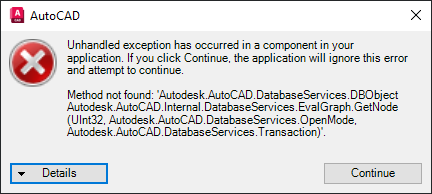
any idea why this happens??
Message 13 of 16
06-06-2022
01:53 PM
- Mark as New
- Bookmark
- Subscribe
- Mute
- Subscribe to RSS Feed
- Permalink
- Report
06-06-2022
01:53 PM
@ehsan_bahrani wrote:
any idea why this happens??
What AutoCAD version are you using? This method is in acmgd.dll

Відповідь корисна? Клікніть на "ВПОДОБАЙКУ" цім повідомленням! | Do you find the posts helpful? "LIKE" these posts!
Находите сообщения полезными? Поставьте "НРАВИТСЯ" этим сообщениям!
На ваше запитання відповіли? Натисніть кнопку "ПРИЙНЯТИ РІШЕННЯ" | Have your question been answered successfully? Click "ACCEPT SOLUTION" button.
На ваш вопрос успешно ответили? Нажмите кнопку "УТВЕРДИТЬ РЕШЕНИЕ"
Alexander Rivilis / Александр Ривилис / Олександр Рівіліс
Programmer & Teacher & Helper / Программист - Учитель - Помощник / Програміст - вчитель - помічник
Facebook | Twitter | LinkedIn
| |
Message 14 of 16
06-16-2022
01:11 AM
- Mark as New
- Bookmark
- Subscribe
- Mute
- Subscribe to RSS Feed
- Permalink
- Report
Message 15 of 16
06-16-2022
02:11 AM
- Mark as New
- Bookmark
- Subscribe
- Mute
- Subscribe to RSS Feed
- Permalink
- Report
06-16-2022
02:11 AM
AutoCAD 2015 also has this method.
Відповідь корисна? Клікніть на "ВПОДОБАЙКУ" цім повідомленням! | Do you find the posts helpful? "LIKE" these posts!
Находите сообщения полезными? Поставьте "НРАВИТСЯ" этим сообщениям!
На ваше запитання відповіли? Натисніть кнопку "ПРИЙНЯТИ РІШЕННЯ" | Have your question been answered successfully? Click "ACCEPT SOLUTION" button.
На ваш вопрос успешно ответили? Нажмите кнопку "УТВЕРДИТЬ РЕШЕНИЕ"
Alexander Rivilis / Александр Ривилис / Олександр Рівіліс
Programmer & Teacher & Helper / Программист - Учитель - Помощник / Програміст - вчитель - помічник
Facebook | Twitter | LinkedIn
| |
Message 16 of 16


04-30-2023
03:58 AM
- Mark as New
- Bookmark
- Subscribe
- Mute
- Subscribe to RSS Feed
- Permalink
- Report
04-30-2023
03:58 AM
Dear @Alexander.Rivilis
Thank you for your example.
However, these lines need reviewing
for (currentColumn = 0; currentColumn < columns; currentColumn++) {
        ed.WriteMessage("{0}; ", bpt.Columns[currentColumn].Parameter.Name);
      }
I've found that accessing the bpt.Columns[currentColumn].Parameter without "Using .... End using" to manually dispose that iParameter object may lead to error
"System.AccessViolationException: 'Attempted to read or write protected memory. This is often an indication that other memory is corrupt.' "
*
That error does not happen immediately, but after a period of implementation.

Reply
Topic Options
- Subscribe to RSS Feed
- Mark Topic as New
- Mark Topic as Read
- Float this Topic for Current User
- Bookmark
- Subscribe
- Printer Friendly Page


