Setting PS Viewport Named View

Setting PS Viewport Named View

Rob.O
Collaborator Collaborator
1,844 Views
5 Replies
Message 1 of 6

Setting PS Viewport Named View

Rob.O
Collaborator
Collaborator

Hi All,


I have code that has the user select a viewport.  I then need to set the selected viewport to an existing view, but I cannot find any exampes of this.


A couple of things that are confusing me...


I have the viewport, but how do I get the ViewPortTable/ViewPortTableRecord from it?


Do I need to set the view in the ViewPortTableRecord od the ViewTableRecord?


No problems to this point...


'Code snip
If acPrmpt_res.Status = PromptStatus.OK Then

                    Dim acVPort As Viewport = Nothing
                    Dim acViewTbl As ViewTable
                    Dim acViewTblrec As ViewTableRecord
                    Dim acVPortTbl As ViewportTable
                    Dim acVPortTblRec As ViewportTableRecord
                    Dim acEnt As Entity = Nothing

                    For Each acObjId As ObjectId In acPrmpt_res.Value.GetObjectIds
                        acEnt = acObjId.GetObject(OpenMode.ForRead)
                        If TypeOf acEnt Is Viewport Then

                            acVPort = acObjId.GetObject(OpenMode.ForRead)
                            acVPort.Highlight()

                            'Set selected viewport named view here...

                        End If
                    Next
'Code snip

 Any help would be greatly appreciated!

0 Likes
Accepted solutions (1)
1,845 Views
5 Replies
Replies (5)
Message 2 of 6

fieldguy
Advisor
Advisor

What I used was set layoutmanager.currentlayout to the name of the layout.  Then I forced the the viewport to be active using setsystemvariable("tilemode",0).  Note that this worked for me because there is only 1 viewport in each of the layouts.  If there was more than 1 viewport I logged an error and fixed it with other methods.  The example in the dev guide uses the cvport and tilemode systemvariables, and then doc.editor.switchtomodelspace.


Once the viewport is active, you can use something like "dim myviewtr as viewtablerecord = doc.editor.getcurrentview.


The dev guide info: 

http://docs.autodesk.com/ACD/2011/ENU/filesMDG/WS1a9193826455f5ff2566ffd511ff6f8c7ca-3482.htm


It seems to me that there should be a better way.

0 Likes
Message 3 of 6

Rob.O
Collaborator
Collaborator

I am very close now, but still having some issues...


I am able to get the view to change with the following code:


For Each acObjId As ObjectId In acPrmpt_res.Value.GetObjectIds
                        acEnt = acObjId.GetObject(OpenMode.ForRead)
                        If TypeOf acEnt Is Viewport Then

                            acVPort = acObjId.GetObject(OpenMode.ForWrite)

                            Dim acVPNum As IntPtr = acVPort.Number
                            
                            '' Make selected viewport the current viewport
                            acedSetCurrentVPort(acVPort.UnmanagedObject)
                           
                            '' Activate model space in the viewport
                            acDoc.Editor.SwitchToModelSpace()

                            '' Get view table
                            acViewTbl = acTrans.GetObject(acCurDb.ViewTableId, OpenMode.ForRead)
                            acViewTblrec = acTrans.GetObject(acViewTbl(strViewName), OpenMode.ForWrite)

                            '' Set current view
                            acEd.SetCurrentView(acViewTblrec)

Works great with one exception... it's only changing the view in the last viewport that was activated and NOT in the viewport that was selected (acVport).  I thought I was activating (or seting current) the selected viewport with the acedSetCurrentVPort function, but it does not change the viewport.


If I try and pass the acVport.number as the value of acedSetCurrentVPort, I get an error:  "Attempting to read or write protected memory..."


All I have left to figure out is how to change the current viewport to the one that was selected.


Any ideas what I am doing wrong?

0 Likes
Message 4 of 6

cadMeUp
Collaborator
Collaborator
Accepted solution

This process should work for you:


acVPort = acObjId.GetObject(OpenMode.ForWrite)

...


acDoc.Editor.SwitchToModelSpace()

Autodesk.AutoCAD.ApplicationServices.Application.SetSystemVariable("CVPORT", acVPort.Number)


'Do something with active viewport here...


'Switch back to paper space...

acDoc.Editor.SwitchToPaperSpace()


Also would be a good idea to check the 'Viewport.On' and 'Viewport.Locked' properties.

Message 5 of 6

Rob.O
Collaborator
Collaborator

Thanks CadMeUp... that worked great!


Why is it you cannot not set the viewport current prior to switching to modelspace?  I tried it, but no luck.  Just a curiosity as one of the unselected viewports will highlight as activated first (due to the acDoc.Editor.SwitchToModelSpace() function) before the correct viewport is set with .SetSystemVariable("CVPORT", acVPort.Number).  Some users will inevitably get confused by this when seeing a viewport they did not select "highlight".


Thanks again!

0 Likes
Message 6 of 6

cadMeUp
Collaborator
Collaborator

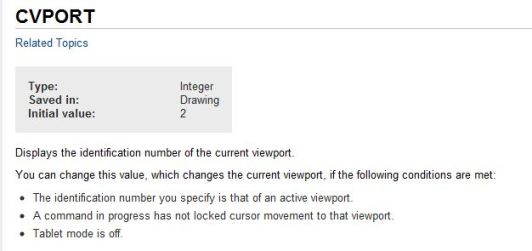
I know, it seems to work backwards and it is confusing in code. The help doc for the CVPORT system variable should make sense of it though:


CVPORT Snippet.JPG


0 Likes