Community
- Forums Home
- >
- AutoCAD Community
- >
- AutoCAD Customization Forum
- >
- .NET forum
- >
- Re: Save preview to file
.NET
Turn on suggestions
Auto-suggest helps you quickly narrow down your search results by suggesting possible matches as you type.
 This page has been translated for your convenience with an automatic translation service. This is not an official translation and may contain errors and inaccurate translations. Autodesk does not warrant, either expressly or implied, the accuracy, reliability or completeness of the information translated by the machine translation service and will not be liable for damages or losses caused by the trust placed in the translation service.
Translate
This page has been translated for your convenience with an automatic translation service. This is not an official translation and may contain errors and inaccurate translations. Autodesk does not warrant, either expressly or implied, the accuracy, reliability or completeness of the information translated by the machine translation service and will not be liable for damages or losses caused by the trust placed in the translation service.
Translate
Reply
Topic Options
- Subscribe to RSS Feed
- Mark Topic as New
- Mark Topic as Read
- Float this Topic for Current User
- Bookmark
- Subscribe
- Printer Friendly Page
Message 1 of 20

06-12-2005
12:34 PM
- Mark as New
- Bookmark
- Subscribe
- Mute
- Subscribe to RSS Feed
- Permalink
- Report
06-12-2005
12:34 PM
Save preview to file
Hi all,
I try to save the thumbnail to a file, but it seems ThumbnailBitmap is alway's nothing. Does anyone know how to use this Autodesk.AutoCAD.DatabaseServices.Database.ThumbnailBitmap?
thanks,
Evert
----
Imports Autodesk.AutoCAD.Runtime
Imports Autodesk.AutoCAD.ApplicationServices
Imports Autodesk.AutoCAD.DatabaseServices
Imports System.Collections
Imports System.Text
Imports System.Drawing
Public Class PreviewBitMap
Public Sub test()
Dim bm As Bitmap
Dim db As Database
Try
'Get the current database
db = HostApplicationServices.WorkingDatabase
Application.DocumentManager.MdiActiveDocument.Editor.WriteMessage("db loaded")
If db.ThumbnailBitmap Is Nothing Then
Application.DocumentManager.MdiActiveDocument.Editor.WriteMessage("geen bitmap?")
Else
db.ThumbnailBitmap.Save("test.bmp")
End If
Catch ex As Exception
Application.DocumentManager.MdiActiveDocument.Editor.WriteMessage("test:" + ex.Message)
Finally
If Not bm Is Nothing Then bm.Dispose()
End Try
End Sub
End Class
I try to save the thumbnail to a file, but it seems ThumbnailBitmap is alway's nothing. Does anyone know how to use this Autodesk.AutoCAD.DatabaseServices.Database.ThumbnailBitmap?
thanks,
Evert
----
Imports Autodesk.AutoCAD.Runtime
Imports Autodesk.AutoCAD.ApplicationServices
Imports Autodesk.AutoCAD.DatabaseServices
Imports System.Collections
Imports System.Text
Imports System.Drawing
Public Class PreviewBitMap
Public Sub test()
Dim bm As Bitmap
Dim db As Database
Try
'Get the current database
db = HostApplicationServices.WorkingDatabase
Application.DocumentManager.MdiActiveDocument.Editor.WriteMessage("db loaded")
If db.ThumbnailBitmap Is Nothing Then
Application.DocumentManager.MdiActiveDocument.Editor.WriteMessage("geen bitmap?")
Else
db.ThumbnailBitmap.Save("test.bmp")
End If
Catch ex As Exception
Application.DocumentManager.MdiActiveDocument.Editor.WriteMessage("test:" + ex.Message)
Finally
If Not bm Is Nothing Then bm.Dispose()
End Try
End Sub
End Class
19 REPLIES 19
Message 2 of 20
06-12-2005
08:49 PM
- Mark as New
- Bookmark
- Subscribe
- Mute
- Subscribe to RSS Feed
- Permalink
- Report
06-12-2005
08:49 PM
You can't set a thumbnail currently. I consider this a bug so I'll make sure
we have defect logged.
albert
wrote in message news:4872660@discussion.autodesk.com...
Hi all,
I try to save the thumbnail to a file, but it seems ThumbnailBitmap is
alway's nothing. Does anyone know how to use this
Autodesk.AutoCAD.DatabaseServices.Database.ThumbnailBitmap?
thanks,
Evert
----
Imports Autodesk.AutoCAD.Runtime
Imports Autodesk.AutoCAD.ApplicationServices
Imports Autodesk.AutoCAD.DatabaseServices
Imports System.Collections
Imports System.Text
Imports System.Drawing
Public Class PreviewBitMap
Public Sub test()
Dim bm As Bitmap
Dim db As Database
Try
'Get the current database
db = HostApplicationServices.WorkingDatabase
Application.DocumentManager.MdiActiveDocument.Editor.WriteMessage("db
loaded")
If db.ThumbnailBitmap Is Nothing Then
Application.DocumentManager.MdiActiveDocument.Editor.WriteMessage("geen
bitmap?")
Else
db.ThumbnailBitmap.Save("test.bmp")
End If
Catch ex As Exception
Application.DocumentManager.MdiActiveDocument.Editor.WriteMessage("test:"
+ ex.Message)
Finally
If Not bm Is Nothing Then bm.Dispose()
End Try
End Sub
End Class
we have defect logged.
albert
Hi all,
I try to save the thumbnail to a file, but it seems ThumbnailBitmap is
alway's nothing. Does anyone know how to use this
Autodesk.AutoCAD.DatabaseServices.Database.ThumbnailBitmap?
thanks,
Evert
----
Imports Autodesk.AutoCAD.Runtime
Imports Autodesk.AutoCAD.ApplicationServices
Imports Autodesk.AutoCAD.DatabaseServices
Imports System.Collections
Imports System.Text
Imports System.Drawing
Public Class PreviewBitMap
Public Sub test()
Dim bm As Bitmap
Dim db As Database
Try
'Get the current database
db = HostApplicationServices.WorkingDatabase
Application.DocumentManager.MdiActiveDocument.Editor.WriteMessage("db
loaded")
If db.ThumbnailBitmap Is Nothing Then
Application.DocumentManager.MdiActiveDocument.Editor.WriteMessage("geen
bitmap?")
Else
db.ThumbnailBitmap.Save("test.bmp")
End If
Catch ex As Exception
Application.DocumentManager.MdiActiveDocument.Editor.WriteMessage("test:"
+ ex.Message)
Finally
If Not bm Is Nothing Then bm.Dispose()
End Try
End Sub
End Class
Message 3 of 20
06-22-2005
08:07 AM
- Mark as New
- Bookmark
- Subscribe
- Mute
- Subscribe to RSS Feed
- Permalink
- Report
06-22-2005
08:07 AM
I reported this, but the thumbnail attribute has the status 'Not Implemented' (yet). It would be nice if autocad would throw an 'Not Implemented' error instead of just returning Nothing.
Message 4 of 20
06-22-2005
09:44 AM
- Mark as New
- Bookmark
- Subscribe
- Mute
- Subscribe to RSS Feed
- Permalink
- Report
06-22-2005
09:44 AM
"Albert Szilvasy" wrote
>> You can't set a thumbnail currently. I consider this
>> a bug so I'll make sure we have defect logged.
If the objective is getting the bitmap, as opposed to
setting it, the problem is most likely this (from the
docs for AcDbDatabase::thumbnailBitmap):
I haven't tried this, but it should work (please let me know
if it doesn't).
/////////////////// ThumbnailExtractor.cs ///////////////////////
using System;
using System.Drawing;
using System.Runtime.InteropServices;
using Autodesk.AutoCAD.Runtime;
namespace acdbUtils
{
public class ThumbnailExtractor
{
[System.Security.SuppressUnmanagedCodeSecurity]
[DllImport("acdb16.dll", CallingConvention = CallingConvention.Cdecl,
EntryPoint = "?acdbGetPreviewBitmap@@YAPAUtagBITMAPINFO@@PBD@Z")]
extern static private IntPtr acdbGetPreviewBitmap(string filename);
static Bitmap GetBitmapFromDwg(string filename)
{
return Marshaler.BitmapInfoToBitmap(acdbGetPreviewBitmap(filename));
}
}
}
//////////////////////////////////////////////////////////////////////////////
--
http://www.caddzone.com
AcadXTabs: MDI Document Tabs for AutoCAD 2004/2005/2006
http://www.acadxtabs.com
>> You can't set a thumbnail currently. I consider this
>> a bug so I'll make sure we have defect logged.
If the objective is getting the bitmap, as opposed to
setting it, the problem is most likely this (from the
docs for AcDbDatabase::thumbnailBitmap):
"Note These APIs are meant primarily for ObjectDBX developers.
Preview thumbnail behavior reflect what the host application must
do to generate a preview.
For ObjectARX developers AutoCAD is taking care of all preview
thumbnail generation. ObjectARX users should leave these APIs
alone, and allow AutoCAD behaviors to prevail.
Most of the time, the AcDbDatabase::thumbnailBitmap() method
will return nothing, since the bitmap is not read into memory by
AcDbDatabase::readDwgFile(). To retreive the thumbnail from the
DWG file, (as opposed to directly from the db) the same existing
ObjectARX standalone functions are preferred. (for example
acdbDisplayPreviewFromDwg())".
I haven't tried this, but it should work (please let me know
if it doesn't).
/////////////////// ThumbnailExtractor.cs ///////////////////////
using System;
using System.Drawing;
using System.Runtime.InteropServices;
using Autodesk.AutoCAD.Runtime;
namespace acdbUtils
{
public class ThumbnailExtractor
{
[System.Security.SuppressUnmanagedCodeSecurity]
[DllImport("acdb16.dll", CallingConvention = CallingConvention.Cdecl,
EntryPoint = "?acdbGetPreviewBitmap@@YAPAUtagBITMAPINFO@@PBD@Z")]
extern static private IntPtr acdbGetPreviewBitmap(string filename);
static Bitmap GetBitmapFromDwg(string filename)
{
return Marshaler.BitmapInfoToBitmap(acdbGetPreviewBitmap(filename));
}
}
}
//////////////////////////////////////////////////////////////////////////////
--
http://www.caddzone.com
AcadXTabs: MDI Document Tabs for AutoCAD 2004/2005/2006
http://www.acadxtabs.com
Message 5 of 20
07-26-2006
11:11 PM
- Mark as New
- Bookmark
- Subscribe
- Mute
- Subscribe to RSS Feed
- Permalink
- Report
07-26-2006
11:11 PM
Sir ,
As you told i tried this code but it didn't work
-----------
using System;
using System.Drawing;
using System.Runtime.InteropServices;
using Autodesk.AutoCAD.Runtime;
namespace acdbUtils
{
public class ThumbnailExtractor
{
[System.Security.SuppressUnmanagedCodeSecurity]
[DllImport("acdb16.dll", CallingConvention = CallingConvention.Cdecl,
EntryPoint = "?acdbGetPreviewBitmap@@YAPAUtagBITMAPINFO@@PBD@Z")]
extern static private IntPtr acdbGetPreviewBitmap(string filename);
static Bitmap GetBitmapFromDwg(string filename)
{
return Marshaler.BitmapInfoToBitmap(acdbGetPreviewBitmap(filename));
}
}
-----------------------
Thanks....
As you told i tried this code but it didn't work
-----------
using System;
using System.Drawing;
using System.Runtime.InteropServices;
using Autodesk.AutoCAD.Runtime;
namespace acdbUtils
{
public class ThumbnailExtractor
{
[System.Security.SuppressUnmanagedCodeSecurity]
[DllImport("acdb16.dll", CallingConvention = CallingConvention.Cdecl,
EntryPoint = "?acdbGetPreviewBitmap@@YAPAUtagBITMAPINFO@@PBD@Z")]
extern static private IntPtr acdbGetPreviewBitmap(string filename);
static Bitmap GetBitmapFromDwg(string filename)
{
return Marshaler.BitmapInfoToBitmap(acdbGetPreviewBitmap(filename));
}
}
-----------------------
Thanks....
Message 6 of 20
08-31-2006
07:17 AM
- Mark as New
- Bookmark
- Subscribe
- Mute
- Subscribe to RSS Feed
- Permalink
- Report
08-31-2006
07:17 AM
[code]
[System.Security.SuppressUnmanagedCodeSecurity]
[DllImport("dwgpreview.arx", CallingConvention = CallingConvention.Cdecl, CharSet = CharSet.Ansi ,
EntryPoint = "SaveDWGPreview")]
extern static private int SaveDWGPreview(string dwgfilename, string bmpfilename);
[CommandMethod("SavePreview")]
public void SavePreview()
{
Database db = HostApplicationServices.WorkingDatabase;
Autodesk.AutoCAD.Runtime.SystemObjects.DynamicLinker.LoadModule("DWGPreview.arx",false,false);
SaveDWGPreview(db.Filename,"C:\\dwgpreview.bmp");
}
[/code]
dwgpreview.arx for AutoCAD 2004...2006 is attached Message was edited by: Alexander Rivilis
[System.Security.SuppressUnmanagedCodeSecurity]
[DllImport("dwgpreview.arx", CallingConvention = CallingConvention.Cdecl, CharSet = CharSet.Ansi ,
EntryPoint = "SaveDWGPreview")]
extern static private int SaveDWGPreview(string dwgfilename, string bmpfilename);
[CommandMethod("SavePreview")]
public void SavePreview()
{
Database db = HostApplicationServices.WorkingDatabase;
Autodesk.AutoCAD.Runtime.SystemObjects.DynamicLinker.LoadModule("DWGPreview.arx",false,false);
SaveDWGPreview(db.Filename,"C:\\dwgpreview.bmp");
}
[/code]
dwgpreview.arx for AutoCAD 2004...2006 is attached Message was edited by: Alexander Rivilis
Message 7 of 20
08-31-2006
09:10 AM
- Mark as New
- Bookmark
- Subscribe
- Mute
- Subscribe to RSS Feed
- Permalink
- Report
08-31-2006
09:10 AM
For AutoCAD 2007, this should do it:
/// Form1.cs
using System;
using System.Collections.Generic;
using System.ComponentModel;
using System.Data;
using System.Drawing;
using System.Text;
using System.Windows.Forms;
using System.Runtime.InteropServices;
using Autodesk.AutoCAD.Runtime;
using Autodesk.AutoCAD.ApplicationServices;
using AcadApp = Autodesk.AutoCAD.ApplicationServices.Application;
// This form requires a PictureBox named 'pictureBox1':
namespace ThumbnailSample
{
public partial class Form1 : Form
{
public Form1()
{
InitializeComponent();
}
// R17 ONLY
[DllImport( "acad.exe", CallingConvention = CallingConvention.Cdecl,
EntryPoint = "?acedGenerateThumbnailBitmap@@YAPAUtagABITMAPINFO@@XZ" )]
private static extern IntPtr acedGenerateThumbnailBitmap();
private void ThumbView_Load( object sender, EventArgs e )
{
IntPtr bmi = acedGenerateThumbnailBitmap();
if( bmi != IntPtr.Zero )
{
Bitmap bm = Marshaler.BitmapInfoToBitmap( bmi );
pictureBox1.Image = (System.Drawing.Image) bm.Clone();
bm.Dispose();
}
}
[CommandMethod( "THUMBVIEW" )]
public static void doit()
{
using( Form1 form = new Form1() )
AcadApp.ShowModalDialog( form );
}
}
}
--
http://www.caddzone.com
AcadXTabs: MDI Document Tabs for AutoCAD 2004/2005/2006/2007
http://www.acadxtabs.com
wrote in message news:5313888@discussion.autodesk.com...
[code]
[System.Security.SuppressUnmanagedCodeSecurity]
[DllImport("dwgpreview.arx", CallingConvention = CallingConvention.Cdecl, CharSet = CharSet.Ansi ,
EntryPoint = "SaveDWGPreview")]
extern static private int SaveDWGPreview(string dwgfilename, string bmpfilename);
[CommandMethod("SavePreview")]
public void SavePreview()
{
Database db = HostApplicationServices.WorkingDatabase;
Autodesk.AutoCAD.Runtime.SystemObjects.DynamicLinker.Load
Module("DWGPreview.arx",false,false);
SaveDWGPreview(db.Filename,"C:\\dwgpreview.bmp");
}
[/code]
dwgpreview.arx for AutoCAD 2004...2006 is attached
Message was edited by: Alexander Rivilis
/// Form1.cs
using System;
using System.Collections.Generic;
using System.ComponentModel;
using System.Data;
using System.Drawing;
using System.Text;
using System.Windows.Forms;
using System.Runtime.InteropServices;
using Autodesk.AutoCAD.Runtime;
using Autodesk.AutoCAD.ApplicationServices;
using AcadApp = Autodesk.AutoCAD.ApplicationServices.Application;
// This form requires a PictureBox named 'pictureBox1':
namespace ThumbnailSample
{
public partial class Form1 : Form
{
public Form1()
{
InitializeComponent();
}
// R17 ONLY
[DllImport( "acad.exe", CallingConvention = CallingConvention.Cdecl,
EntryPoint = "?acedGenerateThumbnailBitmap@@YAPAUtagABITMAPINFO@@XZ" )]
private static extern IntPtr acedGenerateThumbnailBitmap();
private void ThumbView_Load( object sender, EventArgs e )
{
IntPtr bmi = acedGenerateThumbnailBitmap();
if( bmi != IntPtr.Zero )
{
Bitmap bm = Marshaler.BitmapInfoToBitmap( bmi );
pictureBox1.Image = (System.Drawing.Image) bm.Clone();
bm.Dispose();
}
}
[CommandMethod( "THUMBVIEW" )]
public static void doit()
{
using( Form1 form = new Form1() )
AcadApp.ShowModalDialog( form );
}
}
}
--
http://www.caddzone.com
AcadXTabs: MDI Document Tabs for AutoCAD 2004/2005/2006/2007
http://www.acadxtabs.com
[code]
[System.Security.SuppressUnmanagedCodeSecurity]
[DllImport("dwgpreview.arx", CallingConvention = CallingConvention.Cdecl, CharSet = CharSet.Ansi ,
EntryPoint = "SaveDWGPreview")]
extern static private int SaveDWGPreview(string dwgfilename, string bmpfilename);
[CommandMethod("SavePreview")]
public void SavePreview()
{
Database db = HostApplicationServices.WorkingDatabase;
Autodesk.AutoCAD.Runtime.SystemObjects.DynamicLinker.Load
Module("DWGPreview.arx",false,false);
SaveDWGPreview(db.Filename,"C:\\dwgpreview.bmp");
}
[/code]
dwgpreview.arx for AutoCAD 2004...2006 is attached
Message was edited by: Alexander Rivilis
Message 8 of 20
09-03-2006
12:33 AM
- Mark as New
- Bookmark
- Subscribe
- Mute
- Subscribe to RSS Feed
- Permalink
- Report
09-03-2006
12:33 AM
Sir,
Your code is working great. But i want to know does it not works for Autocad 2007 3D Drawings template(acad3D.dwt type files). If i want to save all types of autocad files's thumbanil then how can i achive this.
Thanks...
Your code is working great. But i want to know does it not works for Autocad 2007 3D Drawings template(acad3D.dwt type files). If i want to save all types of autocad files's thumbanil then how can i achive this.
Thanks...
Message 9 of 20
09-03-2006
08:29 PM
- Mark as New
- Bookmark
- Subscribe
- Mute
- Subscribe to RSS Feed
- Permalink
- Report
09-03-2006
08:29 PM
Hi rivilis,
I want to know if you have got dwgpreview.arx for Autocad 2007. IF not then how can i do it in 2007. Tony's code is working but not for 3D drawings.
Thanks....
I want to know if you have got dwgpreview.arx for Autocad 2007. IF not then how can i do it in 2007. Tony's code is working but not for 3D drawings.
Thanks....
Message 10 of 20
09-04-2006
02:35 AM
- Mark as New
- Bookmark
- Subscribe
- Mute
- Subscribe to RSS Feed
- Permalink
- Report
09-04-2006
02:35 AM
Try it:
[code]
[System.Security.SuppressUnmanagedCodeSecurity]
[DllImport("dwgpreview.arx", CallingConvention = CallingConvention.Cdecl, CharSet = CharSet.Unicode,
EntryPoint = "SaveDWGPreview")]
extern static private int SaveDWGPreview(string dwgfilename, string bmpfilename);
[/code]
[code]
[System.Security.SuppressUnmanagedCodeSecurity]
[DllImport("dwgpreview.arx", CallingConvention = CallingConvention.Cdecl, CharSet = CharSet.Unicode,
EntryPoint = "SaveDWGPreview")]
extern static private int SaveDWGPreview(string dwgfilename, string bmpfilename);
[/code]
Message 11 of 20
09-05-2006
01:32 AM
- Mark as New
- Bookmark
- Subscribe
- Mute
- Subscribe to RSS Feed
- Permalink
- Report
09-05-2006
01:32 AM
Alex's code extracts an existing preview from a .DWG file
that's been saved (with a preview), and writes it out to a
BMP file.
The code I posted doesn't do that. Instead, it generates
a new preview image of the Active viewport of the active
document, but it is not assigned as the database's saved
thumbnail.
It may also help to know that to do what Alex's code
does, you don't need native ObjectARX. You can use the
Shell's IExtractImage COM interface to get the thumbnail
preview for any file type that has one, including DWG files.
Have at look here for working example code:
http://www.vbaccelerator.com/home/net/code/libraries/Shell_Projects/Thumbnail_Extraction/article.asp
So, it depends on what you want to do (generate a new
preview, or 'snapshot' of the active viewport, or just get
the preview thumbnail from a saved file). If the drawing
is open in the editor, you should be able to save it, then
use Alex's code, or IExtractImage to get an up-to-date
thumbnail.
--
http://www.caddzone.com
AcadXTabs: MDI Document Tabs for AutoCAD 2004/2005/2006/2007
http://www.acadxtabs.com
wrote in message news:5316869@discussion.autodesk.com...
Hi rivilis,
I want to know if you have got dwgpreview.arx for Autocad 2007. IF not then how can i do it in 2007. Tony's code is working but not for 3D drawings.
Thanks....
that's been saved (with a preview), and writes it out to a
BMP file.
The code I posted doesn't do that. Instead, it generates
a new preview image of the Active viewport of the active
document, but it is not assigned as the database's saved
thumbnail.
It may also help to know that to do what Alex's code
does, you don't need native ObjectARX. You can use the
Shell's IExtractImage COM interface to get the thumbnail
preview for any file type that has one, including DWG files.
Have at look here for working example code:
http://www.vbaccelerator.com/home/net/code/libraries/Shell_Projects/Thumbnail_Extraction/article.asp
So, it depends on what you want to do (generate a new
preview, or 'snapshot' of the active viewport, or just get
the preview thumbnail from a saved file). If the drawing
is open in the editor, you should be able to save it, then
use Alex's code, or IExtractImage to get an up-to-date
thumbnail.
--
http://www.caddzone.com
AcadXTabs: MDI Document Tabs for AutoCAD 2004/2005/2006/2007
http://www.acadxtabs.com
Hi rivilis,
I want to know if you have got dwgpreview.arx for Autocad 2007. IF not then how can i do it in 2007. Tony's code is working but not for 3D drawings.
Thanks....
Message 12 of 20
11-23-2006
11:25 PM
- Mark as New
- Bookmark
- Subscribe
- Mute
- Subscribe to RSS Feed
- Permalink
- Report
11-23-2006
11:25 PM
Hello,
interesting idea to do it with a own arx.
[System.Security.SuppressUnmanagedCodeSecurity]
[DllImport("dwgpreview.arx", CallingConvention = CallingConvention.Cdecl, CharSet = CharSet.Ansi ,
EntryPoint = "SaveDWGPreview")]
extern static private int SaveDWGPreview(string dwgfilename, string bmpfilename);
My question: How is the definition of the function (dllexport) in the ARX programm.
thanks
Peter
interesting idea to do it with a own arx.
[System.Security.SuppressUnmanagedCodeSecurity]
[DllImport("dwgpreview.arx", CallingConvention = CallingConvention.Cdecl, CharSet = CharSet.Ansi ,
EntryPoint = "SaveDWGPreview")]
extern static private int SaveDWGPreview(string dwgfilename, string bmpfilename);
My question: How is the definition of the function (dllexport) in the ARX programm.
thanks
Peter
Message 13 of 20
11-24-2006
03:02 AM
- Mark as New
- Bookmark
- Subscribe
- Mute
- Subscribe to RSS Feed
- Permalink
- Report
11-24-2006
03:02 AM
For AutoCAD 2006:
__declspec( dllexport ) int SaveDWGPreview(const char *dwgfile, const char *bmpfile);
For AutoCAD 2007:
__declspec( dllexport ) int SaveDWGPreview(const TCHAR *dwgfile, const TCHAR *bmpfile);
Also dwgpreview.def has lines:
[code]
EXPORTS
SaveDWGPreview
[/code]
__declspec( dllexport ) int SaveDWGPreview(const char *dwgfile, const char *bmpfile);
For AutoCAD 2007:
__declspec( dllexport ) int SaveDWGPreview(const TCHAR *dwgfile, const TCHAR *bmpfile);
Also dwgpreview.def has lines:
[code]
EXPORTS
SaveDWGPreview
[/code]
Message 14 of 20
02-18-2008
10:36 AM
- Mark as New
- Bookmark
- Subscribe
- Mute
- Subscribe to RSS Feed
- Permalink
- Report
02-18-2008
10:36 AM
Any chance that this could be fixed to work with R2006?
I've made some modest attempts to doso, but it appears that resources like using System.Collections.Generic; are not present in 2006.
TIA
Bill
I've made some modest attempts to doso, but it appears that resources like using System.Collections.Generic; are not present in 2006.
TIA
Bill

Message 16 of 20
02-18-2008
06:04 PM
- Mark as New
- Bookmark
- Subscribe
- Mute
- Subscribe to RSS Feed
- Permalink
- Report
02-18-2008
06:04 PM
>>>it is a framwork issue
Thanks TIm,
After I though about it a bit, I thought that probably was the case.
In any case, reading the preview image, and displaying it, is something that I think I could do. But I'd be more interested in getting the current viewport view as Tony suggested that his .cs does.
That would not only replace what we do now in Vlisp, it would be better.
In our current program, I read the block entities and draw the part, using a transformation matrix to get the VIEW ucs, then use grvecs to put it into an image_tile.
Something that I imagine would be far more complicated in C#.
Anyway, I think a view of the current viewport would do it.
TIA
Bill
Thanks TIm,
After I though about it a bit, I thought that probably was the case.
In any case, reading the preview image, and displaying it, is something that I think I could do. But I'd be more interested in getting the current viewport view as Tony suggested that his .cs does.
That would not only replace what we do now in Vlisp, it would be better.
In our current program, I read the block entities and draw the part, using a transformation matrix to get the VIEW ucs, then use grvecs to put it into an image_tile.
Something that I imagine would be far more complicated in C#.
Anyway, I think a view of the current viewport would do it.
TIA
Bill
Message 17 of 20
02-19-2008
04:02 AM
- Mark as New
- Bookmark
- Subscribe
- Mute
- Subscribe to RSS Feed
- Permalink
- Report
02-19-2008
04:02 AM
>>>Anyway, I think a view of the current viewport would do it.
Hmm,
Maybe not.
I need to be able to display only the one part selected in the listbox. I've attached a .png of the DCL version.
Bill
Hmm,
Maybe not.
I need to be able to display only the one part selected in the listbox. I've attached a .png of the DCL version.
Bill
Message 18 of 20
03-19-2008
07:07 AM
- Mark as New
- Bookmark
- Subscribe
- Mute
- Subscribe to RSS Feed
- Permalink
- Report
03-19-2008
07:07 AM
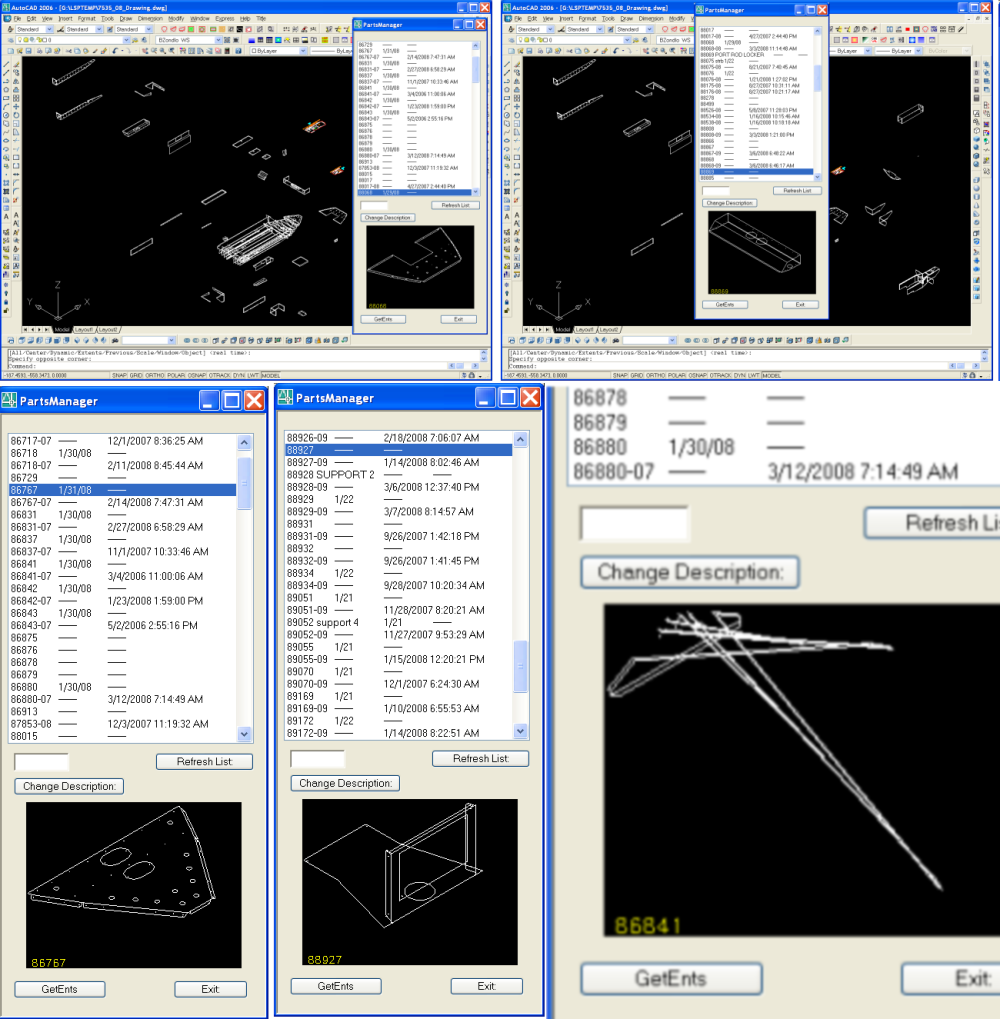
Well I did find a way to accomplish the image problem.
Thanks to Kean Walmsley(watch word wrap):
http://through-the-interface.typepad.com/through_the_interface/2007/02/using_the_com_i.html
I learned how to acces AutoCAD geometry points of certain entities and then use those points to "paint" on a picturebox.
Thanks also to Tony T. for his PolarPoint function that enabled me to add points for arcs & circles.
I still have some scaling and rotation isues to iron out but this program duplicates what the old Vlisp one did by displaying the selected block.
I won't post the code as not all like Italian cusine but as I have time will sort things out better.
The only problem is that once in a while, some of the points that are created with PolarPoint, to duplicate arcs, don't always end up on the right plane of the arc (Using arc startangle). So that's another issue to work on (see last image in the attached).
But thanks for having this site and having people that are knowlegable in .net.
Well ack to my "day job".
Bill
Thanks to Kean Walmsley(watch word wrap):
http://through-the-interface.typepad.com/through_the_interface/2007/02/using_the_com_i.html
I learned how to acces AutoCAD geometry points of certain entities and then use those points to "paint" on a picturebox.
Thanks also to Tony T. for his PolarPoint function that enabled me to add points for arcs & circles.
I still have some scaling and rotation isues to iron out but this program duplicates what the old Vlisp one did by displaying the selected block.
I won't post the code as not all like Italian cusine but as I have time will sort things out better.
The only problem is that once in a while, some of the points that are created with PolarPoint, to duplicate arcs, don't always end up on the right plane of the arc (Using arc startangle). So that's another issue to work on (see last image in the attached).
But thanks for having this site and having people that are knowlegable in .net.
Well ack to my "day job".
Bill
Message 19 of 20

03-04-2012
10:37 PM
- Mark as New
- Bookmark
- Subscribe
- Mute
- Subscribe to RSS Feed
- Permalink
- Report
03-04-2012
10:37 PM
HI,
I am using Auto CAD 2010 and .net
can you please tell me how i can get the preview of the dwg file using file name
Message 20 of 20


03-04-2012
11:02 PM
- Mark as New
- Bookmark
- Subscribe
- Mute
- Subscribe to RSS Feed
- Permalink
- Report
03-04-2012
11:02 PM
Hi,
you have so much samples and links in the above posts. What have you tried from them? Or should all be repeated now againg?
Sorry, - alfred -
------------------------------------------------------------------------------------
Alfred NESWADBA
Ingenieur Studio HOLLAUS ... www.hollaus.at ... blog.hollaus.at ... CDay 2024
------------------------------------------------------------------------------------
(not an Autodesk consultant)
Alfred NESWADBA
Ingenieur Studio HOLLAUS ... www.hollaus.at ... blog.hollaus.at ... CDay 2024
------------------------------------------------------------------------------------
(not an Autodesk consultant)

Reply
Topic Options
- Subscribe to RSS Feed
- Mark Topic as New
- Mark Topic as Read
- Float this Topic for Current User
- Bookmark
- Subscribe
- Printer Friendly Page