.NET
- Subscribe to RSS Feed
- Mark Topic as New
- Mark Topic as Read
- Float this Topic to the Top
- Bookmark
- Subscribe
- Printer Friendly Page
Reload LineTypes
- Mark as New
- Bookmark
- Subscribe
- Subscribe to RSS Feed
- Highlight
- Email to a Friend
- Report Inappropriate Content
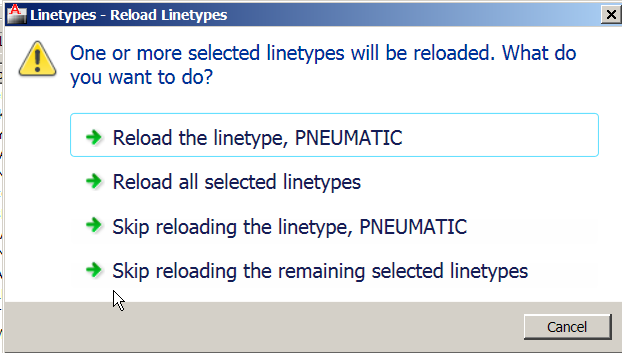
How would I Reload a linetype... the linetype already exists in the drawing...
But I want to update the linetype defintition.
This doesn't work.
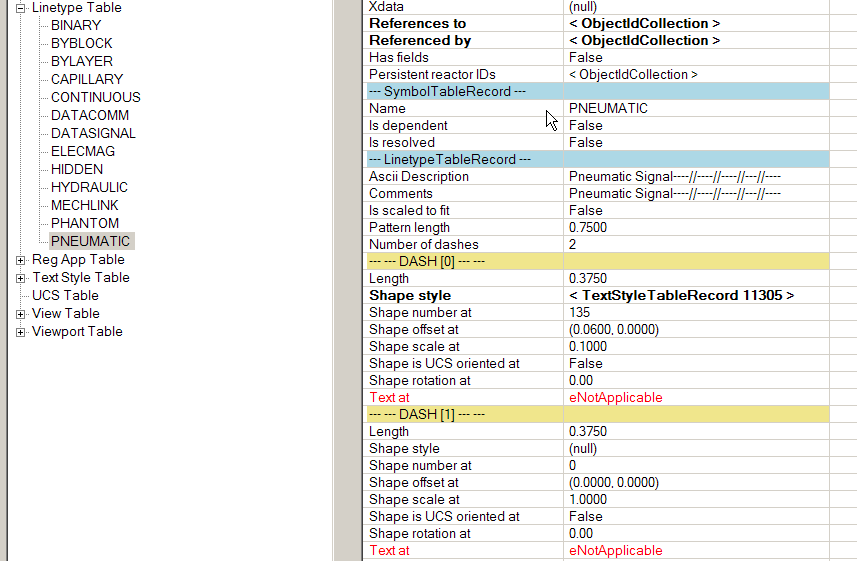
I need to open the linetyperecord... but what do I use to reload or re-define the linetablerecord.
Dim db As Database = ActiveDrawing.Database
Dim ed As Editor = editor
Const filename As String = "SFR_LINETYPES.lin"
Try
Dim path As String = HostApplicationServices.Current.FindFile(filename, db, FindFileHint.Default)
db.LoadLineTypeFile("*", path)
Solved! Go to Solution.

Re: Reload LineTypes
- Mark as New
- Bookmark
- Subscribe
- Subscribe to RSS Feed
- Highlight
- Email to a Friend
- Report Inappropriate Content
Re: Reload LineTypes
- Mark as New
- Bookmark
- Subscribe
- Subscribe to RSS Feed
- Highlight
- Email to a Friend
- Report Inappropriate Content
What about setting EXPERT system variable in value >= 3?
Re: Reload LineTypes
- Mark as New
- Bookmark
- Subscribe
- Subscribe to RSS Feed
- Highlight
- Email to a Friend
- Report Inappropriate Content
Those solutions don't work.
I need to delete the linetype and then reimport or re-define it completely.
For whatever reason It's not working.
Autocad 2011
Windows XP
Re: Reload LineTypes
- Mark as New
- Bookmark
- Subscribe
- Subscribe to RSS Feed
- Highlight
- Email to a Friend
- Report Inappropriate Content
using art's reference above, viru says that a drawing's line type definitions get updated when its .lin file is loaded (as you show in your post). therefore as long as your drawing continues to use its .lin file, the line type definition in the .lin file has to be changed (presuming the line type name stays the same)
Re: Reload LineTypes
- Mark as New
- Bookmark
- Subscribe
- Subscribe to RSS Feed
- Highlight
- Email to a Friend
- Report Inappropriate Content
If CommanfFlags is set to Session
you have use LockDocument, i.e.:
[CommandMethod("relaodLinetype", CommandFlags.Session)]
public static void relaodLinetype()
{
// Set full path of .LIN file herer:
string linfile = @"C:\Test\SFR_LINETYPES.lin";
DocumentCollection docManager = Autodesk.AutoCAD.ApplicationServices.Application.D ocumentManager;
Database db = docManager.MdiActiveDocument.Database;
using (DocumentLock doclock = docManager.MdiActiveDocument.LockDocument())
{
Transaction trans = db.TransactionManager.StartTransaction();
bool bReload = false;
using (trans)
{
LinetypeTable table = trans.GetObject(db.LinetypeTableId, OpenMode.ForRead) as LinetypeTable;
if (table.Has("CENTER"))
bReload = true;
}
System.Int16 fileDia = (System.Int16)
Autodesk.AutoCAD.ApplicationServices.Application.G etSystemVariable("FILEDIA");
Autodesk.AutoCAD.ApplicationServices.Application.S etSystemVariable("FILEDIA", 0);
//reload using linetype command...
Object acadObject = Autodesk.AutoCAD.ApplicationServices.Application.A cadApplication;
object ActiveDocument =
acadObject.GetType().InvokeMember("ActiveDocument" , System.Reflection.BindingFlags.GetProperty, null, acadObject, null);
object[] dataArry = new object[1];
if (bReload)
{
dataArry[0] = "-linetype Load CENTER\n" + linfile + "\nYes\n ";
}
else
{
dataArry[0] = "-linetype Load CENTER\nacad.lin\n ";
}
ActiveDocument.GetType().InvokeMember(
"SendCommand", System.Reflection.BindingFlags.InvokeMethod, null, ActiveDocument, dataArry);
Autodesk.AutoCAD.ApplicationServices.Application.S etSystemVariable("FILEDIA", fileDia);
}
}
~'J'~
C6309D9E0751D165D0934D0621DFF27919
Re: Reload LineTypes
- Mark as New
- Bookmark
- Subscribe
- Subscribe to RSS Feed
- Highlight
- Email to a Friend
- Report Inappropriate Content
Many Thanks Hallex, as you've helped me when I was in a pickle before.
Having some success here! ![]()
It works!
Two follow-up Questions:
1.
So why use the
ActiveDocument.[GetType]().InvokeMember("SendComma nd", System.Reflection.BindingFlags.InvokeMethod, Nothing, ActiveDocument, dataArry)instead of
ActiveDrawing.SendStringToExecute("-linetype load....etc",False,False,False)Why use the InvokeMember? Does it work faster or better? What's the difference.
Could I just use:
Public Shared Sub SendCommand(ByVal Command As String)
Dim doc As Autodesk.AutoCAD.ApplicationServices.Document
doc = Application.DocumentManager.MdiActiveDocument
doc.SendStringToExecute(Command, False, False, True)
End SubAs my function/method for sending commands? What should I dig into to learn more about this?
2. What does LockDocument do exactly, (Yes obviously it locks the document) but why do it on the linetype load?
Re: Reload LineTypes
- Mark as New
- Bookmark
- Subscribe
- Subscribe to RSS Feed
- Highlight
- Email to a Friend
- Report Inappropriate Content
Oh for anybody following along here's my code;
<CommandMethod("reloadLinetype", CommandFlags.Session)> _
Public Shared Sub Reload_LineType()
' Set full path of .LIN file herer:
Dim linfile As String = gstrc_SFR_LineType_FullFileName
Dim linName As String = "PNEUMATIC"
Dim bReload As Boolean = False
'' Get the current document and database
Dim acDoc As Document = Application.DocumentManager.MdiActiveDocument
Dim DB As Database = acDoc.Database
Try
'Lock Document
Using DocLock As DocumentLock = acDoc.LockDocument
'' Start a transaction
Using TR As Transaction = DB.TransactionManager.StartTransaction
'' Open the Linetype table for read
Dim acLineTbl As LinetypeTable
acLineTbl = TR.GetObject(DB.LinetypeTableId, _
OpenMode.ForWrite)
If acLineTbl.Has(linName) = true Then
bReload = True
End If
' Save the changes and dispose of the transaction
TR.Commit()
End Using
End Using
Dim fileDia As System.Int16 = CShort(Autodesk.AutoCAD.ApplicationServices.Applic ation.GetSystemVariable("FILEDIA"))
Autodesk.AutoCAD.ApplicationServices.Application.S etSystemVariable("FILEDIA", 0)
'reload using linetype command...
Dim acadObject As [Object] = Autodesk.AutoCAD.ApplicationServices.Application.A cadApplication
Dim ActiveDocument As Object = acadObject.[GetType]().InvokeMember("ActiveDocumen t", System.Reflection.BindingFlags.GetProperty, Nothing, acadObject, Nothing)
Dim dataArry As Object() = New Object(0) {}
If bReload Then
dataArry(0) = "-linetype Load " & linName & vbLf & linfile & vbLf & "Yes" & vbLf & " "
Else
dataArry(0) = "-linetype Load " & linName & vbLf & "acad.lin" & vbLf & " "
End If
ActiveDocument.[GetType]().InvokeMember("SendComma nd", System.Reflection.BindingFlags.InvokeMethod, Nothing, ActiveDocument, dataArry)
Autodesk.AutoCAD.ApplicationServices.Application.S etSystemVariable("FILEDIA", fileDia)
dataArry(0) = "regen" & vbLf
ActiveDocument.[GetType]().InvokeMember("SendComma nd", System.Reflection.BindingFlags.InvokeMethod, Nothing, ActiveDocument, dataArry)
Catch
Console.WriteLine("Error in LoadLineType")
End Try
End Sub
Re: Reload LineTypes
- Mark as New
- Bookmark
- Subscribe
- Subscribe to RSS Feed
- Highlight
- Email to a Friend
- Report Inappropriate Content
In reponse to VB_Autocad_guy...
The InvokeMember() code is calling the COM interop's AcadDocument.SendCommand() method, except it is calling this using the .NET reflection library's late binding technique. You can google this for more details.
The AcadDocument.SendCommand() method has the advantage of being executed straight away (i.e. synchronously) versus the Document.SendStringToExecute() method which is executed after your code has finished (i.e. asynchronously).
Note that for the COM AcadDocument.SendCommand() method to work synchronously it must be called in the application context (i.e. CommandFlags.Session needs to be set).
Calling this method using late binding is significantly slower than if you reference the interop dll directly in your project. However the advantage is that it will work for both 32-bit and 64-bit systems as well as different versions of AutoCAD - i.e. you don't have to create multiple builds just for a simple COM interop call every now and then.
It's a nice trick to know.
For some further background refer to these posts:
http://through-the-interface.typepad.com/through_t
Art
Re: Reload LineTypes
- Mark as New
- Bookmark
- Subscribe
- Subscribe to RSS Feed
- Highlight
- Email to a Friend
- Report Inappropriate Content
Oh and if you are accessing a document from the application context (i.e. CommandFlags.Session) then you need to lock any document before you edit it, hence the DocumentLock.