Community
- Forums Home
- >
- AutoCAD Community
- >
- AutoCAD Customization Forum
- >
- .NET forum
- >
- Re: Plot dwg as pdf crash the drawing
.NET
Turn on suggestions
Auto-suggest helps you quickly narrow down your search results by suggesting possible matches as you type.
 This page has been translated for your convenience with an automatic translation service. This is not an official translation and may contain errors and inaccurate translations. Autodesk does not warrant, either expressly or implied, the accuracy, reliability or completeness of the information translated by the machine translation service and will not be liable for damages or losses caused by the trust placed in the translation service.
Translate
This page has been translated for your convenience with an automatic translation service. This is not an official translation and may contain errors and inaccurate translations. Autodesk does not warrant, either expressly or implied, the accuracy, reliability or completeness of the information translated by the machine translation service and will not be liable for damages or losses caused by the trust placed in the translation service.
Translate
Reply
Topic Options
- Subscribe to RSS Feed
- Mark Topic as New
- Mark Topic as Read
- Float this Topic for Current User
- Bookmark
- Subscribe
- Printer Friendly Page
Message 1 of 3

Anonymous
678 Views, 2 Replies
09-27-2012
05:50 AM
- Mark as New
- Bookmark
- Subscribe
- Mute
- Subscribe to RSS Feed
- Permalink
- Report
09-27-2012
05:50 AM
Plot dwg as pdf crash the drawing
Hi Guys,
I try to plot the current drawing as pdf file. I took Kean's code from his blog. The function didn't throw any exception. How ever after the function finished the drawing crash.
Here is my code segment
 <CommandMethod("pdfTest")> _
    Public Sub PDFTest()
        Dim doc As Document = Application.DocumentManager.MdiActiveDocument
        Dim ed As Editor = doc.Editor
        Dim db As Database = doc.Database

        Using tr As Transaction = db.TransactionManager.StartTransaction
            Try

                Dim btr As BlockTableRecord = tr.GetObject(db.CurrentSpaceId, OpenMode.ForRead)

                Dim lo As Layout = tr.GetObject(btr.LayoutId, OpenMode.ForRead)

                '--We need a PlotInfo object
                '--linked to the layout
                Dim pi As New PlotInfo
                pi.Layout = btr.LayoutId

                '--We need a PlotSettings object
                '-- based on the layout settings
                '--which we then customize
                Dim ps As PlotSettings = New PlotSettings(lo.ModelType)
                ps.CopyFrom(lo)

                Dim psv As PlotSettingsValidator = PlotSettingsValidator.Current

                '--We'll plot the extents, centered and
                '--scaled to fit
                psv.SetPlotType(ps, Autodesk.AutoCAD.DatabaseServices.PlotType.Extents)
                psv.SetUseStandardScale(ps, True)
                psv.SetStdScaleType(ps, StdScaleType.ScaleToFit)
                psv.SetPlotCentered(ps, True)

                '--We'll use the standard PDF PC3, as
                '--for today we're just plotting to file
                psv.SetPlotConfigurationName(ps, "DWG To PDF.pc3", "ANSI_A_(8.50_x_11.00_Inches)")

                '--We need to link the PlotInfo to the
                '--PlotSettings and then validate it
                pi.OverrideSettings = ps
                Dim piv As New PlotInfoValidator

                piv.MediaMatchingPolicy = MatchingPolicy.MatchEnabled
                piv.Validate(pi)

                '--A PlotEngine does the actual plotting
                '--(can also create one for Preview)
                If (PlotFactory.ProcessPlotState = Autodesk.AutoCAD.PlottingServices.ProcessPlotState.NotPlotting) Then

                    Using pe As PlotEngine = PlotFactory.CreatePublishEngine

                        Dim ppd As PlotProgressDialog = New PlotProgressDialog(False, 1, False)
                        ppd.LowerPlotProgressRange = 0
                        ppd.UpperPlotProgressRange = 100
                        ppd.PlotProgressPos = 0
                        ppd.IsVisible = False

                        ppd.OnBeginPlot()
                        ppd.IsVisible = False

                        pe.BeginPlot(ppd, Nothing)
                        pe.BeginDocument(pi, doc.Name, Nothing, 1, True, "c:\pdftest")

                        Dim ppi As New PlotPageInfo
                        pe.BeginPage(ppi, pi, True, Nothing)

                        pe.BeginGenerateGraphics(Nothing)
                        pe.EndGenerateGraphics(Nothing)

                        pe.EndPage(Nothing)

                        pe.EndDocument(Nothing)

                        pe.EndPlot(Nothing)

                        tr.Commit()
                    End Using


                End If

            Catch ex As Exception
                tr.Abort()
                Debug.Print(ex.Message)
            End Try


        End Using
    End Sub
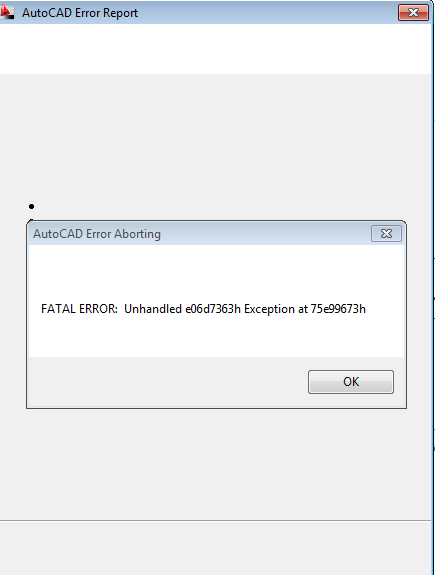
How can I solve it?
Thanks
Yaqi
2 REPLIES 2
Message 3 of 3


10-01-2012
09:13 AM
- Mark as New
- Bookmark
- Subscribe
- Mute
- Subscribe to RSS Feed
- Permalink
- Report
10-01-2012
09:13 AM
Hi Yaqi Zhang,
Did you try disposing the PlotProgressDialog after you are done with it ?

Balaji
Developer Technical Services
Autodesk Developer Network
Reply
Topic Options
- Subscribe to RSS Feed
- Mark Topic as New
- Mark Topic as Read
- Float this Topic for Current User
- Bookmark
- Subscribe
- Printer Friendly Page


