Community
- Forums Home
- >
- AutoCAD Community
- >
- AutoCAD Customization Forum
- >
- .NET forum
- >
- Re: Issue with Model popup in autocad
.NET
Turn on suggestions
Auto-suggest helps you quickly narrow down your search results by suggesting possible matches as you type.
 This page has been translated for your convenience with an automatic translation service. This is not an official translation and may contain errors and inaccurate translations. Autodesk does not warrant, either expressly or implied, the accuracy, reliability or completeness of the information translated by the machine translation service and will not be liable for damages or losses caused by the trust placed in the translation service.
Translate
This page has been translated for your convenience with an automatic translation service. This is not an official translation and may contain errors and inaccurate translations. Autodesk does not warrant, either expressly or implied, the accuracy, reliability or completeness of the information translated by the machine translation service and will not be liable for damages or losses caused by the trust placed in the translation service.
Translate
Reply
Topic Options
- Subscribe to RSS Feed
- Mark Topic as New
- Mark Topic as Read
- Float this Topic for Current User
- Bookmark
- Subscribe
- Printer Friendly Page
Message 1 of 11


09-26-2012
11:23 PM
- Mark as New
- Bookmark
- Subscribe
- Mute
- Subscribe to RSS Feed
- Permalink
- Report
09-26-2012
11:23 PM
Issue with Model popup in autocad
Hi,
I am having issue with autocad with .net addin.
Here is the scenario :
I am showing model up of wpf application on autocad application.
As am showing wpf application as model popup,Once i opne the model popups , autocad applications is in disable mode untill wpf model pop up closed. This is working fine.
But, while doing any operations in wpf model pupup, if wpf addin is throughs any exception
Wpf model is in open,Autocad is getting enabled but is should not enable.,
Please help me on this.
Regards,
Raman
10 REPLIES 10
Message 2 of 11


10-01-2012
01:41 PM
- Mark as New
- Bookmark
- Subscribe
- Mute
- Subscribe to RSS Feed
- Permalink
- Report
10-01-2012
01:41 PM
Hi Raman,
I'n very sorry, but I don't understand your question. Please would you rewrite it more expansively. Also, providing a small sample to demonstrate the problem will help the people on this forum better understand your problem.
Cheers,
Stephen Preston
Autodesk Developer Network
Stephen Preston
Autodesk Developer Network
Message 3 of 11
10-03-2012
10:20 PM
- Mark as New
- Bookmark
- Subscribe
- Mute
- Subscribe to RSS Feed
- Permalink
- Report
Message 4 of 11
10-03-2012
10:30 PM
- Mark as New
- Bookmark
- Subscribe
- Mute
- Subscribe to RSS Feed
- Permalink
- Report
10-03-2012
10:30 PM
Hi,
Please find the attachment with below details
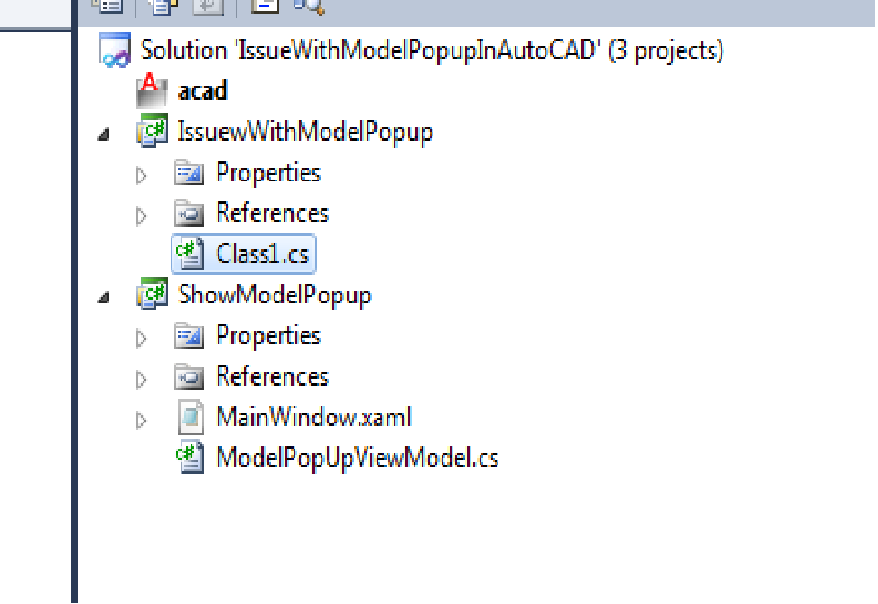
1. Project -- solution structure with two projects.
- Autocad project
- model pupup project.
2. Netload -- Net loading the autocad dll
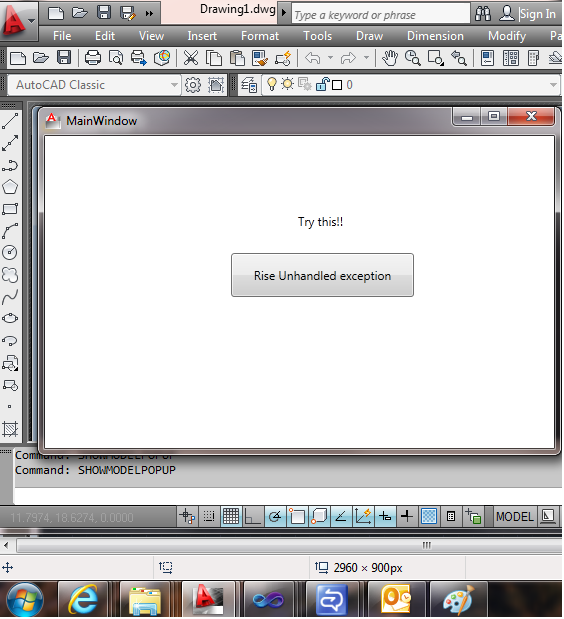
3. showmodelpopup - displaying popup using below code snippet
[CommandMethod("ShowModelPopUp")]
publicvoid ShowModelPopUp()
{ newModelPopUpViewModel().ShowModelPopUP(); }
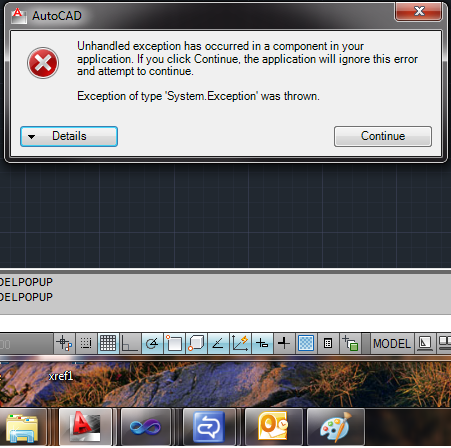
4. Execeptionmessagefrom autocad -- Getting autocad error message
5. EditingAutocad -- Able to access autocad menu bar, even though model pup up is in open state.
I am facing issue as shown in image 4 (Execeptionmessagefrom). When ever some error throws from autocad main application. i will get access to autocad application access, even though model popop is open state.
I don't allow to access autocad application access, when model popup is in open state
Please help me on this.
Regards,
Raman
Message 5 of 11

10-05-2012
03:11 AM
- Mark as New
- Bookmark
- Subscribe
- Mute
- Subscribe to RSS Feed
- Permalink
- Report
10-05-2012
03:11 AM
The only files you've posted so far are image files.
I woudln't expect much in the way of help without showing the code (and when I say 'show', I don't mean an image showing the code).
Message 6 of 11
10-08-2012
02:03 AM
- Mark as New
- Bookmark
- Subscribe
- Mute
- Subscribe to RSS Feed
- Permalink
- Report
10-08-2012
02:03 AM
Hi,
I am here with sample project for explaining the issue.
Net load the given sample project into autocad application and given the command as "ShowModelPopUp"
We can see one model pop up with Button and some text.
On click of the button("Rise Unhandled exception"). Autocad application throws an exception message.
After closing the autocad error message box, I am able to access autocad application, even though the model pop up is in open state., Actually i should not allow user to access autocad application and show model pop up.
Please guide me on this.
Regards,
Raman
Message 7 of 11

10-16-2012
03:55 AM
- Mark as New
- Bookmark
- Subscribe
- Mute
- Subscribe to RSS Feed
- Permalink
- Report
10-16-2012
03:55 AM
Hello Raman,
The project that you shared is not in a buildable form. So cant really try to reproduce that behavior.
If you are trying to show a WPF window inside AutoCAD as a modal window then you must be using :
Autodesk.AutoCAD.ApplicationServices.Application.ShowModalWindow()
Also, I fail to understand the reason why it is so important for you to have this modal behavior when there is an exception. If there is an exception, AutoCAD will try and want to grab the user's attention to submit a CER which is mostly what a user would want to do in such a scenario.

Balaji
Developer Technical Services
Autodesk Developer Network
Message 8 of 11
11-14-2012
09:32 PM
- Mark as New
- Bookmark
- Subscribe
- Mute
- Subscribe to RSS Feed
- Permalink
- Report
11-14-2012
09:32 PM
Hi,
Thanks for your response on this issue.
As you have mentioned above post, I have used below statement for opening model pop up
Autodesk.AutoCAD.ApplicationServices.Application.ShowModalWindow().
Now, on getting error, model popup is not minimizing , that's what I am excepting.
One issue here is, even though, model pop up is open on AutoCAD, I am able to access AutoCAD tool bar, that should not be.
Please help me on this issue
Regards,
Raman
Message 9 of 11

11-16-2012
01:14 PM
- Mark as New
- Bookmark
- Subscribe
- Mute
- Subscribe to RSS Feed
- Permalink
- Report
11-16-2012
01:14 PM
Can you post some code showing the error?
Also why can't you use a palette? I have programs that bring up palettes automatically while in a command and automatically disappear when the comment ends. If you want i can post some code.
---------------------------

(defun botsbuildbots() (botsbuildbots))
(defun botsbuildbots() (botsbuildbots))
Message 10 of 11
12-04-2012
02:40 AM
- Mark as New
- Bookmark
- Subscribe
- Mute
- Subscribe to RSS Feed
- Permalink
- Report
12-04-2012
02:40 AM
Hi,
I am here with sample project.
Please netload the dll named "IssuewWithModelPopup.dll"
After loading above dll to autocad application
Enter command as "SHOWAUTOCADMODELPOPUP"
We will get one popup with button text "Rise Unhandled exception".
On Click of button we will get autocad exception dialog.
Once i closed, autocad exception dialog,
Autocad is getting enabled but is should not enable.,
Please help me on this.
Regards,
Raman
Message 11 of 11
12-10-2012
11:35 PM
- Mark as New
- Bookmark
- Subscribe
- Mute
- Subscribe to RSS Feed
- Permalink
- Report
12-10-2012
11:35 PM
Hello Raman,
Sorry, I still dont get the whole picture of why this is so important for your plugin.
When you say,
"Once i closed, autocad exception dialog, Autocad is getting enabled but is should not enable"
Unhandled exceptions in plugins should not ideally cause AutoCAD to hang, so why is that you expect that AutoCAD should not enable again ?
You plugin should gracefully handle all the exceptions including a catch-all for System.Exception and take appropriate action without passing them on to AutoCAD. I dont think the behavior of AutoCAD to react to those unhandled exceptions from plugins can be configured.
Balaji
Developer Technical Services
Autodesk Developer Network

Reply
Topic Options
- Subscribe to RSS Feed
- Mark Topic as New
- Mark Topic as Read
- Float this Topic for Current User
- Bookmark
- Subscribe
- Printer Friendly Page