Community
- Forums Home
- >
- AutoCAD Community
- >
- AutoCAD Customization Forum
- >
- .NET forum
- >
- Re: How to open autocad.exe in C# , PLEASE HELP!
.NET
Turn on suggestions
Auto-suggest helps you quickly narrow down your search results by suggesting possible matches as you type.
 This page has been translated for your convenience with an automatic translation service. This is not an official translation and may contain errors and inaccurate translations. Autodesk does not warrant, either expressly or implied, the accuracy, reliability or completeness of the information translated by the machine translation service and will not be liable for damages or losses caused by the trust placed in the translation service.
Translate
This page has been translated for your convenience with an automatic translation service. This is not an official translation and may contain errors and inaccurate translations. Autodesk does not warrant, either expressly or implied, the accuracy, reliability or completeness of the information translated by the machine translation service and will not be liable for damages or losses caused by the trust placed in the translation service.
Translate
Reply
Topic Options
- Subscribe to RSS Feed
- Mark Topic as New
- Mark Topic as Read
- Float this Topic for Current User
- Bookmark
- Subscribe
- Printer Friendly Page
Message 1 of 26

Anonymous
7641 Views, 25 Replies
02-05-2012
12:13 AM
- Mark as New
- Bookmark
- Subscribe
- Mute
- Subscribe to RSS Feed
- Permalink
- Report
02-05-2012
12:13 AM
How to open autocad.exe in C# , PLEASE HELP!
I am using Visual.net 2008 with autocad.net API, autocad2010, windows 7 home
right now, i want to start autocad.exe, and draw some lines in it, by using C# WindowsFormsApplication, not C# Class Library
still i cannot start autocad.exe
I hope to open cad by autocad.net API, not ObjectARX or others
I am a new one, please HELP ME
thanks very very much !
25 REPLIES 25
Message 2 of 26
Anonymous
in reply to:
Anonymous
02-05-2012
02:12 AM
- Mark as New
- Bookmark
- Subscribe
- Mute
- Subscribe to RSS Feed
- Permalink
- Report
02-05-2012
02:12 AM
There is no exe autocad, you mean acad.exe?
You cant program in autocad through windows forms with just opening acad.exe with out ObjectARX
Message 3 of 26


02-05-2012
03:14 AM
- Mark as New
- Bookmark
- Subscribe
- Mute
- Subscribe to RSS Feed
- Permalink
- Report
02-05-2012
03:14 AM
If you want to don't add any reference to acad's libraries
in this case just one way to do it is using late-binding to AutoCAD
There is a ton of code to do this work
_____________________________________
C6309D9E0751D165D0934D0621DFF27919
C6309D9E0751D165D0934D0621DFF27919
Message 4 of 26
02-05-2012
05:43 AM
- Mark as New
- Bookmark
- Subscribe
- Mute
- Subscribe to RSS Feed
- Permalink
- Report
02-05-2012
05:43 AM
Here are 2 files were written on vb.net
See if this will be working fror you
_____________________________________
C6309D9E0751D165D0934D0621DFF27919
C6309D9E0751D165D0934D0621DFF27919
Message 6 of 26
02-06-2012
08:17 AM
- Mark as New
- Bookmark
- Subscribe
- Mute
- Subscribe to RSS Feed
- Permalink
- Report
02-06-2012
08:17 AM
Create Wndws Forms Application project
Name it AcadTestExe
Add form Form1 to project
Drop on form OpenFileDialog, texbox and button
Keep default names for all controls
Add class ReflectionCommands.cs
Copy all codes accodingy to classes, then hit F5
~'J'~
_____________________________________
C6309D9E0751D165D0934D0621DFF27919
C6309D9E0751D165D0934D0621DFF27919
Message 7 of 26
02-06-2012
06:26 PM
- Mark as New
- Bookmark
- Subscribe
- Mute
- Subscribe to RSS Feed
- Permalink
- Report
02-06-2012
06:26 PM
Dear Hallex, you are genius!!!
I tried your codes, and it works very well~
Thank for your help, It's really great~
althought I cannot figured out how you fix it without adding any CAD liraries or dll
I am a new one in cad developping , these days I kept searching for any useful book or documents
still there is no result
Can you give me some advice for learning cad with C# ? Is there any useful documents for me ?
PS: I can draw circle by your incredible codes, Could you please tell me how to draw a ARC ?
Message 8 of 26
02-06-2012
09:00 PM
- Mark as New
- Bookmark
- Subscribe
- Mute
- Subscribe to RSS Feed
- Permalink
- Report
02-06-2012
09:00 PM
C'mon
This is very simple code
Glad you like it
This project does not require any
CAD library
I tested it on A2009-2010 Win7
Will be back
~'J'~
_____________________________________
C6309D9E0751D165D0934D0621DFF27919
C6309D9E0751D165D0934D0621DFF27919
Message 9 of 26
02-06-2012
11:07 PM
- Mark as New
- Bookmark
- Subscribe
- Mute
- Subscribe to RSS Feed
- Permalink
- Report
02-06-2012
11:07 PM
your code is incredible simple, I enjoy it
I cannot understand you until now
with your help, I figured it how to draw an arc
thanks ~~~~~~
and please give me some advice 
Message 10 of 26
02-07-2012
12:27 AM
- Mark as New
- Bookmark
- Subscribe
- Mute
- Subscribe to RSS Feed
- Permalink
- Report
02-07-2012
12:27 AM
dear Hallex:
I use your code to draw some lines in cad,
It is ok in WIN7 64bit + AUTOCAD2008 and WinXP + AUTOCAD2004
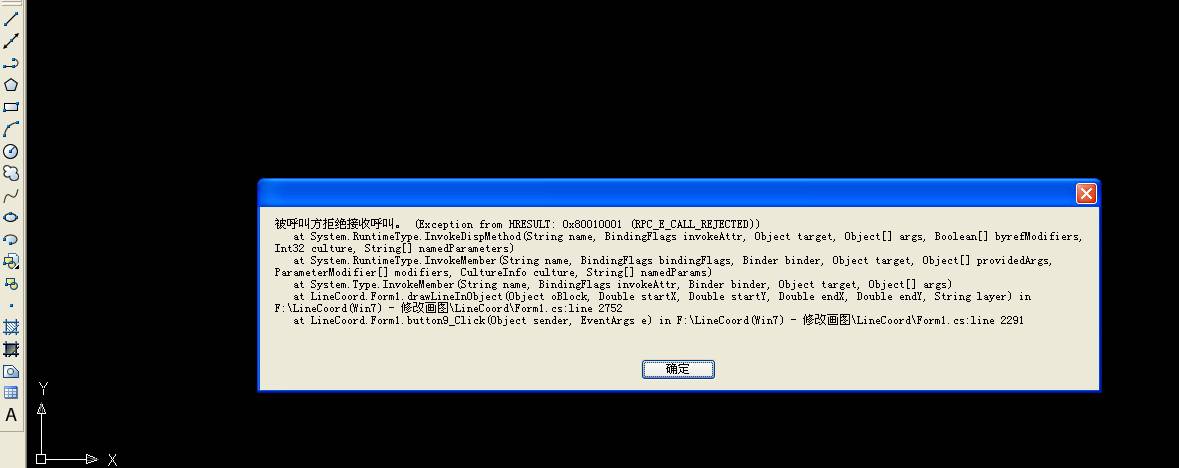
but errors happened in WinXP + AUTOCAD2008
my code is :
for (int k = 1; k < iHH.OutHHXY.Row - 1; k++)
{
pt2[0] = iHH.OutHHXY[k, 0];
pt2[1] = iHH.OutHHXY[k, 1];
drawLineInObject(oSpace, pt1[0], pt1[1], pt2[0], pt2[1], "0");
pt1[0] = pt2[0];
pt1[1] = pt2[1];
}
The error happened in these lines:
object oLine = oBlock.GetType().InvokeMember("AddLine", BindingFlags.InvokeMethod, null, oBlock, pts);
oLine.GetType().InvokeMember("Layer", BindingFlags.SetProperty, null, oLine, new object[] { layer });
oLine.GetType().InvokeMember("Update", BindingFlags.InvokeMethod, null, oLine, null);
BUT , if I debug the loops one by one, It runs well. I am so confused~
please help me ~~
Thanks very much !!!
Message 11 of 26
02-07-2012
02:45 AM
- Mark as New
- Bookmark
- Subscribe
- Mute
- Subscribe to RSS Feed
- Permalink
- Report
02-07-2012
02:45 AM
Try attached code it I rewrote it completely
I added some other things take a look at
the additional functions
_____________________________________
C6309D9E0751D165D0934D0621DFF27919
C6309D9E0751D165D0934D0621DFF27919
Message 12 of 26
02-07-2012
10:11 PM
- Mark as New
- Bookmark
- Subscribe
- Mute
- Subscribe to RSS Feed
- Permalink
- Report
02-07-2012
10:11 PM
I wan't to do your homework sorry
In the attached file all is enough for
the basic operations
you have to read some books
about C# reference for more
_____________________________________
C6309D9E0751D165D0934D0621DFF27919
C6309D9E0751D165D0934D0621DFF27919
Message 13 of 26
02-07-2012
10:34 PM
- Mark as New
- Bookmark
- Subscribe
- Mute
- Subscribe to RSS Feed
- Permalink
- Report
02-07-2012
10:34 PM
 Dear Hallex, Thanks very much for your patience andexcellent codes
I am reading some articles and books, I am sorry to cost you much time
Message 14 of 26
02-07-2012
11:32 PM
- Mark as New
- Bookmark
- Subscribe
- Mute
- Subscribe to RSS Feed
- Permalink
- Report
02-07-2012
11:32 PM
You're welcome
Just a hint:
Don't forget to rewrite drawLineInObject function
easier yet to use double[] as start and end points as
arguments
Something like:
{code}
public static object DrawLine (object oBlock, double[] p1, double[] p2, string layer)
{
// ... the rest portion of your code is goes here.....
return oLine;
}{code}
_____________________________________
C6309D9E0751D165D0934D0621DFF27919
C6309D9E0751D165D0934D0621DFF27919
Message 15 of 26
02-08-2012
08:46 PM
- Mark as New
- Bookmark
- Subscribe
- Mute
- Subscribe to RSS Feed
- Permalink
- Report
02-08-2012
08:46 PM
Dear Hallex:
I read your code and test in Win7 with .net2008 cad2010, runs very well ~
but in winXP .net2008 cad2008, error happens
it says cannot find the following files:
at System.Diagnostics.Process.StartWithShellExecuteEx(ProcessStartInfo startInfo)
at System.Diagnostics.Process.Start()
at System.Diagnostics.Process.Start(ProcessStartInfo startInfo)
at System.Diagnostics.Process.Start(String fileName)
at AcadTestExe.ReflectionCommands.TestACAD(String fname) in F:........
at AcadTestExe.Form1.button1 Click(Object sender. EventArgs e) in F:.......
Dear Hallex, should I add some libraries in winXP?
I am a little confused,
what language do you think is fit for me to learn cad devlopping?
ObjectARX, or VBA, or visual Lisp, or C# ?
can you introduce some reference book for me ?
right now I am more familiar with C#, C++ and matlab
Thanks for your patience and incredible codes~~~
Message 16 of 26
02-08-2012
10:37 PM
- Mark as New
- Bookmark
- Subscribe
- Mute
- Subscribe to RSS Feed
- Permalink
- Report
02-08-2012
10:37 PM
On the quick glance it may occurs by User Permission
See here for more:
http://msdn.microsoft.com/en-us/library/system.diagnostics.process.process(v=vs.80).aspx
_____________________________________
C6309D9E0751D165D0934D0621DFF27919
C6309D9E0751D165D0934D0621DFF27919
Message 17 of 26
02-09-2012
08:52 PM
- Mark as New
- Bookmark
- Subscribe
- Mute
- Subscribe to RSS Feed
- Permalink
- Report
02-09-2012
08:52 PM
Dear Hallex:
I test your code in anther computers
It runs well in WinXP and Win7 64bit, cad2004, 2007, 2008, 2010
you are genius, Hallex
I read many articles
and never see cad C# code without any libraries
your defined AcadApp and AcadDoc as Object
Is it the reason that can runs well in different OS and CAD ?
Message 18 of 26
02-09-2012
11:31 PM
- Mark as New
- Bookmark
- Subscribe
- Mute
- Subscribe to RSS Feed
- Permalink
- Report
02-09-2012
11:31 PM
Hi,
There is no magic in my crappy codes
just well-known runtime methods nothing else
Please see here for more:
http://msdn.microsoft.com/en-us/library/system.reflection(v=vs.80).aspx
Hey, cease to praise me, I same stupid, as my gray-haired @$$ 🙂
~'J'~
_____________________________________
C6309D9E0751D165D0934D0621DFF27919
C6309D9E0751D165D0934D0621DFF27919
Message 19 of 26
02-10-2012
04:47 AM
- Mark as New
- Bookmark
- Subscribe
- Mute
- Subscribe to RSS Feed
- Permalink
- Report
02-10-2012
04:47 AM
Dear Hallex:
I never found cad C# code as powerful as yours which even need not dll or com
so I admire you
I am reading cad VBA now, and take a look at the MSDN web link you gave me
I know your code use some VBA Method, just like AddLine, Open...
My question is :
how do you know the parameters of using vba method?
For example: object AcDoc = AcadDocs.GetType().InvokeMember("Open", BindingFlags.InvokeMethod, null, AcadDocs, args, null);
you define args: args[0] = fname;(file path and name) args[1] = false;(can write dwg)
I saw in vba is :ThisDrawing.Application.Documents.Open "c:\1.dwg"
how do you know need fname together with false?
where can I find the rules?
all in C# library reference, reflection???
Message 20 of 26
02-10-2012
06:09 AM
- Mark as New
- Bookmark
- Subscribe
- Mute
- Subscribe to RSS Feed
- Permalink
- Report
02-10-2012
06:09 AM
No, all these arguments in AutoCAD Help file
That is a lot of work to digg it from there
Say, open VBA editor in AutoCAD by Alt+F11
Then in console add dummy Sub say:
{code}
Public sub Test()
type Open in here, then select a word Open
by double click on them and press F1
See then all arguments in the Help file
End sub
{code}
Hint:
To convert any arguments to numeric values:
Open 'Immediate Window' in same editor and type here
any of AutoCad's constants preceded with question mark like this:
?acActiveViewPort
or
?acSelectionSetAll
or
??acselectionSetCrossingPolygon
or
?acMiddleCenter ETC, ETC
Then press Enter
You should see a numeric equivalent of this constant
in the same window next line below
So nothing smart it's just a lot of work, you have to digg deeper yourself
_____________________________________
C6309D9E0751D165D0934D0621DFF27919
C6309D9E0751D165D0934D0621DFF27919
Reply
Topic Options
- Subscribe to RSS Feed
- Mark Topic as New
- Mark Topic as Read
- Float this Topic for Current User
- Bookmark
- Subscribe
- Printer Friendly Page


