How to close a PaletteSet from code

How to close a PaletteSet from code

Anonymous
Not applicable
3,391 Views
11 Replies
Message 1 of 12

How to close a PaletteSet from code

Anonymous
Not applicable

Hi Guys,


Because there is no way to tell the difference between miniminise ("-") to close ("x") on paletteset. I put a button on my user control to write my own code to close the PaletteSet.


m_ps is the current PaletteSet, m_uc is my user control which has been loaded into m_ps.


what code I need to write inside my close button click event to unload m_uc , close m_ps and set both m_uc and m_ps to nothing?


 Thanks very much

0 Likes
3,392 Views
11 Replies
Replies (11)
Message 2 of 12

Balaji_Ram
Alumni
Alumni

Hi Yaqi,


Simply set the Visible property of the palette to true/false from the button handler.


Balaji
Developer Technical Services
Autodesk Developer Network

0 Likes
Message 3 of 12

Anonymous
Not applicable

Help!

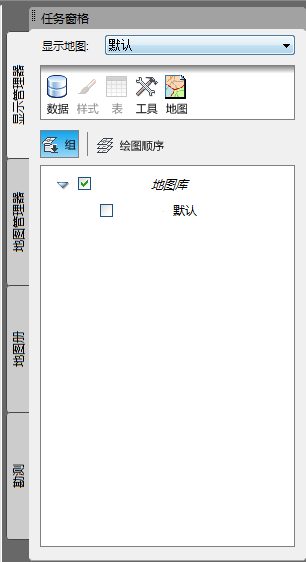
How can I get a PaletteSet which is not created by myself?

e.g. now I know the way to get the ribbon paletteset by Autodesk.AutoCAD.Ribbon.RibbonServices.RibbonPaletteSet.


But how can I get other paletteset like this palette(or this is not a palette but a panel??):

 PaletteSet.png("Task pane" in English?)

Is there a property to get  all the palette collection??


Thanks for any help!


0 Likes
Message 4 of 12

Balaji_Ram
Alumni
Alumni

Sorry, I dont find any way to get access to the PaletteSet that hasnt been created by you.


I am just curious to know, why you would need that if it wasnt created by your plugin ?


Balaji
Developer Technical Services
Autodesk Developer Network

0 Likes
Message 5 of 12

Anonymous
Not applicable

There is nowhere to get a PaletteSet which is not created by yourself, because AutoCAD does not save it to the application settings.


What we see on AutoCAD is ToolPalette, which is different which PaletteSet. ToolPalette is stored as an external .ATC file that is controlled (read & save) by ToolPaletteManager.Manager which can load external catalogs (content location URLs) to display on this ToolPalette. I don't see .NET API to load an existing ToolPalette from an external ATC file. From there you can handle it.


PaletteSet is the code container that we can place our user controls (PaletteSet.Add method), and we have a right to handle it. But it is initialized by code and not saved to an external file like .ATC of ToolPalette.


-Khoa


0 Likes
Message 6 of 12

DiningPhilosopher
Collaborator
Collaborator

You don't have access to PaletteSets that AutoCAD creates and uses (except for the Ribbon), but most of them have commands to close them (for example, "PROPERTIESCLOSE" will close the PropertiesPalette).


0 Likes
Message 7 of 12

ceethreedee.com
Collaborator
Collaborator

12 years late. But hey, might be useful to someone.


The simplest way to close your palette is to simply execute the command that launched it, by using SendStringToExecute() from the active document. Then handle the close in the command that launches the palette.

So from your palette viewmodel, you can link up a button to close like so.

ceethreedeecom_0-1730722458093.png

This function would be in your viewmodel.


public void ClosePalette(string commandName)
{
    Document doc = Application.DocumentManager.MdiActiveDocument;
    Editor ed = doc.Editor;
    try
    {
        if (doc != null)
        {
            doc.SendStringToExecute(commandName + "\n", true, false, false);
        }
    }
    catch (System.Exception ex)
    {
        ed.WriteMessage("Error closing palette: " + ex.Message);
    }
}


Then in the command that launches your palette, you add a bit of toggle code. If the palette is already open then close it.. Like below.


static PaletteSet MyPalette ;
[CommandMethod("CTD", "CTD_MYCOMMANDNAME", CommandFlags.Modal)]
public void CTD_MYCOMMANDNAME()
{
    //Check if palette is open if not open it
    if (MyPalette == null)
    {
        MyPalette = new MyPaletteSet
        {
            Size = new Size(800, 500),
            Name = "My Palette Name",
            Visible = true
        };

    }
    else
    {
        //if the palette is open close it
        if (MyPalette.Visible)
        {
            MyPalette.Visible = false;
            MyPalette.Dispose();
        }
        else
        {
            //if the palette is closed open it
            MyPalette = new MyPaletteSet
            {
                Size = new Size(800, 500),
                Name = "My Palette Name",
                Visible = true
            };
            MyPalette.Visible = true;
        }
    }


}


Civil 3D 2025 / Infraworks 2025
Win 10 -DELL Precision Notebook 7680

Want FREE TOOLS! Come get my free productivity tools for civil 3d from the appstore here Ceethreedee tools
Or from my website below!
https://ceethreedee.com/ceethreedee-tools
0 Likes
Message 8 of 12

norman.yuan
Mentor
Mentor

@ceethreedee.com 

While your code can close(actually hide) the PaletteSet from the hosted palette (WinForm/WPF usercontrol), it unnecessarily add a dependency to an outside factor (commandmethod name, which could be changed for some reasons, and code compiling would not catch the change, thus a potential bug breaking the execution).


A better approach would be to build the explicit ownership relation between the palette and the paletteset by ALWAY derive the custom PaletteSet from PaletteSet class: when adding usercontrol as Palette, set its owner/parent to the PalletteSet, so the palette would have access to the PaletteSet, this be able to close/hide it. Some pseudo code:


public class MyPalleteSet : PaletteSet

{

    private UserControlA _palletteA;

    public MyPaletteSet(...):base(...)

    {

        ...

        _paletteA=new palleteA(this);

        Add("xxxx", _paletteA);

       ...

    }

}


public class UserControlA : UserControl

{

    private MyPaletteSet _parent = null;

    // Default constructor, required by VS desiner

   public UserControlA()

   {

      InitializeComponents();

   }


   // constructor used when added to PaletteSet

   public UserControlA(MyPaletteSet ps) : this()

   {

       _parent = ps;

   }

   public void ClosePaletteSet()

   {

      _parent.Close();

   }

}


Of course, another way is to let usercontrol/palette raise an event (when a button of the usercontrol is clicked, for example). Then when the usercontrol is added to the PaletteSet, the PaletteSet registers an event handler, in which the PaletteSet can decide to close/hide itself, or even veto the closing request, if necessary.


Either way, once the custom PaletteSet is created, its palette child can call its Close() method from inside, no dependency to outside.

Norman Yuan

Drive CAD With Code

EESignature

0 Likes
Message 9 of 12

ceethreedee.com
Collaborator
Collaborator

@norman.yuan have you attempted the pseudo code?

I recall having an issue handing the paletteset to the user control or a viewmodel. It doesn't shut it down when calling the Close() method. The palette just says visible on the screen without the user been able to do anything..

Civil 3D 2025 / Infraworks 2025
Win 10 -DELL Precision Notebook 7680

Want FREE TOOLS! Come get my free productivity tools for civil 3d from the appstore here Ceethreedee tools
Or from my website below!
https://ceethreedee.com/ceethreedee-tools
0 Likes
Message 10 of 12

norman.yuan
Mentor
Mentor

@ceethreedee.com 

PaletteSet.Close() actually hides itself, which is equivelant to set its Visibility property to Visibility.Hide. That is, once a PaletteSet is loaded, it stays in the AutoCAD's memory until AutoCAD session ends. That is why PaletteSet is usually instantiated as static instance.


Norman Yuan

Drive CAD With Code

EESignature

0 Likes
Message 11 of 12

ceethreedee.com
Collaborator
Collaborator

mmm just tried it..


Close() method doesn't work.. It just freezes the palette and doesn't remove it from the screen. Which is what i remember happening.


However setting the visibility property to false hides the palette. though. Odd...  

            if (paletteSet != null)
            {
                paletteSet.Visible = false;
                //paletteSet.Close();
            }


Civil 3D 2025 / Infraworks 2025
Win 10 -DELL Precision Notebook 7680

Want FREE TOOLS! Come get my free productivity tools for civil 3d from the appstore here Ceethreedee tools
Or from my website below!
https://ceethreedee.com/ceethreedee-tools
0 Likes
Message 12 of 12

norman.yuan
Mentor
Mentor

Sorry, I should not use Close() method. In fact, in my coding history with PaletteSet, I never used Close(), which is inherited from Autodesk.AutoCAd.Windows.Window. I always used Visible property for true/false to show/hide the PaletteSet.  So, it is interesting that you prompted me that Close() method call would actually freeze the PaletteSet (while AutoCAD would still alive and even responsible). This behaviour is not limited when the Close() is called from a PaletteSet's child Palette. 


Anyway, as I suggested, it would be better to show/hide without having to know an external command name. For anyone who may read this thread, below is the simple code to show how to close/hide the PaletteSet from inside in 2 ways:


The UserControl as Palette


using System.Windows.Forms;

namespace MiscTest
{
    public partial class ThePalette : UserControl
    {
        private readonly PaletteSet _owner = null;

        public ThePalette()
        {
            InitializeComponent();
        }

        public ThePalette(PaletteSet owner) : this()
        {
            _owner = owner;
        }

        public event EventHandler ClosingRequested;

        private void btnClose_Click(object sender, EventArgs e)
        {
            if (_owner !=null)
            {
                MessageBox.Show("PaletteSet is to be closed directly from the child palette.");
                _owner.Visible=false;
            }
        }

        private void btnClosingEvent_Click(object sender, EventArgs e)
        {
            ClosingRequested?.Invoke(this, EventArgs.Empty);
        }
    }
}


this is what the UserControl looks like:

normanyuan_2-1730910964928.png

The PaletteSet:


using Autodesk.AutoCAD.Windows;
using System;
using System.Windows;

namespace MiscTest
{
    public class MyPaletteSet : PaletteSet
    {
        private readonly ThePalette _palette;
        public MyPaletteSet() : base("", "", new Guid("DDC2578B-1C9D-49EB-8B31-6A80520981E0"))
        {
            Dock = DockSides.None;
            Size = new System.Drawing.Size(400, 400);

            _palette = new ThePalette(this);
            Add("My Data View", _palette);
            _palette.ClosingRequested += (o, e) =>
            {
                MessageBox.Show("PaletteSet is to be closed by the request from child palette.");
                Visible=false;
            };
        }
    }
}


The command to run:


        private static MyPaletteSet _mypaletteSet = null;
        [CommandMethod("MyPS")]
        public static void ShowMyPaletteSet()
        {
            if (_mypaletteSet == null)
            {
                _mypaletteSet = new MyPaletteSet();
            }
            _mypaletteSet.Visible = true;
        }


As one can see, if using the raising "close request" event approach, the palette does not have to know anything about its owner/PaletteSet, which is a good coding practice. But in case that the child palette needs to access owner's power (properties/methods), simply pass the owner in a constructor would make things simple and straightforward. So, choose one of the 2 ways based on the needs.


Norman Yuan

Drive CAD With Code

EESignature