• Industries
  • Products
  • Buy
  • Services & Support
  • Communities
  • Discussion Groups

    .NET

    Reply
    Valued Contributor
    yaqiz
    Posts: 84
    Registered: ‎07-14-2010

    How to close a PaletteSet from code

    174 Views, 5 Replies
    07-23-2012 09:35 AM

    Hi Guys,


    Because there is no way to tell the difference between miniminise ("-") to close ("x") on paletteset. I put a button on my user control to write my own code to close the PaletteSet.


    m_ps is the current PaletteSet, m_uc is my user control which has been loaded into m_ps.


    what code I need to write inside my close button click event to unload m_uc , close m_ps and set both m_uc and m_ps to nothing?


     Thanks very much

    Please use plain text.
    ADN Support Specialist
    Balaji_Ram
    Posts: 358
    Registered: ‎03-21-2011

    Re: How to close a PaletteSet from code

    07-26-2012 07:08 AM in reply to: yaqiz

    Hi Yaqi,


    Simply set the Visible property of the palette to true/false from the button handler.


    Balaji
    Developer Technical Services
    Autodesk Developer Network

    Please use plain text.
    New Member
    Posts: 1
    Registered: ‎11-29-2012

    Re: How to close a PaletteSet from code

    11-29-2012 12:54 AM in reply to: yaqiz

    Help!

    How can I get a PaletteSet which is not created by myself?

    e.g. now I know the way to get the ribbon paletteset by Autodesk.AutoCAD.Ribbon.RibbonServices.RibbonPaletteSet.


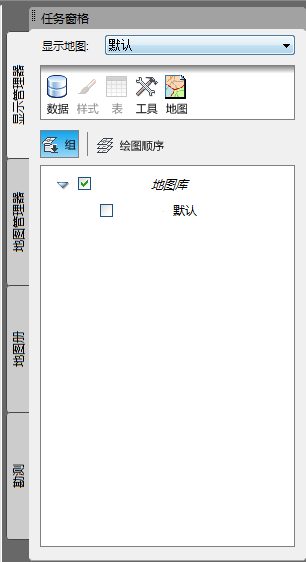
    But how can I get other paletteset like this palette(or this is not a palette but a panel??):

     PaletteSet.png("Task pane" in English?)

    Is there a property to get  all the palette collection??


    Thanks for any help!


    Please use plain text.
    ADN Support Specialist
    Balaji_Ram
    Posts: 358
    Registered: ‎03-21-2011

    Re: How to close a PaletteSet from code

    12-06-2012 08:44 AM in reply to: celwk

    Sorry, I dont find any way to get access to the PaletteSet that hasnt been created by you.


    I am just curious to know, why you would need that if it wasnt created by your plugin ?


    Balaji
    Developer Technical Services
    Autodesk Developer Network

    Please use plain text.
    Distinguished Contributor
    khoa.ho
    Posts: 131
    Registered: ‎09-15-2011

    Re: How to close a PaletteSet from code

    12-06-2012 12:03 PM in reply to: celwk

    There is nowhere to get a PaletteSet which is not created by yourself, because AutoCAD does not save it to the application settings.


    What we see on AutoCAD is ToolPalette, which is different which PaletteSet. ToolPalette is stored as an external .ATC file that is controlled (read & save) by ToolPaletteManager.Manager which can load external catalogs (content location URLs) to display on this ToolPalette. I don't see .NET API to load an existing ToolPalette from an external ATC file. From there you can handle it.


    PaletteSet is the code container that we can place our user controls (PaletteSet.Add method), and we have a right to handle it. But it is initialized by code and not saved to an external file like .ATC of ToolPalette.


    -Khoa


    Please use plain text.
    Valued Mentor
    Posts: 310
    Registered: ‎05-06-2012

    Re: How to close a PaletteSet from code

    12-07-2012 04:38 AM in reply to: celwk

    You don't have access to PaletteSets that AutoCAD creates and uses (except for the Ribbon), but most of them have commands to close them (for example, "PROPERTIESCLOSE" will close the PropertiesPalette).


    Please use plain text.