.NET
- Subscribe to RSS Feed
- Mark Topic as New
- Mark Topic as Read
- Float this Topic to the Top
- Bookmark
- Subscribe
- Printer Friendly Page
Error While opening autocad using process.st art
- Mark as New
- Bookmark
- Subscribe
- Subscribe to RSS Feed
- Highlight
- Email to a Friend
- Report Inappropriate Content
Error While opening autocad using process.start
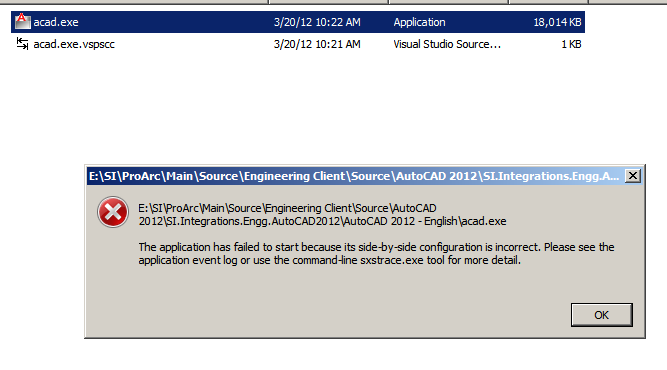
Error:
Activation context generation failed for "E:\SI\ProArc\Main\Source\Engineering Client\Source\AutoCAD 2012\SI.Integrations.Engg.AutoCAD2012\AutoCAD 2012 - English\acad.exe". Dependent Assembly PPClientAssembly,processorArchitecture="x86",type=
Please help me on this issue
Regards,
Raman
Solved! Go to Solution.
Re: Error While opening autocad using process.st art
- Mark as New
- Bookmark
- Subscribe
- Subscribe to RSS Feed
- Highlight
- Email to a Friend
- Report Inappropriate Content
Please post your code on how you are doing the process.start.
Any reason why you would use this method to start AutoCAD?
Re: Error While opening autocad using process.st art
- Mark as New
- Bookmark
- Subscribe
- Subscribe to RSS Feed
- Highlight
- Email to a Friend
- Report Inappropriate Content
Just i am clicking on acad.exe and i am getting above error.
and In Event Viewer It is showing as
Regards,
Raman
Re: Error While opening autocad using process.st art
- Mark as New
- Bookmark
- Subscribe
- Subscribe to RSS Feed
- Highlight
- Email to a Friend
- Report Inappropriate Content
It looks to me like you are trying to start the Acad.exe from a location other than where it was installed. I think you should be starting this from the AutoCAD subdirectory in C:\Program Files\Autodesk unless you have installed this in some other location.