Auto-suggest helps you quickly narrow down your search results by suggesting possible matches as you type.
Showing results for
Show only
|
Search instead for
Did you mean:
This page has been translated for your convenience with an automatic translation service. This is not an official translation and may contain errors and inaccurate translations. Autodesk does not warrant, either expressly or implied, the accuracy, reliability or completeness of the information translated by the machine translation service and will not be liable for damages or losses caused by the trust placed in the translation service.Translate
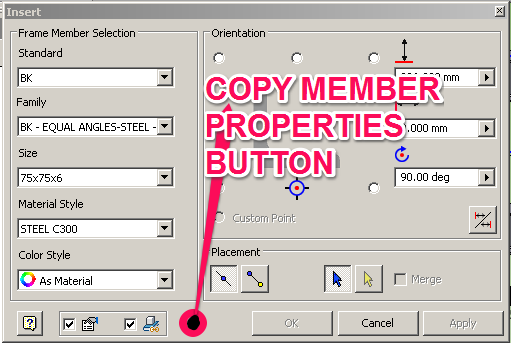
When adding members to a frame, instead of having to select the family and size and such have a selector to pick an existing member in the frame and make consume that selection to the Standard, Family, Size and Material Style. Could save a lot of time having to get frame member info BEFORE adding members to the frame.
This is a little known feature.... may not even be intentional,... but:
If you preselect a piece of steel in your FG assembly and THEN select "Insert Frame" from the ribbon, the dialog will open with the properties of the item you have pre-selected. It's very handy!
btw... this also works in Tube & Pipe. Select a fitting on the screen and select the Place Fitting button.... bam! There it is ready for placement without having to navigate the CC.
I'm not so sure that this should be made a duplicate. My suggestion was for a button in the FG window that when clicked would allow me to pick an existing frame member and populate the FG member selection windows with the chosen members info (Standard, Family, Size, Material, Appearance and Orientation). The other topic is talking about re-using the placed member in the frame, like making a pattern of the member. Regards, Brendan Henderson CAD Manager/Product Development Manager 'Programming today is a race between software engineers striving to build bigger and better idiot-proof programs, and the Universe trying to produce bigger and better idiots. So far, the Universe is winning' [KEOGH_EMBLEM_505_BY_132_TRANSPARENT_BG] _________________________________________________________________________________ From: B. Keogh & Sons Manufacturing Pty Ltd Phone: +61 3 5446 8377 Facsimile: +61 3 5446 1178 Mobile: +61 0428 509 212 E-mail: brendan.henderson@augers.com.au ********************************************************************************************************************* The Information contained in this E-Mail is confidential and intended solely for the use of the addressee(s) If you receive this E-Mail in error, any use, distribution or copying of this E-Mail is NOT permitted Please notify or forward unwanted E-Mail to the contact details above. B. Keogh & Sons Manufacturing Pty Ltd does not represent that this communication, or any future communication, is: (a) free of viruses or other defects, nor (b) received by you in the original form in which it was sent and without having been intercepted and/or tampered with by third parties, and specifically disclaims liability to you and any other person for any loss or damage resulting (directly or indirectly) from the receipt or use of this communication (including any attachments). *********************************************************************************************************************
This can sort of be done now. Before selecting the button to place a new frame member, select and highlight a member on your frame that is the same as the one you want placed. Now when you select Insert Frame, the dialog will be populated with the frame profile information of that piece you selected. All you have to set is the orientation, and place it. Saves a ton of time.
This idea has been implemented within Autodesk Inventor 2019.1. Special thanks to everyone who cast a vote for it. Please see the Autodesk Inventor2019.1 What's Newfor more info.