Announcements
Autodesk has retired Inventor Fusion. We recommend our customers to visit the Fusion 360 community for related inquiries.

"Insetting" a selected face - how?

"Insetting" a selected face - how?

Anonymous
Not applicable
3,364 Views
2 Replies
Message 1 of 3

"Insetting" a selected face - how?

Anonymous
Not applicable

Hello:

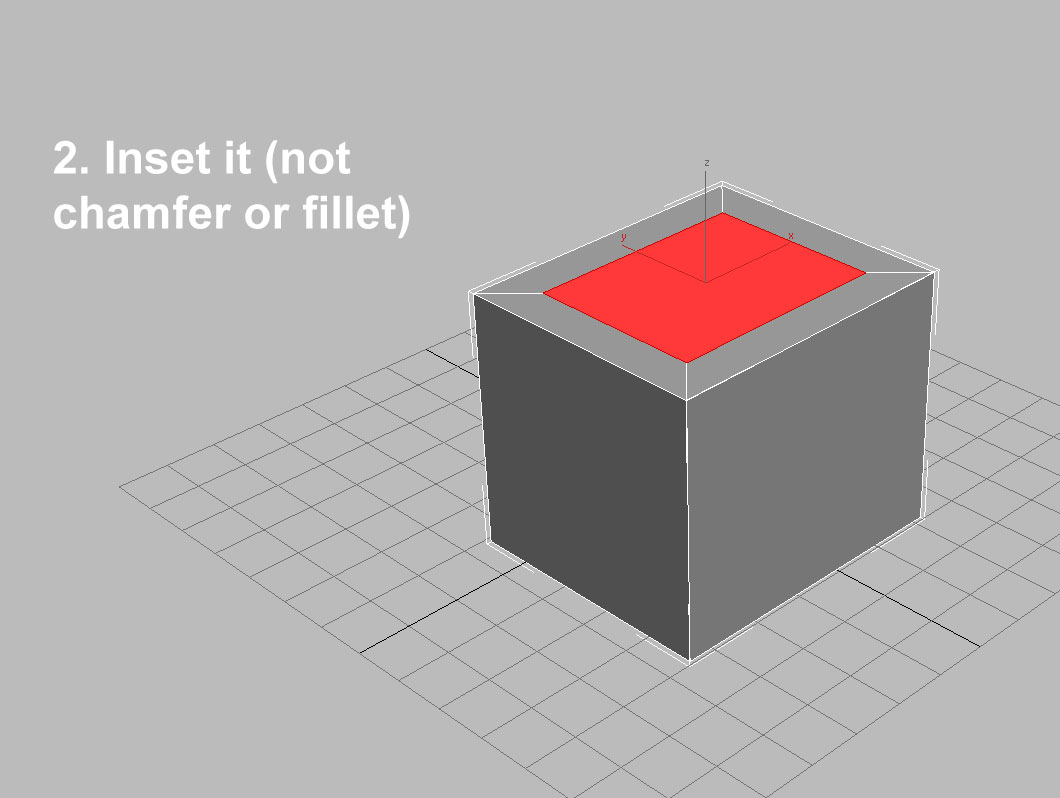
 Is there a way to "inset" a selected face on an object then shrink/scale it so the resized face can be extruded/pulled?

 Being new to Inventor Fusion, maybe I am missing something very obvious or the term "Inset" means something different with Inventor, I don't know.

 I have illustrated what I mean in the screenshots I made in 3D Studio Max to show what I am trying to do in Inventor Fusion.


Any help would be greatly appreciated. Thanks in advance!

Tom

Reply
Reply
0 Likes
Accepted solutions (1)
3,365 Views
2 Replies
Replies (2)
Message 2 of 3

JDMather
Consultant
Consultant
Accepted solution

Offset, the Presspull

Offset.png


-----------------------------------------------------------------------------------------
Autodesk Inventor 2019 Certified Professional
Autodesk AutoCAD 2013 Certified Professional
Certified SolidWorks Professional


Reply
Reply
Message 3 of 3

Anonymous
Not applicable

Thanks very much, JD! Again,  you showed me exactly what I was looking for!

*high fives you*

Tom

Reply
Reply
0 Likes