Community
- Forums Home
- >
- Community Archive - Read Only
- >
- Inventor Fusion (Read Only)
- >
- Unable to merge two faces- HELP!!
Announcements
Autodesk has retired Inventor Fusion. We recommend our customers to visit the Fusion 360 community for related inquiries.
Inventor Fusion (Read Only)
Turn on suggestions
Auto-suggest helps you quickly narrow down your search results by suggesting possible matches as you type.
 This page has been translated for your convenience with an automatic translation service. This is not an official translation and may contain errors and inaccurate translations. Autodesk does not warrant, either expressly or implied, the accuracy, reliability or completeness of the information translated by the machine translation service and will not be liable for damages or losses caused by the trust placed in the translation service.
Translate
This page has been translated for your convenience with an automatic translation service. This is not an official translation and may contain errors and inaccurate translations. Autodesk does not warrant, either expressly or implied, the accuracy, reliability or completeness of the information translated by the machine translation service and will not be liable for damages or losses caused by the trust placed in the translation service.
Translate
Reply
Topic Options
- Subscribe to RSS Feed
- Mark Topic as New
- Mark Topic as Read
- Float this Topic for Current User
- Bookmark
- Subscribe
- Printer Friendly Page
Message 1 of 8


05-01-2012
09:18 PM
- Mark as New
- Bookmark
- Subscribe
- Mute
- Subscribe to RSS Feed
- Permalink
- Report
05-01-2012
09:18 PM
Trying to merge two faces that were at one point in the design process two separate faces, and through tweaking one face to meet the other face it left a line on the face where they should have healed as one face. Dimensions are equal, there is no "step" or difference in elevation for either face, but I can not for the life of me get rid of the lines that separate the two faces.
I have used the merge feature to attempt to merge them, however it will not let me select the faces or click "OK". I'm hoping that there's a really simple solution here- can anyone help?
Problem lines are selected in the image below, shown in blue:

Solved! Go to Solution.
Solved by schneik-adsk. Go to Solution.
Solved by schneik-adsk. Go to Solution.
7 REPLIES 7
Message 2 of 8


05-02-2012
12:46 PM
- Mark as New
- Bookmark
- Subscribe
- Mute
- Subscribe to RSS Feed
- Permalink
- Report

Message 3 of 8
05-02-2012
06:57 PM
- Mark as New
- Bookmark
- Subscribe
- Mute
- Subscribe to RSS Feed
- Permalink
- Report
05-02-2012
06:57 PM
I can, but it doesn't heal into one face like you'd expect. Instead it just deletes the face and leaves a hole:
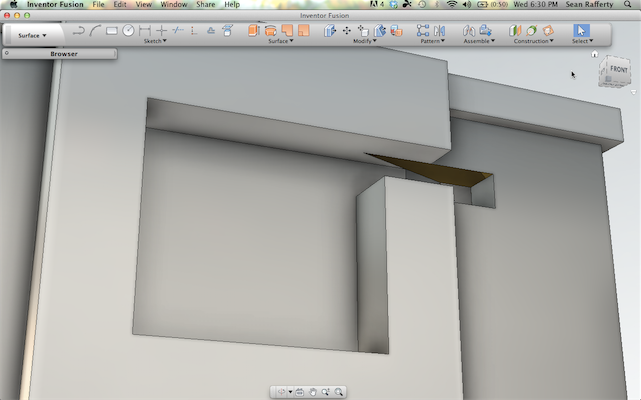
And same story if I delete the other face:

If i delete both faces it leaves the line:

Still can't create a single face from the two faces here- HELP!!!
Message 4 of 8
05-03-2012
07:43 AM
- Mark as New
- Bookmark
- Subscribe
- Mute
- Subscribe to RSS Feed
- Permalink
- Report
05-03-2012
07:43 AM
Switch to the "Solids" workspace and try the delete again. Workspaces can change behavior of some commands and delete when in the surface command does a delete where it will open the solid into a surface when it removes the face.
Delete in the solids workspace does a delete and will heal the gap.
While we are at it... If you could post the model here we could take a closer look and give you some other ideas.
Kevin Schneider
Message 5 of 8
05-04-2012
02:19 AM
- Mark as New
- Bookmark
- Subscribe
- Mute
- Subscribe to RSS Feed
- Permalink
- Report
05-04-2012
02:19 AM
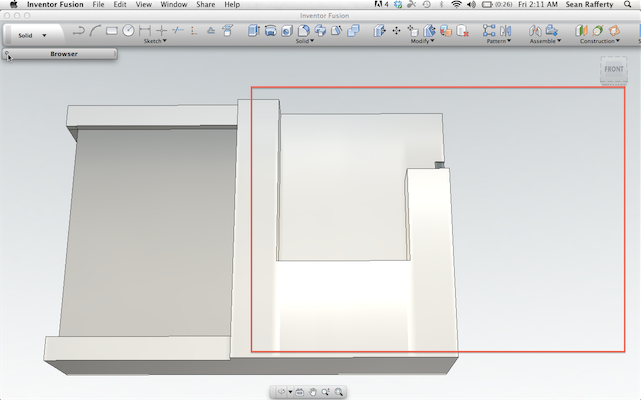
If I do that, it removes large porions of my model, and does not just delete the face and heal to combine into one surface:
If I delete the small surface the geopmetry that existed in the red square is deleted with it:

Same if I delete the larger surface, although more of the model is deleted along with this surface:
Cannot provide model for patent/copyright reasons.
Message 6 of 8
05-04-2012
02:19 PM
- Mark as New
- Bookmark
- Subscribe
- Mute
- Subscribe to RSS Feed
- Permalink
- Report
05-04-2012
02:19 PM
OK.
...Here is a workaround. It is not pretty but should work.
1. From the face with the unwanted seam create an offset workplane 1mm away into the open slot.
2. Create a sketch on this workplane.
3. Project the boundary of the single face you want to create.
4. Extrude the profile from this boundary 2mm into the model, choose join.
5. Delete/hide the work plane.
6. Using press pull, move the new face -1 so that it is now in the correct position.
Kevin Schneider
Message 7 of 8
05-04-2012
02:26 PM
- Mark as New
- Bookmark
- Subscribe
- Mute
- Subscribe to RSS Feed
- Permalink
- Report
05-04-2012
02:26 PM
I should also say that in a future update this will be MUCH easier to deal with, and hopefully won't happen in the first place.
Kevin Schneider
Message 8 of 8
05-04-2012
06:21 PM
- Mark as New
- Bookmark
- Subscribe
- Mute
- Subscribe to RSS Feed
- Permalink
- Report
05-04-2012
06:21 PM
Perfect- that worked!! So until an update comes out addressing this, projecting the surface, trimming the unwanted lines, press-pulling and then re-merging the shape back to the model works. Indeed, a few more steps than desired, but gets me out of this dead end! Thanks!!


Reply
Topic Options
- Subscribe to RSS Feed
- Mark Topic as New
- Mark Topic as Read
- Float this Topic for Current User
- Bookmark
- Subscribe
- Printer Friendly Page
