Community
- Forums Home
- >
- Community Archive - Read Only
- >
- Inventor Fusion (Read Only)
- >
- Ribbon Displaying on Secondary Display
Announcements
Autodesk has retired Inventor Fusion. We recommend our customers to visit the Fusion 360 community for related inquiries.
Inventor Fusion (Read Only)
Turn on suggestions
Auto-suggest helps you quickly narrow down your search results by suggesting possible matches as you type.
 This page has been translated for your convenience with an automatic translation service. This is not an official translation and may contain errors and inaccurate translations. Autodesk does not warrant, either expressly or implied, the accuracy, reliability or completeness of the information translated by the machine translation service and will not be liable for damages or losses caused by the trust placed in the translation service.
Translate
This page has been translated for your convenience with an automatic translation service. This is not an official translation and may contain errors and inaccurate translations. Autodesk does not warrant, either expressly or implied, the accuracy, reliability or completeness of the information translated by the machine translation service and will not be liable for damages or losses caused by the trust placed in the translation service.
Translate
Ribbon Displaying on Secondary Display
4 REPLIES 4
SOLVED
Reply
Topic Options
- Subscribe to RSS Feed
- Mark Topic as New
- Mark Topic as Read
- Float this Topic for Current User
- Bookmark
- Subscribe
- Printer Friendly Page
Message 1 of 5


04-25-2012
01:20 PM
- Mark as New
- Bookmark
- Subscribe
- Mute
- Subscribe to RSS Feed
- Permalink
- Report
04-25-2012
01:20 PM
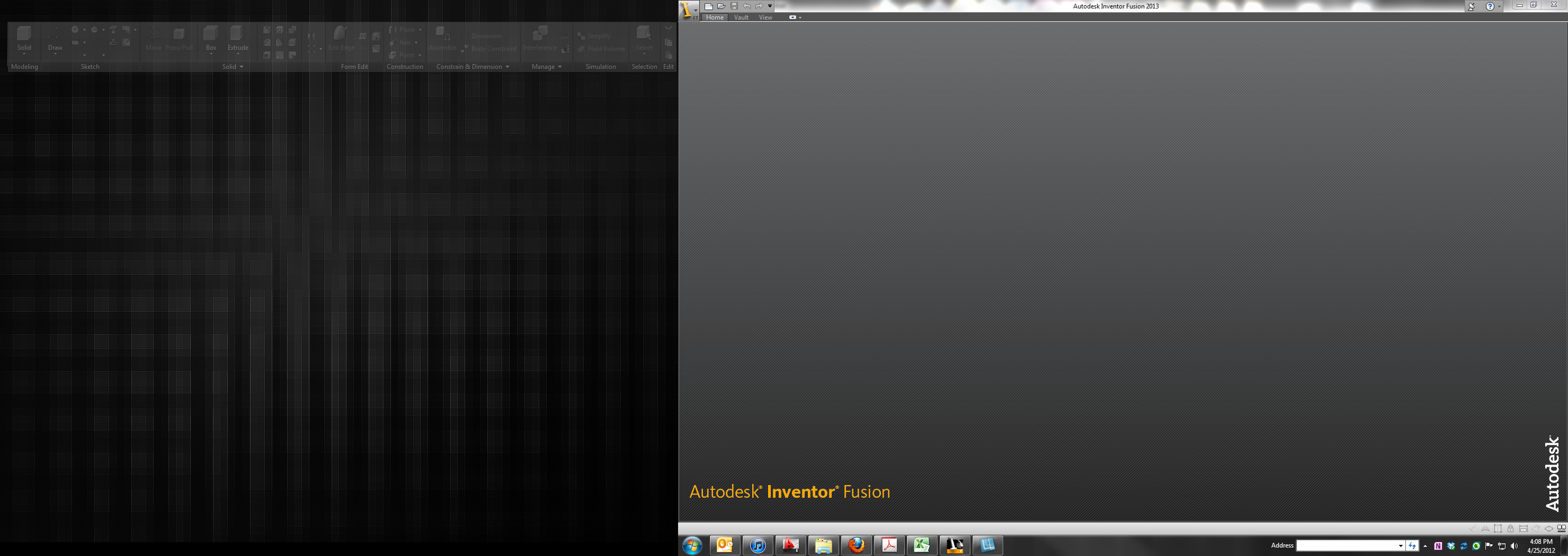
I just installed the latest version of Autodesk Inventor Fusion (2013) (2.0.0.206) (64bit) and since first launch the Ribbon is displaying on my secondary display while the application appears on my primary display. Well kind of anyway - the Ribbon tab titles appear on the main display in the application window but the Ribbon components display on the secondary. See the attached screenshot. My secondary display is to my left so the left of the screenshot is my secondary while the right is my primary.
I don't see any way to move the Ribbon back to primary display other than dragging parts of it but maybe I am missing something. I have only used Inventor Fusion a few times - mainly use it to generate 2D items for use in ACADE.
Any help or info? Not sure if this is a bug or a feature.
-----
JReese
Dell Precision T1600
Xeon E31245, 16GB RAM, Quadro 400
Windows 10 Professional 64bit
Autocad Electrical 2018 64bit
JReese
Dell Precision T1600
Xeon E31245, 16GB RAM, Quadro 400
Windows 10 Professional 64bit
Autocad Electrical 2018 64bit
Solved! Go to Solution.
Solved by schneik-adsk. Go to Solution.
4 REPLIES 4
Message 2 of 5


04-26-2012
03:26 PM
- Mark as New
- Bookmark
- Subscribe
- Mute
- Subscribe to RSS Feed
- Permalink
- Report
04-26-2012
03:26 PM
This is a known issue. We apologize. If you take Inventor Fusion out of full screen/maximized window mode the problem will go away.
Thanks for letting us know about the issue.
Kevin Schneider
Message 4 of 5


12-08-2012
11:55 PM
- Mark as New
- Bookmark
- Subscribe
- Mute
- Subscribe to RSS Feed
- Permalink
- Report
12-08-2012
11:55 PM
I'm also having the same issue on my PC.
It's very frustrating since my main display is a 40" led hdtv that connects through the hdmi port which is automaticly detected as a secondary monitor no matter what the physical port configuration is. So I have to manually set it as the main display through the display options in Windows.
I hope this is resolved soon.
Thanks.
[update]
The only solution that I have found is to manually drag the corners of the window as close as possible to the corners of the screen without maximizing it completely.
I hope this helps others. 
Message 5 of 5


05-21-2014
01:42 PM
- Mark as New
- Bookmark
- Subscribe
- Mute
- Subscribe to RSS Feed
- Permalink
- Report
05-21-2014
01:42 PM
Any update on this?
(Just got an upgraded laptop at work and was about to chase down the IT dept until I found this thread.)

Reply
Topic Options
- Subscribe to RSS Feed
- Mark Topic as New
- Mark Topic as Read
- Float this Topic for Current User
- Bookmark
- Subscribe
- Printer Friendly Page