Announcements
Autodesk has retired Inventor Fusion. We recommend our customers to visit the Fusion 360 community for related inquiries.

Parallelogram mechanism

Parallelogram mechanism

MrNickBarker
Explorer Explorer
3,900 Views
7 Replies
Message 1 of 8

Parallelogram mechanism

MrNickBarker
Explorer
Explorer

I'm trying to build a simple parallelogram mechanism which should lift a top plane.


My problem is that as soon as I add the last joint the model won't move and I get "Distance conflict due to joint type". 


I'm guessing that it's mechally imposible for the joints to move the way they are setup, I've attached an image so you can see better.


Thanks in advance.


Screen-Shot-2012-12-04-at-7.51.11-PM.jpg

Reply
Reply
0 Likes
Accepted solutions (1)
3,901 Views
7 Replies
Replies (7)
Message 2 of 8

JDMather
Consultant
Consultant

Can you attach the dwg file here?


-----------------------------------------------------------------------------------------
Autodesk Inventor 2019 Certified Professional
Autodesk AutoCAD 2013 Certified Professional
Certified SolidWorks Professional


Reply
Reply
0 Likes
Message 3 of 8

MrNickBarker
Explorer
Explorer

The file format which Inventor Fusion for Mac allows me to save is f3d and this forum doesn't allow f3d extensions for attachments, so I just replaced the extension with .dwg change to .f3d to open again.


I tried to use export but there isn't dwg there either.

Reply
Reply
0 Likes
Message 4 of 8

JDMather
Consultant
Consultant

I didn't realize you were using Mac version or that Mac version would not allow you to save dwg.


-----------------------------------------------------------------------------------------
Autodesk Inventor 2019 Certified Professional
Autodesk AutoCAD 2013 Certified Professional
Certified SolidWorks Professional


Reply
Reply
0 Likes
Message 5 of 8

MrNickBarker
Explorer
Explorer

It allows me to export to SAT, STL or STEP. When saving there is no option to choose type, it just saves it as f3d.

Reply
Reply
0 Likes
Message 6 of 8

Phil.E
Autodesk
Autodesk
Accepted solution

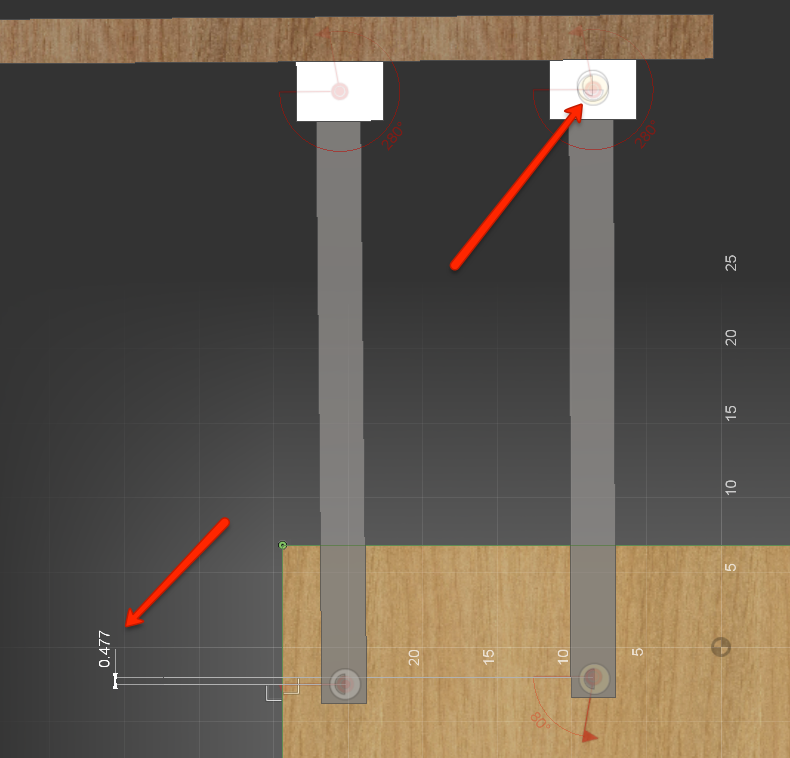
Looking at your model I see a few problems. See attached image.


The joint origins are not lined up. This will cause the mechanism to bind. A mechanism like this requires the same joint origin spacing on both parts that the link bars are linking.


Please mark this response as "Accept as Solution" if it answers your question


Phil Eichmiller
Software Engineer
Quality Assurance
Autodesk, Inc.


Reply
Reply
0 Likes
Message 7 of 8

MrNickBarker
Explorer
Explorer

Thanks, thats what I figured.


Is there an easy way to align joint origins or to snap them toghether? A link to a tutorial would be apreciated (I've watched the esentials videos).

Reply
Reply
0 Likes
Message 8 of 8

Phil.E
Autodesk
Autodesk

Use [sketch>circle>extrude cut] to accurately locate holes. Use the holes for Joint Origins. Or use other geometry such as edges or corners that the Joint Origin command wants to snap to.


Phil Eichmiller
Software Engineer
Quality Assurance
Autodesk, Inc.


Reply
Reply