• Industries
  • Products
  • Buy
  • Services & Support
  • Communities
  • Discussion Groups

    Inventor Fusion

    Reply
    Member
    Posts: 4
    Registered: ‎10-07-2012
    Accepted Solution

    How do you reset Inventor Fusion toolbars to the default configuration?

    551 Views, 8 Replies
    10-07-2012 01:51 PM

    I mistakenly dragged a tool off onto the canvas (thinking that was the way to use the tool--newbie), and the tool was removed from the toolbar.


    I don't see any way to restore the toolbars, to get the tool back.


    Thanks ...

    Please use plain text.
    Board Manager
    schneik
    Posts: 262
    Registered: ‎04-05-2003

    Re: How do you reset Inventor Fusion toolbars to the default configuration?

    10-07-2012 02:29 PM in reply to: alecramsay

    Are you using the Windows or Mac version?

    Kevin Schneider


    Please use plain text.
    Member
    Posts: 4
    Registered: ‎10-07-2012

    Re: How do you reset Inventor Fusion toolbars to the default configuration?

    10-07-2012 02:40 PM in reply to: schneik

    Sorry--Mac.

    Please use plain text.
    Employee
    Phil.E
    Posts: 71
    Registered: ‎06-29-2012

    Re: How do you reset Inventor Fusion toolbars to the default configuration?

    10-10-2012 03:29 PM in reply to: alecramsay

    From the dropdown menus on the toolbar you can find a small grip to the right of each tool (requires a mouse hover near right hand edge of dropdown list to reveal it). Using this grip, drag the tool to the toolbar in the area above the list. In this way you can customize your tool bar with your favorite tools or you can remove tools you do not use from the default toolbar as you have discovered.


    (Please mark this response as "Accept as Solution" if it answers your question)

    Please mark this response as "Accept as Solution" if it answers your question.


    Phil Eichmiller
    Software QA Engineer
    Fusion Quality Assurance Team
    Autodesk, Inc.

    Please use plain text.
    Board Manager
    schneik
    Posts: 262
    Registered: ‎04-05-2003

    Re: How do you reset Inventor Fusion toolbars to the default configuration?

    10-11-2012 06:06 PM in reply to: alecramsay

    You can also right mouse click on the toolbar and choose reset toolbar customization.


    Kevin Schneider


    Please use plain text.
    Member
    Posts: 4
    Registered: ‎10-07-2012

    Re: How do you reset Inventor Fusion toolbars to the default configuration?

    10-14-2012 03:00 PM in reply to: alecramsay

    "Reset toolbar customization" is the command / function that I want--thanks. I want the toolbars to be like they were when I first installed the product (before I mistakenly dragged some tools off the toolbar).


    However, the only place that right-clicking brings up menus is the drawing space. Right-clicking anywhere in the toolbar does not bring up any menus (Mac OS X -- 10.7.5).


    Am I doing something wrong? Can you be more specific (e.g., screenshot)? Is there another way to invoke the command (or achieve the same result)?


    Thanks!


    Alec 

    Please use plain text.
    Employee
    Posts: 36
    Registered: ‎07-31-2012

    Re: How do you reset Inventor Fusion toolbars to the default configuration?

    10-14-2012 07:43 PM in reply to: alecramsay

    Hi Alec,


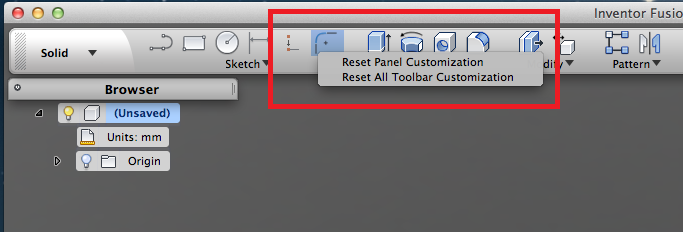
    Please see the screenshot for this command.

    You need right click the command on toolbar to invoke the context mene. Please note the command will be disable if your toolbar was the same with default.Reset Toolbar.png

    Sincerely,
    Sally

    (Please mark this response as "Accept as Solution" if it answers your question)
    Please use plain text.
    Member
    Posts: 4
    Registered: ‎10-07-2012

    Re: How do you reset Inventor Fusion toolbars to the default configuration?

    10-16-2012 07:26 AM in reply to: alecramsay

    Thanks for the help.


    Your screenshot is very clear. Unfortunately, that context menu won't come up on my Mac, even though right-click is enabled (and working elsewhere in the tool) and even though the toolbars are most definitely not the default (I dragged two more tools off onto the canvas).


    Is there some other way to invoke this command (or get the context menu on the toolbar to work? Thanks ...

    Please use plain text.
    Employee
    Posts: 36
    Registered: ‎07-31-2012

    Re: How do you reset Inventor Fusion toolbars to the default configuration?

    10-16-2012 07:54 PM in reply to: alecramsay

    This is really strange that the command couldn't be invoked, however you can try below steps to clean you configuration files and get your toolbar reset:


    1. First, log on to your account.
    2. At Finder>Go>Go to Folder, enter: ~/Library/Application Support/Autodesk
    3. Look for the folder called Inventor Fusion
    4. Delete it
    5. Start Fusion
    Sincerely,
    Sally

    (Please mark this response as "Accept as Solution" if it answers your question)
    Please use plain text.