Announcements
Autodesk has retired Inventor Fusion. We recommend our customers to visit the Fusion 360 community for related inquiries.

Fusion 2012 / Cange Manager Add-In missing

Fusion 2012 / Cange Manager Add-In missing

Anonymous
Not applicable
1,549 Views
3 Replies
Message 1 of 4

Fusion 2012 / Cange Manager Add-In missing

Anonymous
Not applicable

Running Autodesk Product Design Suite Premium 2012 / Win7 64 bit.

Fusion is intalled as part of orignal install. Have created part in Inventor, modified it in Fusion, saved it as dwg file (I can't see a way to save it as anything else - so am assuming it is being saved as Fusion dwg file), want to bring it back into Inventor. Do not see an "Open Fusion DWG"  option under file..open as shown under "Overview of Change Manager" in Wiki help

http://wikihelp.autodesk.com/Inventor_Fusion/enu/2012/Help/0164-Interope164/0165-Import_I165/0166-Ch...

Change Manager is not listed in Add-Ins. Tried repair of Fusion from Control Panel. Have installed Drawing Tools add-in from SDK location (have revcloud, etc). Have installed Fusion SP3. What am I doing wrong?

Thanks.

Reply
Reply
0 Likes
Accepted solutions (1)
1,550 Views
3 Replies
Replies (3)
Message 2 of 4

schneik-adsk
Community Manager
Community Manager

Make sure that the file is not open in Fusion  when opeining in Inventor.


-Kevin Schneider

Kevin Schneider
Reply
Reply
0 Likes
Message 3 of 4

Anonymous
Not applicable

Thank you.

1. Should the "About Autodesk Fusion"  window (attached) report SP3?

2.I have completely reinstalled Fusion from the flash drive, installed Fusion SP3 (which, by the way, never gives me a "completed intstallation" message).

3. The wiki help keeps referring to the Fusion Change Manager as an add-in. Is there a way I can navigate to and manually install the add-in myself? Shouldn't this be reported as an installed add in with it's own loading behavior in the Inventor Add In Manager Applications tab?

4. No other files are open anywhere. Complete cold re-boot, open Inventor, File..Open... no Fusdion DWG option.

5. Have also made sure "Edit Base Solids using: InventorFusion" option is checked in Application Options Part tab.


Thank you.

Reply
Reply
0 Likes
Message 4 of 4

Wendy.Chen_Autodesk
Alumni
Alumni
Accepted solution

Hello, mies07


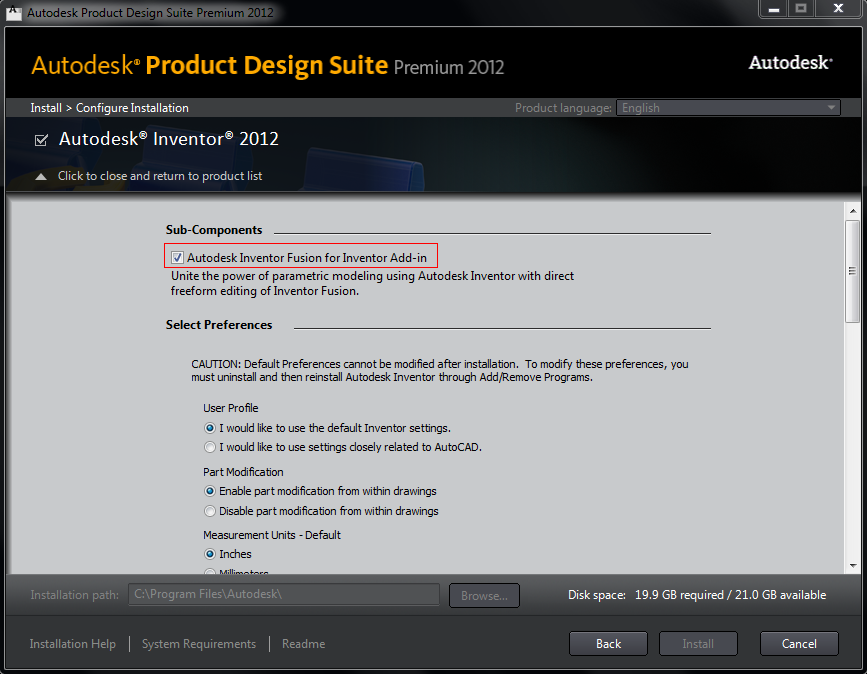
Many thanks for reporting the issue. For the integration workflow of Fusion and Inventor, firstly we need install Inventor Fusion add-in for Inventor. It should be checked in Inventor Configuration page.  It is just like the picture I attached.


From what you said, I think you didn’t install the Inventor Fusion add-in for Inventor, so can’t see Change manager add-in and can’t find “Open Fusion DWG” in Inventor.


Hope this helps.

Regards,

Wendy

Wendy Chen
Fusion 360 Team
Autodesk, Inc.
Reply
Reply
0 Likes