Community
- Forums Home
- >
- Community Archive - Read Only
- >
- Inventor Fusion (Read Only)
- >
- Re: Extrusions and components not visible
Announcements
Autodesk has retired Inventor Fusion. We recommend our customers to visit the Fusion 360 community for related inquiries.
Inventor Fusion (Read Only)
Turn on suggestions
Auto-suggest helps you quickly narrow down your search results by suggesting possible matches as you type.
 This page has been translated for your convenience with an automatic translation service. This is not an official translation and may contain errors and inaccurate translations. Autodesk does not warrant, either expressly or implied, the accuracy, reliability or completeness of the information translated by the machine translation service and will not be liable for damages or losses caused by the trust placed in the translation service.
Translate
This page has been translated for your convenience with an automatic translation service. This is not an official translation and may contain errors and inaccurate translations. Autodesk does not warrant, either expressly or implied, the accuracy, reliability or completeness of the information translated by the machine translation service and will not be liable for damages or losses caused by the trust placed in the translation service.
Translate
Reply
Topic Options
- Subscribe to RSS Feed
- Mark Topic as New
- Mark Topic as Read
- Float this Topic for Current User
- Bookmark
- Subscribe
- Printer Friendly Page
Message 1 of 3


07-19-2012
02:15 PM
- Mark as New
- Bookmark
- Subscribe
- Mute
- Subscribe to RSS Feed
- Permalink
- Report
07-19-2012
02:15 PM
Extrusions and components not visible
Hello!
Currently I am trying to extrude solids from any of the three planes into the encapsulated space.
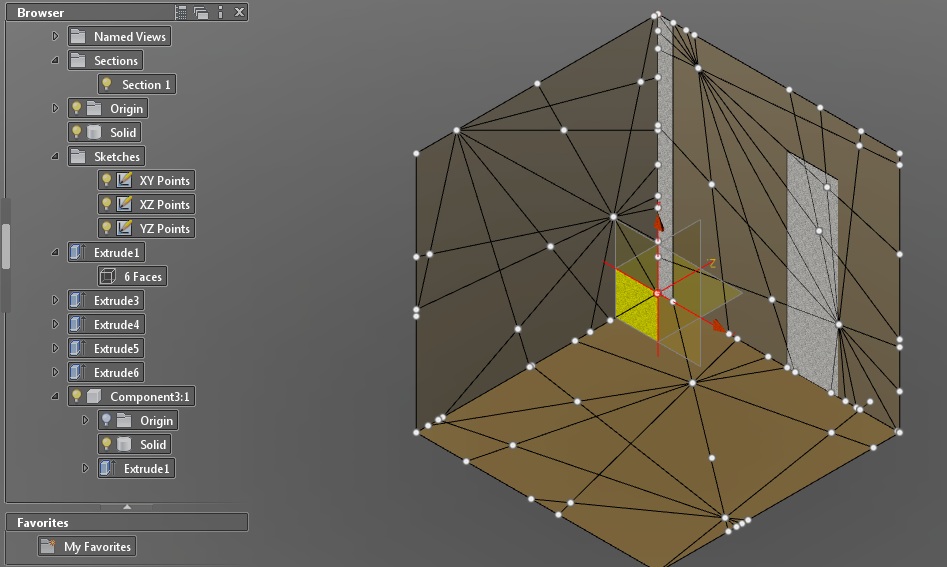
However, multiple different extrusions become invisible after pressing okay. They seem to be in wireframe mode as they become visible when the mouse hovers over their names on the left browser.
Sometimes they are okay, but as soon as I pull extrude another shape the first vanishes again.
Also as the shapes vanish, grey blocks appear as seen on the right of the picture.
I am on my third day working with the program, please excuse the inexperience. Also have tried on multiple computers with the three different files achieving the same result.
The problem must be me or something I did with the file, but have been unsuccessful.
Thank you so much for the help!
2 REPLIES 2
Message 2 of 3


07-19-2012
10:06 PM
- Mark as New
- Bookmark
- Subscribe
- Mute
- Subscribe to RSS Feed
- Permalink
- Report
07-19-2012
10:06 PM
Try turning off the section. notice there is a section in the browser. Click on the lightbulb to turn it off. Perhapse you can explain why you are creating these sections as you make your first shapes?
Kevin Schneider
Message 3 of 3
07-22-2012
09:12 PM
- Mark as New
- Bookmark
- Subscribe
- Mute
- Subscribe to RSS Feed
- Permalink
- Report

Reply
Topic Options
- Subscribe to RSS Feed
- Mark Topic as New
- Mark Topic as Read
- Float this Topic for Current User
- Bookmark
- Subscribe
- Printer Friendly Page