Community
- Forums Home
- >
- Community Archive - Read Only
- >
- Inventor Fusion (Read Only)
- >
- Re: Can't delete extruded solids ?
Announcements
Autodesk has retired Inventor Fusion. We recommend our customers to visit the Fusion 360 community for related inquiries.
Inventor Fusion (Read Only)
Turn on suggestions
Auto-suggest helps you quickly narrow down your search results by suggesting possible matches as you type.
 This page has been translated for your convenience with an automatic translation service. This is not an official translation and may contain errors and inaccurate translations. Autodesk does not warrant, either expressly or implied, the accuracy, reliability or completeness of the information translated by the machine translation service and will not be liable for damages or losses caused by the trust placed in the translation service.
Translate
This page has been translated for your convenience with an automatic translation service. This is not an official translation and may contain errors and inaccurate translations. Autodesk does not warrant, either expressly or implied, the accuracy, reliability or completeness of the information translated by the machine translation service and will not be liable for damages or losses caused by the trust placed in the translation service.
Translate
Reply
Topic Options
- Subscribe to RSS Feed
- Mark Topic as New
- Mark Topic as Read
- Float this Topic for Current User
- Bookmark
- Subscribe
- Printer Friendly Page
Message 1 of 9

Anonymous
13111 Views, 8 Replies
07-28-2012
04:44 PM
- Mark as New
- Bookmark
- Subscribe
- Mute
- Subscribe to RSS Feed
- Permalink
- Report
07-28-2012
04:44 PM
Having been used Pro Engineering and Solidworks for years, I fall in love with this beautiful Inventor Fusion by the first try. But I'm now struggling with understanding some concept of Inventor Fusion. Please help me.
Here is the very simple problem but it trapped me inside:
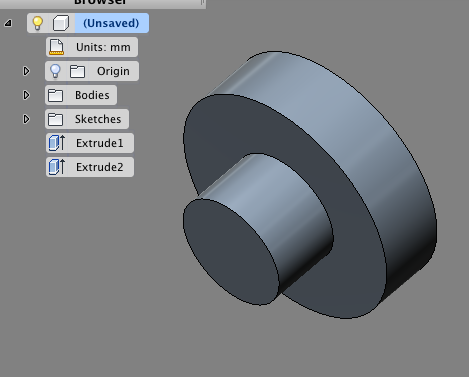
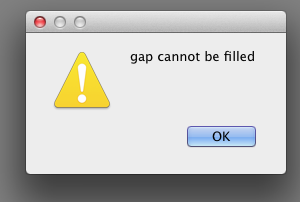
I've made two cylinders, using "cylinder" or extrude. After making them, I want to delete the large cylinder which is extruded on top of the small one. Now the problem comes. I can't delete the large cylinder, there is an error saying "gap cannot be filled" when I hit delete. Yet I can delete the small one without any problem.
My question is: Why can't I delete the large cylinder directly and how can I delete it?

Solved! Go to Solution.
Solved by jeff_strater. Go to Solution.
Solved by frankwu. Go to Solution.
8 REPLIES 8
Message 2 of 9


07-31-2012
10:14 AM
- Mark as New
- Bookmark
- Subscribe
- Mute
- Subscribe to RSS Feed
- Permalink
- Report
07-31-2012
10:14 AM
Deleting the faces you have shown does not leave enough faces for the solid to reform.
Since Fusion is not history based the capping face for the small cylinder is what is preventing you from deleting the larger cylinder.
The easiest thing to do is press-pull the large diameter to match the small diamater, then shorten the cylinder. We will look at how we can make cases like this easier in the future.
Thanks.
Kevin Schneider
Message 3 of 9


08-01-2012
06:37 AM
- Mark as New
- Bookmark
- Subscribe
- Mute
- Subscribe to RSS Feed
- Permalink
- Report
08-01-2012
06:37 AM
How about this? Create a rectangle offset from the double cylinder; then Patch the surface.
Extrude the smaller cylinder head through the recangle.
Then take the remaining shape (rectangle minus smaller cylinder) and extrude that through the doouble cylinder.
This should leave only the smaller cylinder.
On Mac, using Inventor Fusion 568.1.0.
Frank Wu
P.S. Inventor Fusion is my favorite program on this planet. And now, with Mountain Lion on the Mac, you can preview an Inventor Fusion file in the finder!!! (Couldn't do that before with earlier combination of early IF and Mac OS).
Message 4 of 9
08-01-2012
07:00 AM
- Mark as New
- Bookmark
- Subscribe
- Mute
- Subscribe to RSS Feed
- Permalink
- Report
08-01-2012
07:00 AM
A third way to get around this problem:
When you create the smaller cylinder (presumably by extruding a smaller circle), click on New Body. Then the smaller cylinder is a different object than the bigger cylinder. And then just delete the bigger cylinder.
Message 5 of 9
08-01-2012
07:14 AM
- Mark as New
- Bookmark
- Subscribe
- Mute
- Subscribe to RSS Feed
- Permalink
- Report
08-01-2012
07:14 AM
Thank you Kevin and Frank. The solutions work. I like the last solution best, which makes the other cylinder as a separate body. This allows me to delete it without effort and I can also group them later as component. If Fusion can remember my setting and let it extrude as a body every time as default it would be great! At the moment I have to switch it to body every time I want to extrude. Not bad but sometimes lack of efficiency.
Message 6 of 9
08-01-2012
07:22 AM
- Mark as New
- Bookmark
- Subscribe
- Mute
- Subscribe to RSS Feed
- Permalink
- Report
08-01-2012
07:22 AM
Glad to be of help.
One thing that it took me a while to realize is that when you create something like a cylinder, you (a) sketch a circle, and (b) extrude it. And (c) after you extrude the cylinder, the original sketch disappears.
But what it took me a while to realize is that it's not gone. If you go back and maximize the Sketch folder along the left hand side, you will see your original sketch as the last item (though not visible). Click on the ligh bulb and it shows up again in case you need to move or re-use it).
Message 7 of 9
08-01-2012
07:23 AM
- Mark as New
- Bookmark
- Subscribe
- Mute
- Subscribe to RSS Feed
- Permalink
- Report
08-01-2012
07:23 AM
Ack. Now that I re-read your post I see that my last comment might not be what you were talking about at all. Sorry about that. But good luck with your project anyway!
Message 8 of 9

08-13-2012
07:46 AM
- Mark as New
- Bookmark
- Subscribe
- Mute
- Subscribe to RSS Feed
- Permalink
- Report
08-13-2012
07:46 AM
The other approach that I would use (which is similar to the "create each cylinder as a new body") is to use Split Body. If you start with the original geometry as a single body, you can use this command to split it into two, by selecting the plane of the larger cylinder as the splitting tool. Then, just delete the body you don't want. The advantage of this approach is you don't have to plan ahead to keep all the bodies separate.
Hope this helps.
Jeff Strater
- Autodesk

Jeff Strater
Engineering Director
Message 9 of 9
08-13-2012
04:38 PM
- Mark as New
- Bookmark
- Subscribe
- Mute
- Subscribe to RSS Feed
- Permalink
- Report
Reply
Topic Options
- Subscribe to RSS Feed
- Mark Topic as New
- Mark Topic as Read
- Float this Topic for Current User
- Bookmark
- Subscribe
- Printer Friendly Page

