Community
- Forums Home
- >
- Community Archive - Read Only
- >
- Inventor Fusion (Read Only)
- >
- Re: 3D mouse too slow
Announcements
Autodesk has retired Inventor Fusion. We recommend our customers to visit the Fusion 360 community for related inquiries.
Inventor Fusion (Read Only)
Turn on suggestions
Auto-suggest helps you quickly narrow down your search results by suggesting possible matches as you type.
 This page has been translated for your convenience with an automatic translation service. This is not an official translation and may contain errors and inaccurate translations. Autodesk does not warrant, either expressly or implied, the accuracy, reliability or completeness of the information translated by the machine translation service and will not be liable for damages or losses caused by the trust placed in the translation service.
Translate
This page has been translated for your convenience with an automatic translation service. This is not an official translation and may contain errors and inaccurate translations. Autodesk does not warrant, either expressly or implied, the accuracy, reliability or completeness of the information translated by the machine translation service and will not be liable for damages or losses caused by the trust placed in the translation service.
Translate
Reply
Topic Options
- Subscribe to RSS Feed
- Mark Topic as New
- Mark Topic as Read
- Float this Topic for Current User
- Bookmark
- Subscribe
- Printer Friendly Page
Message 1 of 7


06-29-2009
01:15 PM
- Mark as New
- Bookmark
- Subscribe
- Mute
- Subscribe to RSS Feed
- Permalink
- Report
06-29-2009
01:15 PM
3D mouse too slow
Hello all, I'm really excited about this, my first issue is that my 3D mouse is too slow. Do I need special drivers for the fusion plug in? The mouse works fine in Inventor 2010, but when I open Fusion it is unacceptable.
XP Professional SP2
3D connexion mouse
Regards,
Rick
XP Professional SP2
3D connexion mouse
Regards,
Rick
RickP
Autodesk Inventor Professional 2017
Autodesk Inventor Professional 2017
6 REPLIES 6
Message 2 of 7


06-29-2009
02:28 PM
- Mark as New
- Bookmark
- Subscribe
- Mute
- Subscribe to RSS Feed
- Permalink
- Report
06-29-2009
02:28 PM
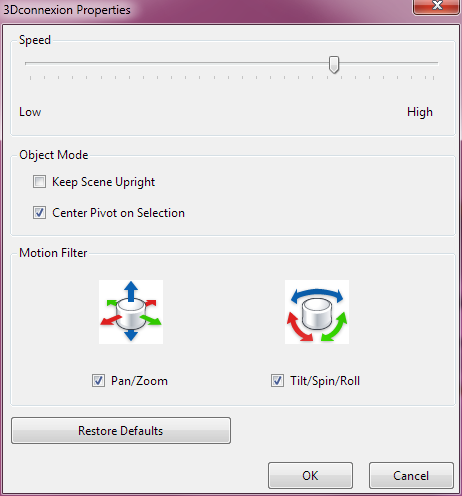
You can increase the 3Dconnexion drive on a per application basis. Simply bring up the 3dconnexion control panel and turn up the sensitivity to a level that you are happy with.
-Kevin Schneider
Autodesk, Inc.
-Kevin Schneider
Autodesk, Inc.
Kevin Schneider
Message 3 of 7
06-30-2009
07:49 AM
- Mark as New
- Bookmark
- Subscribe
- Mute
- Subscribe to RSS Feed
- Permalink
- Report
06-30-2009
07:49 AM
Yes, Okay Kevin.
Thank you - the 3DX software is kind of cryptic.... With the software open I adjust the speeds and it works fine - but it's not that clear that the app has to be open first,
Regardless, I shall tread on in fusion 😉
Rick
Thank you - the 3DX software is kind of cryptic.... With the software open I adjust the speeds and it works fine - but it's not that clear that the app has to be open first,
Regardless, I shall tread on in fusion 😉
Rick
RickP
Autodesk Inventor Professional 2017
Autodesk Inventor Professional 2017
Message 4 of 7


12-06-2011
05:02 AM
- Mark as New
- Bookmark
- Subscribe
- Mute
- Subscribe to RSS Feed
- Permalink
- Report
12-06-2011
05:02 AM
Got this same problem with Autodesk Inventor Fusion Preview 2012 and 3DConnexion Space Explorer USB.
I've set up the mouse to work very nicely in Inventor 2011, but with Fusion Preview 2012, it's more like unusable (slow) and does not react to changes in the 3DConnexion panel, for "Autodesk Inventor" profile. Does it need a profile of its own?
The platform is Windows 7 Home Premium 32-bit, 4GB RAM, 2.0GHz Core 2 Duo Mac Mini (under BootCamp).
The 3DConnexion panel really is confusing. First, I didn't realize it has application specific settings (pressing 'panel' on the mouse does *not* bring up the panel for the running application, but for Explorer - heh!).
Asko Kauppi
IT guy into Cleantech.
IT guy into Cleantech.
Message 5 of 7
12-06-2011
05:23 AM
- Mark as New
- Bookmark
- Subscribe
- Mute
- Subscribe to RSS Feed
- Permalink
- Report
12-06-2011
05:23 AM
Unable to save edits to that post.
The FIX is to use the Fusion Preview 2012's own little 3d mouse button (nice!). However, even then the performance is sluggish with the fastest speed. Not a GPU issue, NVidia GT9400 is fast enough and view change is instantenous with regular mouse.
Asko Kauppi
IT guy into Cleantech.
IT guy into Cleantech.
Message 6 of 7

12-12-2011
05:48 PM
- Mark as New
- Bookmark
- Subscribe
- Mute
- Subscribe to RSS Feed
- Permalink
- Report
12-12-2011
05:48 PM
have you tried contacting the mouse manufacturer?
DarrenP
Did you find this post helpful? Feel free to Like this post.
Did your question get successfully answered? Then click on the ACCEPT SOLUTION button.

Message 7 of 7
12-12-2011
10:47 PM
- Mark as New
- Bookmark
- Subscribe
- Mute
- Subscribe to RSS Feed
- Permalink
- Report
12-12-2011
10:47 PM
I haven't contacted Logitech/3DConnexion on this. But I don't think it's primarily their issue.
It can be the "experimental" version 10 drivers they have. Those work better for me otherwise. Anyways, Fusion is still in beta so I simply wanted to share the experience.
By the way, my 4GB of RAM seems way too little (!) for Fusion. A friend said he'd "not approach it" without at least 6GB. I wonder where all those bits disappear nowadays (I've got 32-bit Windows so there's no chance of 6GB without re-buying an OS and re-installing that). I strongly believe Autodesk should have a look at the memory footprint as well before finally releasing Fusion. Otherwise, I tend to like it.
Asko Kauppi
IT guy into Cleantech.
IT guy into Cleantech.

Reply
Topic Options
- Subscribe to RSS Feed
- Mark Topic as New
- Mark Topic as Read
- Float this Topic for Current User
- Bookmark
- Subscribe
- Printer Friendly Page