Community
Turn on suggestions
Auto-suggest helps you quickly narrow down your search results by suggesting possible matches as you type.
Inventor Engineer-to-Order Ideas (Read Only)
Share your ideas about how to improve Inventor ETO with the Development Team
Options
- Mark all as New
- Mark all as Read
- Float this item to the top
- Subscribe
- Bookmark
- Subscribe to RSS Feed
Idea Statuses
Showing ideas with category Workflows.
Show all ideas

 jan.liska
on
02-04-2013
11:27 PM
Submitted on
02-04-2013
11:27 PM
Status:
Gathering Support
jan.liska
on
02-04-2013
11:27 PM
Submitted on
02-04-2013
11:27 PM
Status:
Gathering Support
It would be useful to have visual rule editor where user could create rules visually using drag & drop similar to Visio or Dynamo for Revit:
Show More

 Chris_Rogers
on
11-16-2012
01:49 PM
Submitted on
11-16-2012
01:49 PM
Status:
Gathering Support
Chris_Rogers
on
11-16-2012
01:49 PM
Submitted on
11-16-2012
01:49 PM
Status:
Gathering Support
It would be very useful if we had a couple of dropdowns that included Children, Methods, and Rules as it is with .net. In .net, it lists all of the methods in the active class. This would be useful in the Design Editor as well as in Visual Studio when you are working with design files. This would be especially useful on large designs where you may have lots of rules and/or children. You should be able to click on an item (ex. "Length") and the window will jump to that rule.
Show More

 GeorgeWilliams
on
10-25-2012
11:29 AM
Submitted on
10-25-2012
11:29 AM
Status:
Accepted
GeorgeWilliams
on
10-25-2012
11:29 AM
Submitted on
10-25-2012
11:29 AM
Status:
Accepted
Sorting by the values in the properties grid will give us the ability to more easily find rules based on the expected values. This is especially helpful when working on datasets by others who have not properly documented the rules in a way that it is easy to find the rules in question. In the case below, I know that the tank is 72 inches tall from my measurement of the Inventor model. If I could sort by the Values then I would be able to very quickly find that the associated rule is very likely TankHeight. My understanding is that the grid below is a DevExpress grid and column sorting is a property setting. That simple and quick change would be quite helpful for debugging.
Show More


 summittrailer
on
04-29-2015
12:46 PM
Submitted on
04-29-2015
12:46 PM
Status:
Gathering Support
summittrailer
on
04-29-2015
12:46 PM
Submitted on
04-29-2015
12:46 PM
Status:
Gathering Support
How about some productivity options in the constraint tool dialog box. First would be a check box to "auto apply" constraints as you pick the second feature. This would be eliminate the need to hit the apply button after each selection set is made and help speed up the process of appling constraints. The second would be and "undo" button that would only apply to the previous constraint set. This would help in large assemblies when you miss the second selection. Not hard to do in large assembly models.
Show More
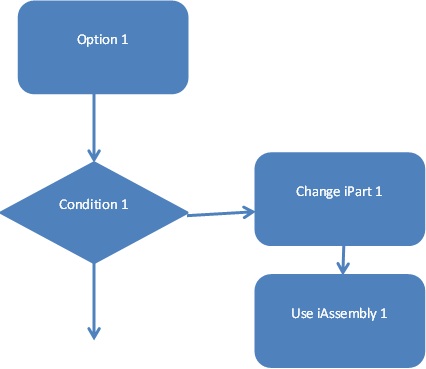
Inventor ETO should have the capability to reverse engineer and configure from an existing iPart / iAssembly factory + incorporate rules from iLogic. There should also be an option to create configurations through a flowchart / flowdiagram rather than through code.
Show More
 MattH_Work
on
06-12-2013
02:18 AM
Submitted on
06-12-2013
02:18 AM
Status:
Gathering Support
MattH_Work
on
06-12-2013
02:18 AM
Submitted on
06-12-2013
02:18 AM
Status:
Gathering Support
Can we get the Design Editor to automatically Indent our code, most (I say most as iLogic doesn't) other prgramming UI's do this already
Show More
 frank
on
07-17-2015
04:35 AM
Submitted on
07-17-2015
04:35 AM
Status:
Gathering Support
frank
on
07-17-2015
04:35 AM
Submitted on
07-17-2015
04:35 AM
Status:
Gathering Support
When calling out a "Bolted Connection" in an idw file, while anotating, it would be nice to have multiple balloons with the item number/letter be automatic instead of needing to Balloon each part seperately (Bolt,Washer, Lock Washer, Nut). So when you Balloon a bolted connection, Inventor would automatically place a string of balloons for each part in the bolted connection. Same for Clevis Pins with cotterpins. BTW, why not have Clevis pins placed with the proper cotter pin already in the hole? Save a step, or at least have the option to place both at the same time. Also, why are there no Clevis' listed under "shaft parts" in the content center? Frank
Show More
frank
on
04-30-2015
10:27 AM
Submitted on
04-30-2015
10:27 AM
Status:
Gathering Support
I would like to see an option with the mirror tool, to be able to mirror constraints. This would be especially useful when mirroring groups of parts in an assembly model. Anything I mirror, wether a group or single part, the mirrored part(s) are unconstrained, so they are not "connected" to any other part(s). at present the only option is to make them grounded. This is not a good option as they won't respond if they are supposed to be symetrical and the parent part(s) are moved or adjusted. Working on models with left and right parts, for me, this would be a great feature.
Show More
bsee1
on
01-18-2013
10:37 AM
Submitted on
01-18-2013
10:37 AM
Status:
Gathering Support
As it stands, the ETO documentation has improved greatly from a year ago. What's lacking is documentation describing when to use specific features. I suggest to make a best practices knowledgebase which answers questions for anyone looking to start a new project. Some example answers might include: Benefits of Server vs series. Is there any reason to use server if everything will be used internally? What is the best way to build a large ETO project when considering performance? When should we use intent code vs push a function into a dll?(again considering performance) If we wanted all out parts to be stored in a database that ETO can just call, what would be the first steps to set up the database and ETO to make them work together? Best practices for using ETO to generate a document. (The current example is too small scale. Maybe have an example that generates a document that will insert items to a loop of bookmarks) This may look like a lot of suggestions at once. All I'm asking is for someone who has built a number of ETO projects to put a bunch of advice somewhere ETO developers can read it. The more topics covered the better. I'd be happy to clarify since each of these are problems I've run into over the last year. I'd be happy to clarify or give a longer list if anyone wants.
Show More
 james.snyder
on
10-18-2012
05:05 AM
Submitted on
10-18-2012
05:05 AM
Status:
Under Review
james.snyder
on
10-18-2012
05:05 AM
Submitted on
10-18-2012
05:05 AM
Status:
Under Review
Integrate the Smart Connector functionality found in Factory Design Suite into ETO. The ETO projects that I work on have many configured machines inside a main assembly. To have the ability to configure a machine, drag the machine onto the model window and then have it attach to a chosen piece of geometry would be a great addition to the user experience.
Show More
 jwallin
on
01-21-2016
08:16 AM
Submitted on
01-21-2016
08:16 AM
Status:
Gathering Support
jwallin
on
01-21-2016
08:16 AM
Submitted on
01-21-2016
08:16 AM
Status:
Gathering Support
I find more often than not I go straight to the dialog box to edit the root parameters after creating a new Intent Assembly. Specifically the inputs in my particular design. I think it would be useful to have a button on the New Intent Assembly dialog to edit the Parameters during creation.
Show More
0
Votes
frank
on
08-26-2015
08:03 AM
Submitted on
08-26-2015
08:03 AM
Status:
Gathering Support
Level of detail/design view rep... As my work flow doesn't require me to use either of these features/tools, I would like to be able to turn them off! Also, why does turning off a parts visability off remove its associativity. When I turn visibility off, usually I just nee to look behind it or need it out of the way to place another part and constrain it. Then I will turn visability back on. I know, supress the part instead of turning off its visability, but then you get into the Level of detail/ design view rep thing. (see first line) all done now! have a great day everyone. Frank
Show More
0
Votes
jan.liska
on
03-03-2014
10:32 PM
Submitted on
03-03-2014
10:32 PM
Status:
Gathering Support
Currently when I need to access item within list I'm using nth function. It works ok but I think that standard VB style access would be even easier especially for developers who have experience with other programming languages.
For example:
list(index)
in addition to:
nth(list, index)
Show More
0
Votes
jan.liska
on
03-03-2014
10:24 PM
Submitted on
03-03-2014
10:24 PM
Status:
Gathering Support
When creating new ETO model in Inventor it would be usefull to have command which directly opens corresponding factory part either for selected part in ETO Model Browser or selected component in the assembly.
Currently I need to locate file manually which can be tedious for complex designs with lot of components.
Show More
0
Votes
csuffell
on
09-09-2013
09:40 AM
Submitted on
09-09-2013
09:40 AM
Status:
Gathering Support
For those of use with slow Internet support and to alieviate the problems of 'Can't connect' to on-line help Can we have the ability to download the ETO help files to our local PC's?
Show More
0
Votes
alundr
on
08-05-2013
06:23 AM
Submitted on
08-05-2013
06:23 AM
Status:
Gathering Support
point(1,0,0) + (unitZ * 3) = point(1,0,3) 0 * 3 does not equal 3. This is really confusing and really irritiating when you're trying to learn this software. Point(1,0,0) + (unitZ + 3) = Point(1,0,3) makes more sense. My opinion anyway. Thanks, Andrew
Show More
0
Votes
Categories
-
A360
1 -
Drawings
2 -
Engineer to Order
19 -
Future of ETO
14 -
Interoperability
1 -
Lighweight Representation
1 -
Products
2 -
Utility
1 -
Workflows
16
