STUDENTS - Serial Number or Product Key Issues

STUDENTS - Serial Number or Product Key Issues

brian.kling
Alumni Alumni
258,340 Views
1,173 Replies
Message 1 of 1,174

STUDENTS - Serial Number or Product Key Issues

brian.kling
Alumni
Alumni

You are having problems with:


  • Getting a Serial Number or Product Key
  • Your 30 day trial is about to expire
  • Your 30 day trial has expired and you can't get a serial number
See the Solution in the Reply below!


Brian Kling
Sr International Customer Experience Lead
Autodesk, Inc.
Reply
Reply
Accepted solutions (1)
258,341 Views
1,173 Replies
Replies (1,173)
Message 641 of 1,174

Anonymous
Not applicable

While trying to download "AutoCAD Electrical (English) 64-Bit" I keep getting an error:  "Error assigning serial number to product: ~HASH(0x15a337d0)->{'Body'}->{'Fault'}->{'faultstring'}"


The Product Serial Number provided is invalid.


I would appreciate any help considering the problem above.


Thank you in advance,


Damir Mirkovic

Reply
Reply
0 Likes
Message 642 of 1,174

philip.s
Alumni
Alumni

Hello Damir,


We greatly apologize for the inconvenience, and are investigating the root cause of this issue.


With that being said, you can either utilize the software in it's trial mode for the time being, obtain a free student license from the Students Facebook page, or create a new Education Community profile using a different email address (as this is tied to your current account and is not system wide).

Reply
Reply
0 Likes
Message 643 of 1,174

Anonymous
Not applicable

Need activation code

Regarding CaseNo:07880239

V98D 5298 ADF8 A353 ARUX E42R CKT3

Reply
Reply
0 Likes
Message 644 of 1,174

camilo.lemos
Alumni
Alumni

Hi tracy.wheeler and welcome to the forums!

It seems that your Inventor Suite 2009 has been activated by our registration and activations team. In any case, I have sent you the activation code via private message here on the forums (click on the envelope by your name at the top of the screen).


Regards,


Camilo Lemos

Reply
Reply
0 Likes
Message 645 of 1,174

Anonymous
Not applicable

Hey,


I am having the same problem as some of you here, with activating the AutoCad Mac 2013 English download.

when i enter my Serial Number and Product Key, i get this message saying it wont work. 


The Serial Number or Product Key don't Match. 
Valid format for serial number is (XXX-XXXXXXXX)


Please Help.
Luci

Reply
Reply
0 Likes
Message 646 of 1,174

joane.bonghanoy
Alumni
Alumni

Hi Luci,


Sorry for the trouble this has caused you.


Please send me a Private Message (click on my joane.bonghanoy profile name and then “Send this user a private message”) with your Serial Number and Request Code


Joane Bonghanoy
Reply
Reply
0 Likes
Message 647 of 1,174

Anonymous
Not applicable

I have the same problem.Smiley Frustrated

I'm in Taiwan.

But finally the installation display "Your product cannot be registered in Taiwan."

Why? Something wrong?

Reply
Reply
0 Likes
Message 648 of 1,174

joane.bonghanoy
Alumni
Alumni

Hi Avonyu,


Please send me a Private Message (click on my joane.bonghanoy profile name and then “Send this user a private message”) with your Serial Number and Request Code


Looking forward to your reply so I can get this sorted out right away. 


Joane Bonghanoy
Reply
Reply
0 Likes
Message 649 of 1,174

Anonymous
Not applicable

Hello,


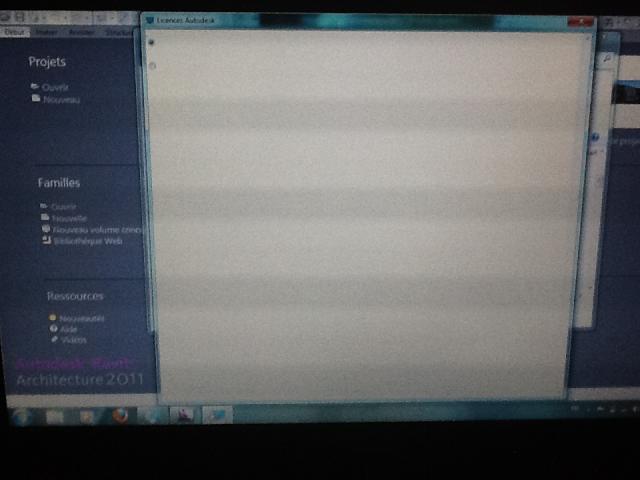
I downloaded Revit Architecture v2011 on my laptop and I can't activate the license ! So I had about 20 days with a test version (i could save my work and all), but now this period is over, and I still can't activate the license ! When I choose "repair" in the window that tells me to activate the license, I get that strange new window : 


Two options, it seems, and whatever I choose, even pressing "enter", nothing happens.


I precise I had downloaded an Autodesk program yet, Autocad v2011, and i had no problem activating the license.


Someone help me ? 😞


Thanks in advance !


Kevin.

Reply
Reply
0 Likes
Message 650 of 1,174

philip.s
Alumni
Alumni

Hello Kevin,


The blank activation screen error is a know issue with documented troubleshooting steps. Please check out the solution here, on our Pinterest page and let us know if you have any additional questions, concerns, or issues.

Reply
Reply
0 Likes
Message 651 of 1,174

Anonymous
Not applicable

processing+error.png


I'm in Taiwan.

Please tell me why the product can't be registered in Taiwan.

Reply
Reply
0 Likes
Message 652 of 1,174

Anonymous
Not applicable

Mine is saying serial key and product key do not match. Can anyone help me?

Reply
Reply
0 Likes
Message 653 of 1,174

Anonymous
Not applicable

it's on mac

Reply
Reply
0 Likes
Message 654 of 1,174

philip.s
Alumni
Alumni

Hello Avonyu,


It doesn't look like you've requested a license yet from the Education Community. Did you obtain one elsewhere? If so, can you please send me a Private Message (click on my philip.s profile name and then "Send this user a private message") with the Serial Number so that I can investigate accordingly.

Reply
Reply
0 Likes
Message 655 of 1,174

philip.s
Alumni
Alumni

Hi Kyle,


What happens if you install in trial mode and then proceed with the standard activation process upon opening the program?

Reply
Reply
0 Likes
Message 656 of 1,174

Anonymous
Not applicable

After installing 2013 simulation CFD on windows 7 64-bit as a standalone installation it will not load up.  The FLEXnet License Finder pops up and no matter what option I select, whether my firewall is off or on, ... It will not load up.  The list of error codes I found does not include either of the ones I am getting nor did the search turn up any specific results for those codes. I have also reinstalled the software to no avail.   Any help would be appreciated.


when trying to specify license server system (-10.15.10061)


when trying to specify license file (-3.278.0)

Reply
Reply
0 Likes
Message 657 of 1,174

Anonymous
Not applicable

I figured it out on my own.  had to run the program in windows 7 compatibility mode on a windows 7 machine lol

Reply
Reply
0 Likes
Message 658 of 1,174

Anonymous
Not applicable

Hi all,


I spent 8 hours in trying to activate my student version of Autodesk Inventor Professional 2013 (German).

The problem  I am fighting with is that the activation page just shows the "known" two radio buttons and nothing more.


I have tried all the things which have been mentioned here

http://usa.autodesk.com/adsk/servlet/ps/dl/item?siteID=123112&id=6404339&linkID=9240617

but none of this solutions is working.....


Also re-installing the software doesn't help.


Is there another way to get the software activated??


Thanks.


Best regards,


Tobias Tischler

Reply
Reply
0 Likes
Message 659 of 1,174

camilo.lemos
Alumni
Alumni

Hi Tobias and welcome to our community!

I've just had a look at your software activations and it looks like your Inventor Pro 2013 has just been successfully activated. Can you please confirm whether your software is not up and running?

Thank you.


Camilo Lemos

Reply
Reply
0 Likes
Message 660 of 1,174

Anonymous
Not applicable

Hi Camilo,


thanks for the fast reply but the software is still running as a Trail-version. The serial number is starting with xxx-xxxxxxxx.


And the activation is still showing a blank page.


Best regards,


Tobias

Reply
Reply
0 Likes