Installation & Licensing
- Subscribe to RSS Feed
- Mark Topic as New
- Mark Topic as Read
- Float this Topic to the Top
- Bookmark
- Subscribe
- Printer Friendly Page
Problem with activation (error activation ) error (400)
- Mark as New
- Bookmark
- Subscribe
- Subscribe to RSS Feed
- Highlight
- Email to a Friend
- Report Inappropriate Content
Hello
I have a problem with activation autodesk Autodesk 3ds Max 2012 64-bit
the problem is that:
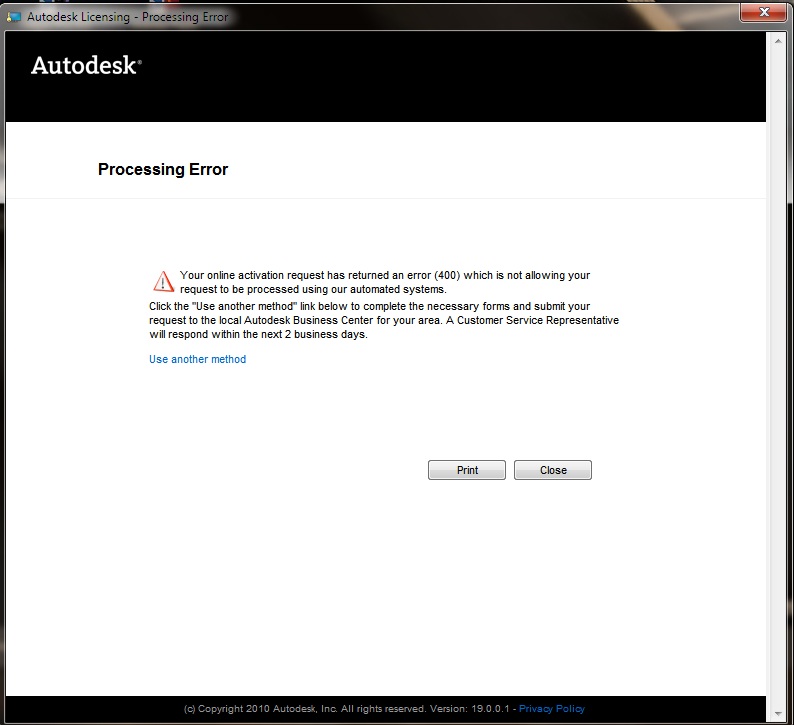
When I clicked on "Activate" and next "Continue" the next screen was "Processing Error"
"
| Your online activation request has returned an error (400) which is not allowing your request to be processed using our automated systems. |
Click the "Use another method" link below to complete the necessary forms and submit your request to the local Autodesk Business Center for your area. A Customer Service Representative will respond within the next 2 business days.
"
I have a student license
Re: Problem with activation (error activation ) error (400)
- Mark as New
- Bookmark
- Subscribe
- Subscribe to RSS Feed
- Highlight
- Email to a Friend
- Report Inappropriate Content
Hi p3pis89:
We can assist you with manual activation. Please provide us your serial number through private message (envelope next to your account name at the top of this page) together with your request code.
Following are the steps to retrieve the request code:
1. Run the program
2. Pull down menu 'Help'
3. Click on 'About'
4. Click the Production Information button at the right hand corner
5. Click on the Activate button
6. On this page you will be able to view Product, Serial Number and Request Code
For future reference, you may contact our Registration and Activation Team directly through this link.
Have a nice day!
Best Regards,
Arlin
Re: Problem with activation (error activation ) error (400)
- Mark as New
- Bookmark
- Subscribe
- Subscribe to RSS Feed
- Highlight
- Email to a Friend
- Report Inappropriate Content
I am having the exact same problem! I also have a student license, the only difference is it's occurring with Autodesk Maya2011 64-bit version.
Re: Problem with activation (error activation ) error (400)
- Mark as New
- Bookmark
- Subscribe
- Subscribe to RSS Feed
- Highlight
- Email to a Friend
- Report Inappropriate Content
Please can you help me with manual activation also? I am having the exact same problem and I can't find any other assistance.
Re: Problem with activation (error activation ) error (400)
- Mark as New
- Bookmark
- Subscribe
- Subscribe to RSS Feed
- Highlight
- Email to a Friend
- Report Inappropriate Content
Hi aoctigan,
Please Private Message me your Serial Number and Request Code.
The request code is a series of random digits and letters which will appear on your screen when you begin the activation process. If you are activating the software for the first time, you will have two options: <Run> or <Activate>, please click on <Activate> and you will be able to view the Request Code and enter your serial number and product key.
Otherwise please take the following steps:
1) From the pull down menu <Help> and click <About>.
2) Click on <Product Information> button at the top right hand corner.
3) Click on <Activate> button.
4) On this page, you will be able to view Product Serial Number and Request Code
Re: Problem with activation (error activation ) error (400)
- Mark as New
- Bookmark
- Subscribe
- Subscribe to RSS Feed
- Highlight
- Email to a Friend
- Report Inappropriate Content
I have the same problem with Autodesk 3ds Max 2013. Can someone help me?
Re: Problem with activation (error activation ) error (400)
- Mark as New
- Bookmark
- Subscribe
- Subscribe to RSS Feed
- Highlight
- Email to a Friend
- Report Inappropriate Content
Hi gamerpro95:
You may send me your serial number through private message. Upon validation, I may generate an activation code manually for you.
In order to generate an activation code we will need the request code that is displayed on your monitor after you begin the activation procedure. Following are the steps to retrieve the request code:
1. Run the program
2. Pull down menu 'Help'
3. Click on 'About'
4. Click the Production Information button at the right hand corner
5. Click on the Activate button
6. On this page you will be able to view Product, Serial Number and Request Code
Have a nice day!
Re: Problem with activation (error activation ) error (400)
- Mark as New
- Bookmark
- Subscribe
- Subscribe to RSS Feed
- Highlight
- Email to a Friend
- Report Inappropriate Content
I also have this same problem with the same circumstances. Can you help me with the manual activation please? thank you.
Re: Problem with activation (error activation ) error (400)
- Mark as New
- Bookmark
- Subscribe
- Subscribe to RSS Feed
- Highlight
- Email to a Friend
- Report Inappropriate Content
Hi sherlockwjl,
It looks like a successful activation was already processed for your 3ds Max 2013 license today. If you still need assistance, please contact our Registration and Activation team or send me a Private Message (click on my philip.s profile name, and then "Send this user a private message") with your serial number (to confirm I'm looking at the right one) and corresponding request code.
Re: Problem with activation (error activation ) error (400)
- Mark as New
- Bookmark
- Subscribe
- Subscribe to RSS Feed
- Highlight
- Email to a Friend
- Report Inappropriate Content
I got the same problem with maya 2012 3ds max 2012、13 with student version. Could you help me?


