Community
- Forums Home
- >
- Subscription, Installation and Licensing Community
- >
- Installation & Licensing forum
- >
- Re: Network License Error [1.5.-15] and IPv6
Installation & Licensing
Welcome to Autodesk’s Installation and Licensing Forums. Share your knowledge, ask questions, and explore popular Download, Installation, and Licensing topics.
Turn on suggestions
Auto-suggest helps you quickly narrow down your search results by suggesting possible matches as you type.
 This page has been translated for your convenience with an automatic translation service. This is not an official translation and may contain errors and inaccurate translations. Autodesk does not warrant, either expressly or implied, the accuracy, reliability or completeness of the information translated by the machine translation service and will not be liable for damages or losses caused by the trust placed in the translation service.
Translate
This page has been translated for your convenience with an automatic translation service. This is not an official translation and may contain errors and inaccurate translations. Autodesk does not warrant, either expressly or implied, the accuracy, reliability or completeness of the information translated by the machine translation service and will not be liable for damages or losses caused by the trust placed in the translation service.
Translate
Network License Error [1.5.-15] and IPv6
68 REPLIES 68
SOLVED
Reply
Topic Options
- Subscribe to RSS Feed
- Mark Topic as New
- Mark Topic as Read
- Float this Topic for Current User
- Bookmark
- Subscribe
- Printer Friendly Page
Message 1 of 69


04-07-2011
12:28 PM
- Mark as New
- Bookmark
- Subscribe
- Mute
- Subscribe to RSS Feed
- Permalink
- Report
04-07-2011
12:28 PM
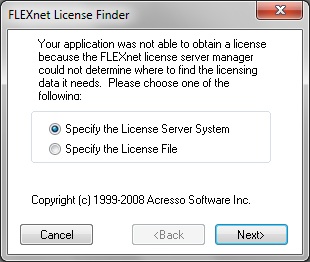
PROBLEM: You launch your Autodesk product and receive a the FlexLM License Finder box and after specifying the License Server System, you are presented with the following error:

The network license manager was not able to get a valid license. If this problem continues, please contact your system administrator. Error [1.5.-15]
CAUSE: Your Autodesk Network License Manager is installed on a Windows Server 2008 or Windows Vista/7 machine and/or your NLM and Autodesk product exist on the same workstation with IPv6 enabled.
RESOLUTION: If your NLM and your Autodesk product are installed on the same workstation, verify that the connection made to the NLM is not via IPv6. If so, disable IPv6 or redirect the protocol to use IPv4 instead.
Method #1: Verify connectivity with your NLM server by opening a command prompt (Start > Run > CMD) and PING your server hostname:
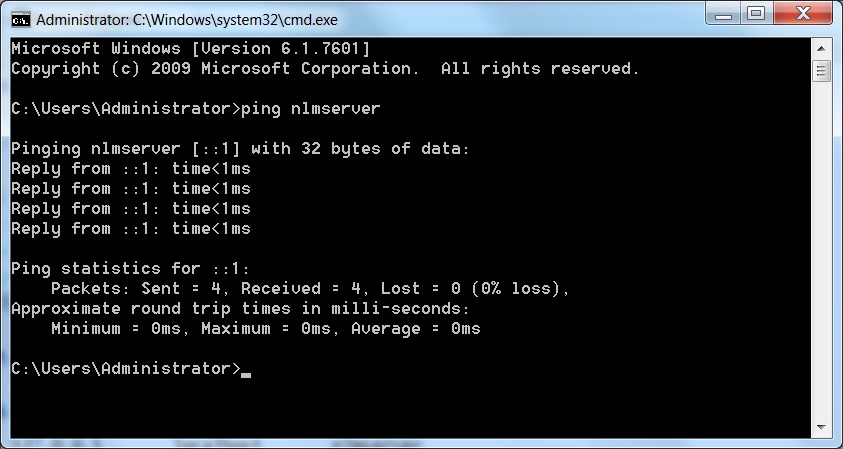
A typical IPv6 response for localhost loopback when the NLM is on the same machine may be ::1 or it may be a full IPv6 address such as 3ffe:1900:4545:3:200:f8ff:fe21:67cf. Your results may look different. If the response is an IPv6 as in the picture above, then you need to disable IPv6 on your Network LAN settings and verify PING again to ensure it has an IPv4 address in the format of xxx.xxx.xxx.xxx. For more configuration changes, continue on to Method #2.
For more information on how to disable IPv6 in Microsoft Windows Vista and 7, please see the following Microsoft KB support article:
http://support.microsoft.com/kb/929852/en-us
Method #2: If you are unable to disable IPv6 or have a need for IPv6 on your network, then you can make a change to your system HOSTS file to redirect the protocol to use an IPv4 address instead.
Verify that connectivity to the NLM server is using IPv6 as described in Method #1. If your response in an IPv6, then you need to edit your HOSTS file to point the server hostname to an IPv4 address instead. You will need Administrative rights for this process.
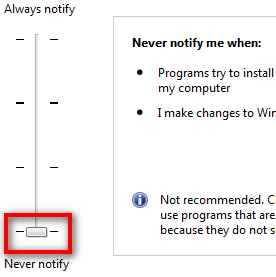
First ensure that the User Account Control (UAC) in Windows is disabled. Open the Control Panel and choose System and Security:

Then choose Change User Account Control settings:

Finally, disable the UAC option by setting it to Never notify:
Now you should be able to open and edit the Windows HOSTS file to make the necessary changes. Find the file in the following location:
C:\Windows\system32\drivers\etc
Open the hosts file with Notepad.exe. You should have Administrator privileges when performing this task. If the file is Read-only, you may need to make the file writable from within the file properties dialog box.
Your HOSTS file should appear similar to the image below.
If your NLM and Autodesk product are on the same machine:
First, comment out the IPv6 localhost address of ::1 by adding a # sign. Then add your hostname behind the IPv4 localhost 127.0.0.1 address as shown. Save the file and close Notepad.

If your NLM is on a different server than your client installed software:
Create a new entry for your NLM server with the correct IPv4 xxx.xxx.xxx.xxx formatted address followed by your server hostname and save the file then close Notepad.
Verify IPv4 connectivity by opening the Command prompt and PING the server hostname. It should now read the appropriate IPv4 response. If your NLM is local, it should read 127.0.0.1. If the NLM is on a server, it should read the IP address of your server.

Launch your Autodesk product. It should now launch and obtain a license as appropriate.
For more information about Autodesk compatibility with IPv6, please see the following Autodesk Support KB article here:
http://usa.autodesk.com/adsk/servlet/ps/dl/item?siteID=123112&id=13107015&linkID=9261340
Travis Nave
 Need help in your post? Mention me with @TravisNave
HOT: Named User FAQ | 2025 Download Links | Invalid Serial Number | LiteHTML.DLL error | Reset Autodesk 2020-24 Licensing
My Expert Contributions to the
FLEXnet License Admin | MSI Cleanup Utility | .NET Framework Cleanup Tool | IPv6 NLM Fix | adskflex.opt Options File | Combine .LIC Files
Disk Space | Quickstart Guide for LMTOOLS | Edit setup.ini for 1603 Installation Failure | 1603 Error installing /w Updates | Disable Optimus
Understanding Failures in the Installation .log File | Server Status from Client | Autodesk 2024 System Requirements Fix | Reuse USB Stick
⤽ If my post was helpful, please give Likes and/or mark the Accept as Solution button(s) below. Thank you! ⤵
Solved! Go to Solution.
Solved by scottmoyse. Go to Solution.
Solved by TravisNave. Go to Solution.
Solved by TravisNave. Go to Solution.
Solved by TravisNave. Go to Solution.
Solved by TravisNave. Go to Solution.
Solved by TravisNave. Go to Solution.
68 REPLIES 68
Message 21 of 69


07-10-2012
07:50 AM
- Mark as New
- Bookmark
- Subscribe
- Mute
- Subscribe to RSS Feed
- Permalink
- Report
07-10-2012
07:50 AM
The status Enquiry says (we use LMTOOLS also for Tekla):
--------
Status
--------
Flexible License Manager status on Tue 7/10/2012 16:24
[Detecting lmgrd processes...]
License server status: 27007@thor
License file(s) on thor: D:\TeklaStructures\License\Server\tekla.lic:
thor: license server UP (MASTER) v11.9
Vendor daemon status (on thor):
tekla: UP v11.9
Feature usage info:
Users of TeklaServer: (Total of 1 license issued; Total of 0 licenses in use)
Message 22 of 69


07-10-2012
07:56 AM
- Mark as New
- Bookmark
- Subscribe
- Mute
- Subscribe to RSS Feed
- Permalink
- Report
07-10-2012
07:56 AM
thats why it is not working
there is no revit license in the license file only tekla
tekla is not revit
DarrenP
Did you find this post helpful? Feel free to Like this post.
Did your question get successfully answered? Then click on the ACCEPT SOLUTION button.

Message 23 of 69
07-11-2012
03:10 AM
- Mark as New
- Bookmark
- Subscribe
- Mute
- Subscribe to RSS Feed
- Permalink
- Report
07-11-2012
03:10 AM
Dit is momenteel de Status Enquiry. Ik krijg nog steeds exact dezelfde meldingen.
-------- Status --------
Flexible License Manager status on Wed 7/11/2012 11:57
[Detecting lmgrd processes...]
License server status: 27000@thor
License file(s) on thor: C:\Program Files\Autodesk Network License Manager\Licenses\REVITS2013enlicense.lic:
thor: license server UP (MASTER) v11.10
Vendor daemon status (on thor):
adskflex: UP v11.10
Feature usage info:
Users of 65900REVITS_F: (Total of 1 license issued; Total of 0 licenses in use)
Users of 85954REVITS_2013_0F: (Total of 1 license issued; Total of 0 licenses in use)
Users of 85791REVITS_2012_0F: (Total of 1 license issued; Total of 0 licenses in use)
Users of 85623REVITS_2011_0F: (Total of 1 license issued; Total of 0 licenses in use)
Users of 74200REVITS_2010_0F: (Total of 1 license issued; Total of 0 licenses in use)
----------------------------------------------------------------------------
License server status: 27007@thor License file(s) on thor: D:\TeklaStructures\License\Server\tekla.lic:
thor: license server UP (MASTER) v11.9
Vendor daemon status (on thor):
tekla: UP v11.9 Feature usage info:
Users of TeklaServer: (Total of 1 license issued; Total of 0 licenses in use)
Message 24 of 69
07-11-2012
07:20 AM
- Mark as New
- Bookmark
- Subscribe
- Mute
- Subscribe to RSS Feed
- Permalink
- Report
07-11-2012
07:20 AM
That looks good. Make sure these links work in Internet Explorer:
And make sure when you PING thor from a command prompt that it responds with the correct IPv4 address.
Travis Nave
Need help in your post? Mention me with @TravisNave HOT: Named User FAQ | 2025 Download Links | Invalid Serial Number | LiteHTML.DLL error | Reset Autodesk 2020-24 Licensing
My Expert Contributions to the
FLEXnet License Admin | MSI Cleanup Utility | .NET Framework Cleanup Tool | IPv6 NLM Fix | adskflex.opt Options File | Combine .LIC Files
Disk Space | Quickstart Guide for LMTOOLS | Edit setup.ini for 1603 Installation Failure | 1603 Error installing /w Updates | Disable Optimus
Understanding Failures in the Installation .log File | Server Status from Client | Autodesk 2024 System Requirements Fix | Reuse USB Stick
⤽ If my post was helpful, please give Likes and/or mark the Accept as Solution button(s) below. Thank you! ⤵
Message 25 of 69
07-17-2012
12:01 AM
- Mark as New
- Bookmark
- Subscribe
- Mute
- Subscribe to RSS Feed
- Permalink
- Report
07-17-2012
12:01 AM
http://thor:27000 gives as result Wê-60Wê-60Wê-60Wê-60Wê-60Wê-60Wê-60.
http://thor:27000 gives as result Wê-60Wê-60Wê-60Wê-60Wê-60Wê-60Wê-60.
PING thor gives as result:
Pinging thor.ICTSC.local [10.33.7.22] with 32 bytes of data:
Reply from 10.33.7.22: bytes=32 time<1ms TTL=127
Reply from 10.33.7.22: bytes=32 time<1ms TTL=127
Reply from 10.33.7.22: bytes=32 time<1ms TTL=127
Reply from 10.33.7.22: bytes=32 time<1ms TTL=127
Ping statistics for 10.33.7.22:
Packets: Sent = 4, Received = 4, Lost = 0 (0% loss),
Approximate round trip times in milli-seconds:
Minimum = 0ms, Maximum = 0ms, Average = 0ms
Message 26 of 69
07-17-2012
09:40 AM
- Mark as New
- Bookmark
- Subscribe
- Mute
- Subscribe to RSS Feed
- Permalink
- Report
07-17-2012
09:40 AM
Set the ADSKFLEX_LICENSE_FILE to @THOR and the FLEXLM_TIMEOUT to 1000000. Then try to connect again. If it fails, post your debug.log file created by the Autodesk FLEXLM Service 1.
Travis Nave
Need help in your post? Mention me with @TravisNave HOT: Named User FAQ | 2025 Download Links | Invalid Serial Number | LiteHTML.DLL error | Reset Autodesk 2020-24 Licensing
My Expert Contributions to the
FLEXnet License Admin | MSI Cleanup Utility | .NET Framework Cleanup Tool | IPv6 NLM Fix | adskflex.opt Options File | Combine .LIC Files
Disk Space | Quickstart Guide for LMTOOLS | Edit setup.ini for 1603 Installation Failure | 1603 Error installing /w Updates | Disable Optimus
Understanding Failures in the Installation .log File | Server Status from Client | Autodesk 2024 System Requirements Fix | Reuse USB Stick
⤽ If my post was helpful, please give Likes and/or mark the Accept as Solution button(s) below. Thank you! ⤵
Message 27 of 69

07-25-2012
12:58 AM
- Mark as New
- Bookmark
- Subscribe
- Mute
- Subscribe to RSS Feed
- Permalink
- Report
07-25-2012
12:58 AM
Dear Travis,
One of my client is using Autocad 2012 network license, on NLM Pc it shows that license issued and is working fine.
But at client PC when i start Autocad it stops at AutoCAD Launch screen reading at the bottom Checking License and after some time it gives brouse license box.
I did the following things as you mentioned in you post.
1. added ADSKFLEX_LICENSE_FILE & FLEXLM_TIMEOUT environment VARIABLE.
2. Added Autocad.exe in windows filrewall also minimized user account settings.
3. Edited host file on client PC and added following lines, kindly check whether it is right or wrong.
4. Deleted CASCADEINFO.CAS
# For example:
#
# 102.54.94.97 rhino.acme.com # source server
# 38.25.63.10 x.acme.com # x client host
# localhost name resolution is handled within DNS itself.
127.0.0.1 localhost SERVERNAMEhere
# ::1 localhost
4. Added 2080 port to NLM PC's firewall's advanced new inbound rules.
5. Added NLM pc's LMTOOL directory to firewall exception.
6. Form Client PC I pinged NLM server name and is working fine.
7. Edited LICPATH.LIC and added server name & Host ID there.
Still i don't get license do you have any guess/solution. Any other step is missing my side.
Regards,
Mohan suryawanshi
Best Regards,
Mohan Suryawanshi
Mohan Suryawanshi
Message 28 of 69
07-25-2012
08:10 AM
- Mark as New
- Bookmark
- Subscribe
- Mute
- Subscribe to RSS Feed
- Permalink
- Report
07-25-2012
08:10 AM
First, you do not put your NLM servername as 127.0.0.1 localhost. That is only when the client software and the NLM are on the same machine. If you did that, remove it or you will never be able to connect to the server. Secondly, the firewall issue needs to be addressed at the server, not the client. You need to make exceptions for the four NLM files along with ports 2080 and 27000.
Travis Nave
Need help in your post? Mention me with @TravisNave HOT: Named User FAQ | 2025 Download Links | Invalid Serial Number | LiteHTML.DLL error | Reset Autodesk 2020-24 Licensing
My Expert Contributions to the
FLEXnet License Admin | MSI Cleanup Utility | .NET Framework Cleanup Tool | IPv6 NLM Fix | adskflex.opt Options File | Combine .LIC Files
Disk Space | Quickstart Guide for LMTOOLS | Edit setup.ini for 1603 Installation Failure | 1603 Error installing /w Updates | Disable Optimus
Understanding Failures in the Installation .log File | Server Status from Client | Autodesk 2024 System Requirements Fix | Reuse USB Stick
⤽ If my post was helpful, please give Likes and/or mark the Accept as Solution button(s) below. Thank you! ⤵
Message 29 of 69

08-28-2012
08:21 AM
- Mark as New
- Bookmark
- Subscribe
- Mute
- Subscribe to RSS Feed
- Permalink
- Report
08-28-2012
08:21 AM
Travis, Thank you for posting the update for this issue, the instructions here worked perfectly for one of my clients who was experiencing difficulties as listed below.
************************************
I uploaded the new license file to c:\program files\autodesk network license manager\license\
Then I opened up the lmtools.exe program and updated the path to the license file.
When I attempt to execute the Autodesk Inventor program, it asks me to choose a license server (I had mistakenly put the wrong server name into the deployment) and when I choose it, it says “the flexnet license finder has been successful” or something to that effect. When I click “finish,” it asks me for the server name again. If I click “cancel,” I get this error message. Any help is appreciated!
Message 30 of 69
08-28-2012
08:34 AM
- Mark as New
- Bookmark
- Subscribe
- Mute
- Subscribe to RSS Feed
- Permalink
- Report
08-28-2012
08:34 AM
Always glad to help. You can override any client path setting with a system environment variabled called ADSKFLEX_LICENSE_FILE with a value of @SERVERNAME <-- hostname of your server.
For more information see here:
http://usa.autodesk.com/adsk/servlet/ps/dl/item?siteID=123112&id=8385605&linkID=9240617
Travis Nave
Need help in your post? Mention me with @TravisNave HOT: Named User FAQ | 2025 Download Links | Invalid Serial Number | LiteHTML.DLL error | Reset Autodesk 2020-24 Licensing
My Expert Contributions to the
FLEXnet License Admin | MSI Cleanup Utility | .NET Framework Cleanup Tool | IPv6 NLM Fix | adskflex.opt Options File | Combine .LIC Files
Disk Space | Quickstart Guide for LMTOOLS | Edit setup.ini for 1603 Installation Failure | 1603 Error installing /w Updates | Disable Optimus
Understanding Failures in the Installation .log File | Server Status from Client | Autodesk 2024 System Requirements Fix | Reuse USB Stick
⤽ If my post was helpful, please give Likes and/or mark the Accept as Solution button(s) below. Thank you! ⤵
Message 31 of 69
08-28-2012
08:35 AM
- Mark as New
- Bookmark
- Subscribe
- Mute
- Subscribe to RSS Feed
- Permalink
- Report
08-28-2012
08:35 AM
you also need to check to see if you can ping the license server by host name
DarrenP
Did you find this post helpful? Feel free to Like this post.
Did your question get successfully answered? Then click on the ACCEPT SOLUTION button.
Message 32 of 69
01-08-2013
09:00 AM
- Mark as New
- Bookmark
- Subscribe
- Mute
- Subscribe to RSS Feed
- Permalink
- Report
01-08-2013
09:00 AM
Modified the HOST file, as suggested, which did the trick. I spent hours sorting through knowledgebase articles and making several attempts to resolve this issue. We are utilizing AutoCAD Civil 3D 2013 on Windows 2008 R2, with one shared network license. I am thrilled this is resolved. Many thanks!
Message 33 of 69
01-10-2013
09:00 AM
- Mark as New
- Bookmark
- Subscribe
- Mute
- Subscribe to RSS Feed
- Permalink
- Report
01-10-2013
09:00 AM
amartinez wrote:
I am thrilled this is resolved. Many thanks!
Thank you. This is why we volunteer our time here. I always look forward to responses like yours. 
Travis Nave
Need help in your post? Mention me with @TravisNave HOT: Named User FAQ | 2025 Download Links | Invalid Serial Number | LiteHTML.DLL error | Reset Autodesk 2020-24 Licensing
My Expert Contributions to the
FLEXnet License Admin | MSI Cleanup Utility | .NET Framework Cleanup Tool | IPv6 NLM Fix | adskflex.opt Options File | Combine .LIC Files
Disk Space | Quickstart Guide for LMTOOLS | Edit setup.ini for 1603 Installation Failure | 1603 Error installing /w Updates | Disable Optimus
Understanding Failures in the Installation .log File | Server Status from Client | Autodesk 2024 System Requirements Fix | Reuse USB Stick
⤽ If my post was helpful, please give Likes and/or mark the Accept as Solution button(s) below. Thank you! ⤵
Message 34 of 69
03-18-2013
12:53 AM
- Mark as New
- Bookmark
- Subscribe
- Mute
- Subscribe to RSS Feed
- Permalink
- Report
03-18-2013
12:53 AM
Travis,
Thanks so much much for all of your info with this.
I have just transfered my Maya stand alone license to a network licence and I have spent the weekend troubleshooting this. AAAARGGHH!!
Finally got it all working thanks to your help, except as soon as I turn on my Eset Smart Security Firewall the client cannot connect and it kills the network connection. I believe I have opend all the required ports and I have added exceptions for the four NLM.exe's still no joy! As soon as I disable the firewall it's fine.
I can't seem to find where I'm going wrong!!!
Any advice would be greatly appreciated.
Cheers,
Paul
Message 35 of 69
03-18-2013
06:44 PM
- Mark as New
- Bookmark
- Subscribe
- Mute
- Subscribe to RSS Feed
- Permalink
- Report
03-18-2013
06:44 PM
.... Here is a log file from ESET showing that it thinks it's getting attack by my other machine.
Hope this helps? I'm not sure how to proceed with this??
Cheers,
Paul
Message 36 of 69
03-19-2013
07:42 PM
- Mark as New
- Bookmark
- Subscribe
- Mute
- Subscribe to RSS Feed
- Permalink
- Report
03-19-2013
07:42 PM
Ok, managed to solve this.
Here it is in case anyone else runs into the same problem.
In the Eset /advanced setup/Personal firewall/IDS and advanced options/intrusion detection/ "TCP Port Scanning Attack Detection" Disable this.
Cheers,
Paul
Message 37 of 69
04-30-2013
10:47 AM
- Mark as New
- Bookmark
- Subscribe
- Mute
- Subscribe to RSS Feed
- Permalink
- Report
04-30-2013
10:47 AM
Hi Travis,
I'm trying to install ASMI2014 but when i try to run the program appears a security failure box as the one on the top of this thread: http://forums.autodesk.com/t5/Installation-Licensing/A-security-failure-has-occured-when-trying-to-r...
My autodesk administrator account gave me a license file, and when i click perform status enquiry in lmtools the following text appears:
--------
Status
--------
Flexible License Manager status on Tue 4/30/2013 18:25
[Detecting lmgrd processes...]
License server status: 26@AndreSilva
License file(s) on AndreSilva: C:\Program Files\Autodesk Network License Manager\MFS2014enlicense.lic:
AndreSilva: license server UP (MASTER) v11.7
Vendor daemon status (on AndreSilva):
adskflex: UP v11.7
Feature usage info:
Users of 77800MFS_F: (Total of 25 licenses issued; Total of 0 licenses in use)
Users of 86156MFIA_2014_0F: (Total of 75 licenses issued; Total of 0 licenses in use)
Users of 86158MFS_2014_0F: (Total of 25 licenses issued; Total of 0 licenses in use)
Users of 86012MFS_2013_0F: (Total of 25 licenses issued; Total of 0 licenses in use)
Users of 85826MFS_2012_0F: (Total of 25 licenses issued; Total of 0 licenses in use)
Users of 85647MFS_2011_0F: (Total of 25 licenses issued; Total of 0 licenses in use)
Is the license file the problem? why are there no licenses in use?
Hope you can help me,
Best regards,
Andre Silva
Message 38 of 69
04-30-2013
11:11 AM
- Mark as New
- Bookmark
- Subscribe
- Mute
- Subscribe to RSS Feed
- Permalink
- Report
04-30-2013
11:11 AM
Make sure you have configured your NLM as a service. And make sure when you PING your servername AndreSilva that it comes back with an IPv4 address, per my OP.
For a Quick-Start Guide on configuring the Autodesk License Manager, please see my post for further information:
http://forums.autodesk.com/t5/Installation-Licensing/Quick-Start-Guide-for-Configuring-LMTOOLS/m-p/3...
If you have additional problems, please start a new thread.
Travis Nave
Need help in your post? Mention me with @TravisNave HOT: Named User FAQ | 2025 Download Links | Invalid Serial Number | LiteHTML.DLL error | Reset Autodesk 2020-24 Licensing
My Expert Contributions to the
FLEXnet License Admin | MSI Cleanup Utility | .NET Framework Cleanup Tool | IPv6 NLM Fix | adskflex.opt Options File | Combine .LIC Files
Disk Space | Quickstart Guide for LMTOOLS | Edit setup.ini for 1603 Installation Failure | 1603 Error installing /w Updates | Disable Optimus
Understanding Failures in the Installation .log File | Server Status from Client | Autodesk 2024 System Requirements Fix | Reuse USB Stick
⤽ If my post was helpful, please give Likes and/or mark the Accept as Solution button(s) below. Thank you! ⤵
Message 39 of 69
09-13-2013
08:47 AM
- Mark as New
- Bookmark
- Subscribe
- Mute
- Subscribe to RSS Feed
- Permalink
- Report
09-13-2013
08:47 AM
Autodesk has now made my post an official Knowledge Base article. You can read the 'official' support article here:
http://usa.autodesk.com/adsk/servlet/ps/dl/item?siteID=123112&id=22250018&linkID=9240617
Thanks! 
Travis Nave
Need help in your post? Mention me with @TravisNave HOT: Named User FAQ | 2025 Download Links | Invalid Serial Number | LiteHTML.DLL error | Reset Autodesk 2020-24 Licensing
My Expert Contributions to the
FLEXnet License Admin | MSI Cleanup Utility | .NET Framework Cleanup Tool | IPv6 NLM Fix | adskflex.opt Options File | Combine .LIC Files
Disk Space | Quickstart Guide for LMTOOLS | Edit setup.ini for 1603 Installation Failure | 1603 Error installing /w Updates | Disable Optimus
Understanding Failures in the Installation .log File | Server Status from Client | Autodesk 2024 System Requirements Fix | Reuse USB Stick
⤽ If my post was helpful, please give Likes and/or mark the Accept as Solution button(s) below. Thank you! ⤵
Message 40 of 69
09-13-2013
08:50 AM
- Mark as New
- Bookmark
- Subscribe
- Mute
- Subscribe to RSS Feed
- Permalink
- Report
09-13-2013
08:50 AM
they should at least give you credit for the article
DarrenP
Did you find this post helpful? Feel free to Like this post.
Did your question get successfully answered? Then click on the ACCEPT SOLUTION button.

Reply
Topic Options
- Subscribe to RSS Feed
- Mark Topic as New
- Mark Topic as Read
- Float this Topic for Current User
- Bookmark
- Subscribe
- Printer Friendly Page